NETGEAR is aware of a growing number of phone and online scams. To learn how to stay safe click here.
Forum Discussion

Chad2tjc
Dec 13, 2024Aspirant
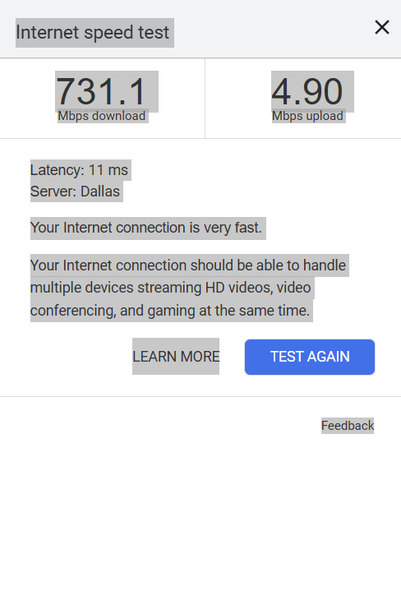
Nighthawk RS600 Slow upload speeds Never over 5 mbps.
I am getting really slow upload speeds on Wi-Fi. I work from home with videos and need the upload speed to keep work going. I bought this router to replace a 10 year old asus and currently the asus i...
Chad2tjc
Dec 14, 2024Aspirant
It has been reset 2 times. I am using iPhone 13 Pro Max, Dell XPS last years model i7 And an hp desktop that is new in the last year for editing. Also very fast computer. Wired I get 1500 or so up and down. It is only the WiFi up that is super slow.
I don’t recall the modem I’m not at the house but wouldn’t it be odd that only WiFi would be effected by a modem.
Just wondering if this slow speed is common or again a Qos issue!?!?
Also don’t have any of the armor protection ever activated or turned on.
I don’t recall the modem I’m not at the house but wouldn’t it be odd that only WiFi would be effected by a modem.
Just wondering if this slow speed is common or again a Qos issue!?!?
Also don’t have any of the armor protection ever activated or turned on.

plemans
Dec 16, 2024Guru - Experienced User
double nat's an other network configurations can cause strange effects, it why we ask the modem/gateway.
When you set it up, did you test the speeds with it in its default configuration?
Try running through setup using the GUI (not the app) and don't change anything during setup. Leave ssid/password/etc. Just enough to get it setup and test the speeds.