NETGEAR is aware of a growing number of phone and online scams. To learn how to stay safe click here.
Forum Discussion

neoprodigy
Sep 21, 2022Aspirant
Brute force attack on ReadyNAS 316
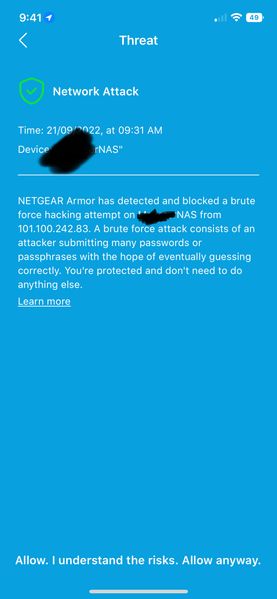
im been getting these alerts from Netgear Armor my setup : orbi rbr850 and readynas 316
neoprodigy
Sep 21, 2022Aspirant
1. dont think so
2. dont think so
I check my netgear armor been constant attack. and they are all different ip addresses.
let me know what I need to do. thanks

StephenB
Sep 21, 2022Guru - Experienced User
neoprodigy wrote:
1. dont think so
2. dont think so
You need to know for sure.
Go into the Orbi web ui. Select "advanced" at the top, and then select "advanced" again from the side menu.
- Select UPnP from the left menu. If "Turn UPnP" is checked, then uncheck it and select "Apply".
- Then select Port Forwarding/Port Triggering from the same left menu. See if there is anything forwarded to the NAS. Make sure you click "Port Triggering" after you've checked "Port forwarding".
neoprodigy wrote:
let me know what I need to do. thanks
Also, let us know what apps are running on the NAS. A torrent app is one possible vector for these attacks (but there could be others).
- neoprodigySep 22, 2022Aspirant
seem like this one works?
- StephenBSep 22, 2022Guru - Experienced User
neoprodigy wrote:
seem like this one works?
Did you check the upnp and forwarding/triggering as I suggested?
Also, did you look at the apps you installed on the NAS? Any torrent app could expose you to these attacks, and perhaps others as well.
Blocking all services is a bit extreme. You are blocking both NTP (time synchronization), and check-for-updates. While you could do this as a stop-gap, it would be better to understand what is allowing these attacks in the first place, and close the underlying vulnerability.
- neoprodigySep 22, 2022Aspirant
1. I dont see 10.0.0.4 using UPnP
10.0.0.5 = plex server
10.0.0.6 = synology nas
10.0.0.57 = PS5
2. no apps running
- schumakuNov 13, 2022Guru - Experienced User
neoprodigy wrote:
seem like this one works?
Depends for what. First we need to understand that this massive blocking does connect outgoing connections from your LAN, 10.0.0.5 (.4) or whatever the ReadyNAS has) to the outside world. All reports however show connection attempts from the wild Internet -to- some internal system, probably the ReadyNAS, probably a different device with exposed services. Cumbersome is the reports are not very (read: NOT) helpful at all. Sure, of this NAS would be affected by malware, the filter might block it to call home to some CCC system
Doe this vendor providing the Netgear Armor system (or Netgear) realize that these threat information is just scaring, does but help nothing in finding which system on the LAN is affected, which protocol (like tcp) or which service resp. port like http 80, https 443, ssh 22, ... is affected? Incredible! Was this ever tested and reviewed? Blanca_O KevinLiT - trigger your Armor PMs.
And then, worse than ever, Blanca_O KevinLiT the rputer design does still let even senior users like StephenB expect this service blocking is a control over incoming connections: It's not! And late 2022, there is still no firewall control on these routers for Internet->LAN (beyond of the basic port forwarding).
The feature potential for these routers and armor would be huge. However, Netgear is still sleeping well, still promoting wonky features ...

Related Content
NETGEAR Academy

Boost your skills with the Netgear Academy - Get trained, certified and stay ahead with the latest Netgear technology!
Join Us!
