NETGEAR is aware of a growing number of phone and online scams. To learn how to stay safe click here.
Forum Discussion

xbmcgotham
Aug 12, 2021Tutor
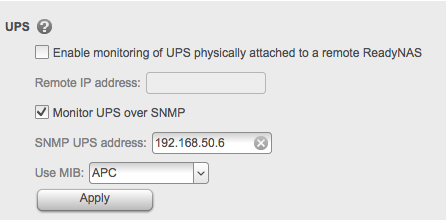
Monitoring UPS over SNMP for Readynas nv+ v2.
Hi, I cant understand why the Readynas is not switching off when a low UPS battery level is reached. As you can see on the screenshots, I am monitoring a UPS over SNMP and it can ready the values...
xbmcgotham
Aug 12, 2021Tutor
Hi StephenB ,
The power court of the NAS is going into the UPS.
The UPS is a serverrack UPS and only has power and a network connection, which is used to communicated with the other devices on the network. No USB available.

StephenB
Aug 12, 2021Guru - Experienced User
xbmcgotham wrote:
No USB available.
This is the Smart-UPS X 2200? The manual (attached) says there is a USB port.
- xbmcgothamAug 13, 2021Tutor
Hi,
Its not completly the same as the document. mine is a SMX2200HV
The manual does look to show a usb, not sure why I never seen it. I will have another look on the UPS. :-)
Question:
1. why would I connect the NAS with the UPS using USB cable? Does this not defeat the purpose of the network monitoring option?
2 If all would have worked correctly without using a USB cable, what would be the value on which the NAS should switch off when using the network monitor option? Low battery? Any idea?
Thanks
- StephenBAug 13, 2021Guru - Experienced User
xbmcgotham wrote:
1. why would I connect the NAS with the UPS using USB cable? Does this not defeat the purpose of the network monitoring option?
The idea is that you switch away from SNMP, and try using that alternate monitoring tool. If that works, it would give you a clean shutdown if the power were to fail.
In any event, as far as the NAS is concerned, there is no particular advantage I am aware of with SNMP over USB.
But I'm not sure that SNMP isn't working properly (see below)
xbmcgotham wrote:
what would be the value on which the NAS should switch off when using the network monitor option? Low battery? Any idea?
I don't know (I use USB monitoring with a different brand of UPS), but I did look at the MIB a couple years ago. I believe it shuts down when the UPS sends a trap. I think you can configure the timing of that on the APC. https://community.netgear.com/t5/Using-your-ReadyNAS-in-Business/Shutdown-rules-on-ReadyNas-Duo-V2-arm-with-connected-APC/m-p/1508811/highlight/true#M142436
One thing you could do to test your monitoring (either SNMP or UPS) is to connect the equipment to the main power temporarily, and then connect a test load onto the UPS (a fan, or anything that uses a fair amount of power). Then disconnect the UPS from the main power, and wait for it to completely drain. You can then confirm that everything shuts down cleanly.
- xbmcgothamAug 13, 2021Tutor
Thanks again StephenB I will have a try on the suggested steps.
I guess for now this case is closed as the OS is no longer supported.
CU
Related Content
NETGEAR Academy

Boost your skills with the Netgear Academy - Get trained, certified and stay ahead with the latest Netgear technology!
Join Us!

