NETGEAR is aware of a growing number of phone and online scams. To learn how to stay safe click here.
Forum Discussion

LPC
Sep 15, 2015Star
Fresh Costumer to ReadyNAS 104, quick review and some questions...
Hello dear friends... For some years now, i have being using home NAS to Cloud Services, since the BITCASA Fiasco, where i lost some very important files that where irreplacable... Being a very cau...

LPC
Sep 15, 2015Star
Hello Eskender,
Thanks for your reply.
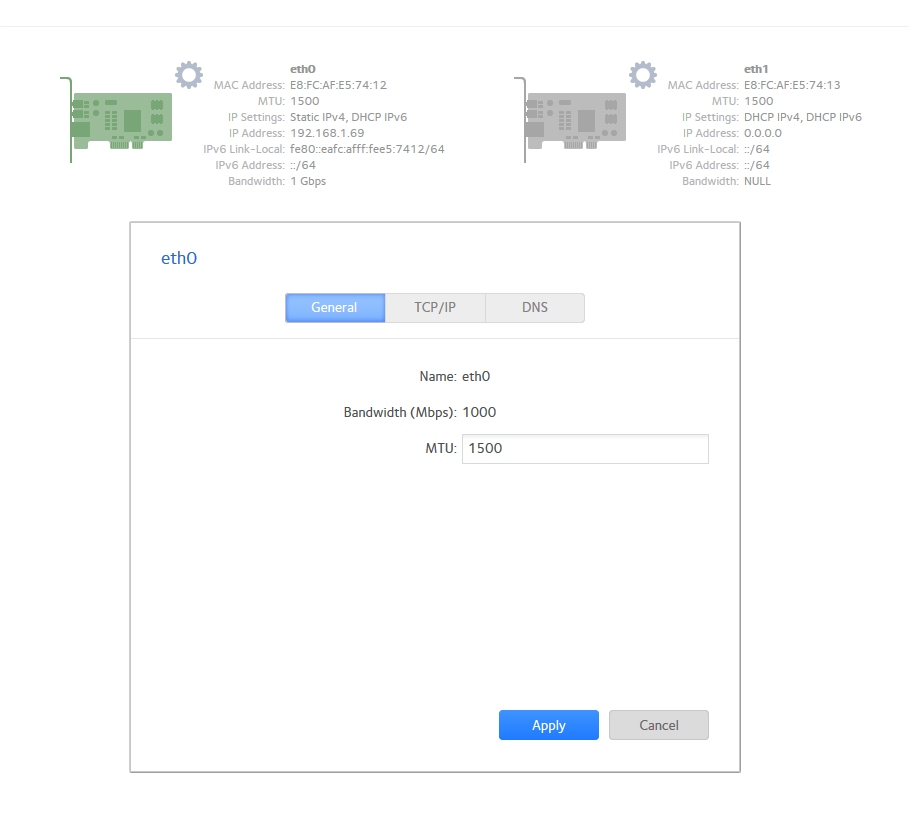
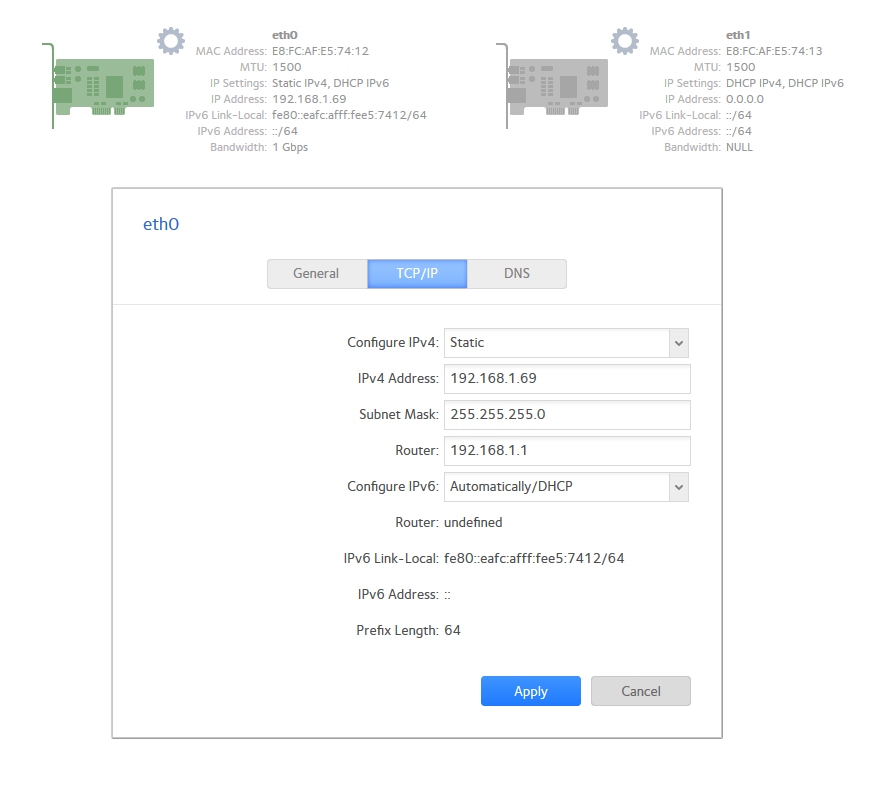
Well i did configure a static IP for the NAS, should i add anything else on that part?
Im trying to install the apps from the NAS Interface.
I go to Apps, the "available apps" and then i click install.
The Dropbox function i did see on the Backup part, but no other cloud solution was listed there... Any reason why? Some kind of exclusivity deal or something?
I use the Gdrive because i have an android ecosystem that i use for work. On the Synology there are a agnostic app that uses several cloud services that allow for sync the files and folders with ease...
Are NetGear considering this approach? Gdrive extra security layer is for me a plus!
Do the ReadyNAS OS (Does it have a name?), allows for automatic updates? Or some form of information that an update is available? That is important because sometimes i don´t have the time to manually check if there is any new version of the OS.
I have allready see the 6.4.0 Beta version that are being tested, but my point is are these kind of updates regular?
Are enhancements being expected on the GUI front of things?
Or any of the other things i reported? The fan control is very needed, because with that manual control we can control for silence or noise, or balance...
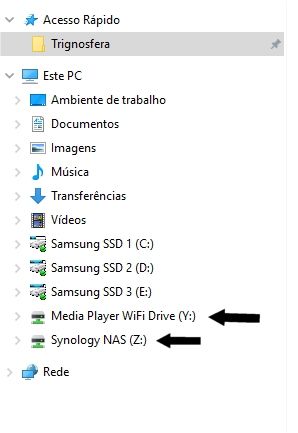
As for the mapping i can do a map drive of a shared folder, but if i do that i cant see the space in properties... like i have on that mapped drives in the synology... Why is that?
Also what is best... Mapping a Folder by creating a drive with the full space of the volume or create IScsi LUN?
Also about the dual lan ports, i have a Netgear Router, is there any special sinergy of configuration due to the fact that are 2 products from the same company?
With my best regards,
Paulo Eduardo

EskenderNG
Sep 16, 2015NETGEAR Employee Retired
Hello Paolo,
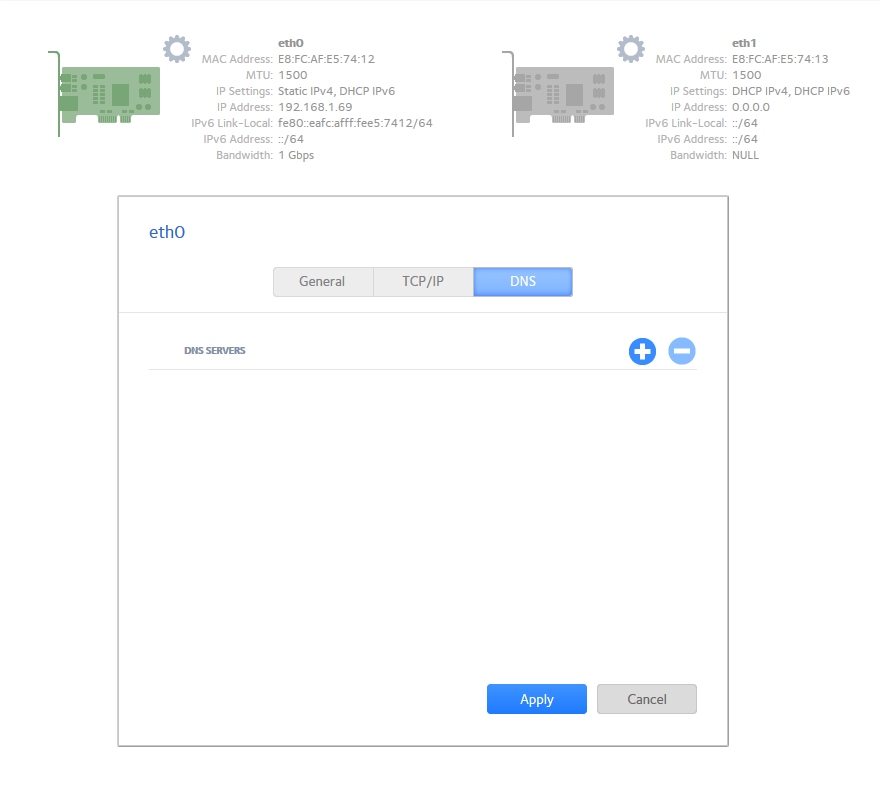
on the same dialog, where you set the static IP address is also a tab for setting the DNS server. Please make sure that this information is also entered. Thinking of it, if you are presented with Apps on the admin page most likely everything is set correctly. However, it might be worth checking.
I believe Dropbox is the only external Cloud Service integrated at the moment.
Concerning the firmware there is no scheduled interval at which new releases are provided. This is also due to an extensive beta phase of varying time. Once a new firmware is released you will be notified when you login to the local admin page. An auto-update feature is not implemented and I believe would not serve well.
When I create a mapping and check the properties Windows displays the total occupied and free space on the ReadyNAS. Are you not seeing any information or would like to see the information per share? In terms of total available size no change would to be expected as currently a share could occupy all space on the ReadyNAS.
I would choose a normal share/mapping unless you have specific reason to use iSCSI.
For Link Aggregation configuration is still required on both ends. In terms of performance I would not expect to see any benefit in a normal environment.
Unfortunately, I cannot provide information on which new features will implemented at which time. However, experience has shown that feedback does have influence on the development process. A request for specific elements may be elevated depending on the response of other users to it.
Thanks, Eskender
- LPCSep 16, 2015Star
Hello Eskender,
Thanks for your reply!
I have confirmed that with my current configuration the NAS is not connecting to the internet, so something must be missing... I have here 3 images for you to see...
I think the problem is on the DNS, i think i must add 192.168.1.1 what do you think?
I have selected the auto settings on the connections, and got internet runing again, so i manage finally to install both the Antivirus PLUS and the Cacti.
But i have a question about cacti... After the instalation it asks me the username and password.I tested the Username and Password to access the NAS OS, but it doesn´t work...
What are the username and password that cacti is asking for? I did not configure any information on that application.
About the external Cloud Service, is expected that Netgear support other and better Cloud Services? Is there any APP that could be used for GDrive Sync on this NAS?
Thanks for the information on the firmware updates... So the next version is 6.4.0? From what i see it will unify the 1xx and 2xx series? 6.2.5 and 6.3.5 to 6.4.0 on both?
So i can´t get an email from the nas replying to me that is a new firmware available?
For the mapping after a while it started to give me the space available... (and in this case the full space of the NAS). Its possíble to limit the share space? I have 2 shares mapped as 2 diferent drives. But both feeds from the same pool.
So for Link Agregation is need a configuration on the NAS and in the rooter... From your words is not worth it right? Better fail safe the two lans then link aggregation?For new features, i don´t know if you can be my word to the devs that work on the NAS firmwares, but if you can, please give them my honest feedback... I can get any brand i want, but i did choose Netgear because i trust this brand and products.
Please ask them if this is possible to be implemented on the future:
- Fan Control
- Top Header information (with some usefull info there, link fan speed and profiles, disc temps, cpu temps, internet status, NAS status, Firmware Status, etc...).
- Improved GUI, with a more easy to work with interface with more help marks with explanations to what do, and what don´t do...
- More information on the front display panel (where it exists ofc). (option to add informations to the panel, like temps, fan speed, etc...).
- Capability for more External Cloud providers (or an agnostic app for various services)
- Capability for manual or auto updates with fail-safe options
- Some better design features on the storage part, because that unit representation and cages is simply awfull... Very ugly and tiny...
For now its what i see and remeber...
With my best regards,
Paulo Eduardo
- StephenBSep 16, 2015Guru - Experienced User
LPC wrote:
...I think the problem is on the DNS...
Yes. That can't be blank.
The answer might not be 192.168.1.1 though. You should check to see what DNS servers are being handed out by your router.
With Window you can find that out by launching cmd (in win7 just type cmd in the "search programs and files bar"). Then enter
ipconfig /all | findstr /R "DNS\ Servers"That will tell you the right address(es) to enter there.
You can also safely enter Google's public DNS server addresses (8.8.8.8 or 8.8.4.4).
Truthfully, the best way is to keep the NAS set to DHCP, and reserve an address for it in your router.
...So for Link Agregation is need a configuration on the NAS and in the router... From your words is not worth it right?
I don't speak for Eskender :smileywink:
But frankly it's not worth it on the RN104. It's not fast enough to fill a single gigabit connection, so there's no benefit. The RN200 and above are fast enough, but even there you only benefit if you have multiple users accessing the NAS at the same time. Just connect one ethernet cable, and be done with it.
- EskenderNGSep 16, 2015NETGEAR Employee Retired
Hello Paulo,
For cacti please use username: admin and password: admin. A password change will be required after that.
I am not using google drive myself so I am not sure if there is any external app that can be used. Maybe it would be best to post this question in a new thread to increase chances that other users will reply to this.The 6.4.0 release will be for your device. Unfortunately, there is no email notification. Looking at the beta release notes there will be a share quota implemented:
“1. Share quota support. You can now set a size limit on a share.
* Note that the size limit will be enforced but not displayed from connected clients.”I have copied your requests.
Bye,
Eskender
Related Content
NETGEAR Academy

Boost your skills with the Netgear Academy - Get trained, certified and stay ahead with the latest Netgear technology!
Join Us!
