NETGEAR is aware of a growing number of phone and online scams. To learn how to stay safe click here.
Forum Discussion

gtadevos
May 15, 2024Aspirant
Ready Nas104 Data Dead
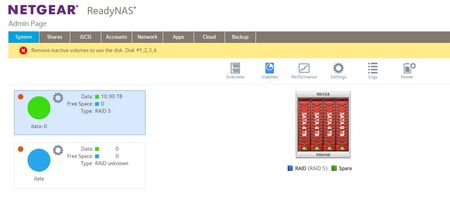
My Ready Nas104 is reporting Data is Dead as I pulled 2 drives out while it was online. I placed the disks back and powered it off and back on and got the message remove the inactive volumes to use ...

StephenB
May 18, 2024Guru - Experienced User
gtadevos wrote:
I found this Post as well do you think this is an option to try?
Solved: Re: Recover Destroyed Volume - NETGEAR Communities
No. In that post the volume was working/mounted when it was accidentally destroyed. In your case it wasn't.

Sandshark
May 18, 2024Sensei
The steps I listed in my final post there might get you back to where you were before you destroyed the volumes, but there would still be work to do to ressurrect the BTRFS volume.
- gtadevosMay 18, 2024AspirantHi Sand Shark,
Thanks, I am not very familiar with Linux etc are you able to provide step by step instruction and commands i can try?
Cheers
Garry - StephenBMay 19, 2024Guru - Experienced User
Sandshark wrote:
The steps I listed in my final post there might get you back to where you were before you destroyed the volumes, but there would still be work to do to ressurrect the BTRFS volume.
Not with the original disks.
Maybe with the set that was installed when gtadevos destroyed the volume. But I think all that would do is prevent the resync from completing.
- gtadevosMay 19, 2024Aspirant
Hi Sandshark Sand Shark and StephenB Stephen,
I'm thinking that the drives that were attached when the was volume destroyed cleared the data.
1. Try and restore all the data on each drive individually
2. Should I Start with inserting all 4 drives in a 4x usb drive bay repair the Raid First?
3. Then try and individually restore the data on each drive.
4. I have also placed 2 spare 6TB drives in a RAID 1 XRaid config in the NAS and rebuild it.
5. Then was planning to do the steps in the post once the data is restored.
Let me know your thoughts or Ideas, would be good to get the steps as well.
Cheers
Garry
- StephenBMay 20, 2024Guru - Experienced User
gtadevos wrote:
Try and restore all the data on each drive individually
There's no way to do that. RAID creates a virtual disk that the file system is installed on. The data is "striped" across the disks (so a large file will have some data blocks on each disk).
If you want to try RAID recovery software like ReclaiMe, you will either
- need to enough USB/SATA enclosures to connect all the disks. A 4-bay docks will work, or possibly two 2-bay docks. 4-bay docks sometimes have hardware RAID - which you don't want, as it will get in the way.
- need to create disk images of all the disks on the PC. That requires enough storage on the PC to hold all the disk images (but you only need to connect one disk at a time to make the images).
- gtadevosMay 20, 2024AspirantShould i base the scan to look for the deleted files only on btrfs?
- gtadevosMay 20, 2024Aspirant
Hi Stephen, I have found the files after scanning 1 of the 6TB drives
question is once I scan all 4 drives individually my assumption is that I will see the same structure across all 4 drives is that correct? then one they all have been restored how we move just these files only out of the restore?
- gtadevosMay 20, 2024Aspirant
Hi Stephen, I have found the files from one of the 6TB disks scanning BTRFS, still only 7% of the scan complete.
My assumption is that all for drives will have the same folder and files when scan is performed?
Also, once all these specific folders have been restored from each drive is its a simple copy and paste into the new NAS volume that i created with other spare drives or there is more work needed.
Thanks
Garry
- StephenBMay 20, 2024Guru - Experienced User
gtadevos wrote:
I have found the files after scanning 1 of the 6TB drives
Again, the files are generally spread across all the drives. The folder structures you are seeing might not be on the same drive as the actual files.
You need to scan them all together.
- gtadevosMay 26, 2024Aspirant
Just wanted to update you all on this topic.
1. I purchased Reclaim Pro version restoration Software
2. I purchased a usb 3 4x Drive Caddie (Clone and HDD Caddie No Raid function just simple reader) ORICO 4 Bay Hard Drive Docking Station with Offline Clone SATA to USB 3.0 HDD | eBay
3. The Software is next level where its actually used by professional restoration companies.
4. It managed to bring back the 8TB worth of Data from the deleted and wiped Drives, just wating for it to complete to 100% before it restores to another 10TB Disk. It picked up like for like files and folders. It has taken 3 days to get to 88% so it takes time, but it works.
5. I had another 4 spare 6TB drives I placed them in the NAS and build a brand-new Volume (cleaner as I only need to transfer the data to the same default shares.
Hope this post will help someone else if they have the same issue and situation.
Another questions I have, is it better to do backups to another NAS or just buy a simple 4 bay enclosure to just do backups on that?
- StephenBMay 26, 2024Guru - Experienced User
Thanks for the update!
gtadevos wrote:
Another questions I have, is it better to do backups to another NAS or just buy a simple 4 bay enclosure to just do backups on that?
Personally I back up to another NAS. But both are ok, the main thing is to have a regular backup plan in place.
One thing to consider is physical threats (theft, flood, fire, lightning, ...). Cloud storage for irreplacable stuff is one way to address those.
- SandsharkMay 26, 2024Sensei
Whether to back up to another NAS, a USB enclosure, or just web storage depends a lot on your circumstances. Like StephenB , I back up to a pair of local NAS. But I have 90TB volume, so other methods would be very cumbersome.
A big advantage of using a USB enclosure is that you can format it as NTFS and read it on other machines. They are typically cheaper, too. But if you have a large volume, you're going to either have to balance the load between the drives by share or need one that has built-in RAID capability. The tools you need to maintain the RAID aren't going to be available for the NAS, so you'll have to put it on a PC or Mac occasionally for that. RAID expandability is also something not typically as easy as with a NAS. I suppose you could use SSH to create a BTRFS volume on the drives in the USB case, but I think the potential negatives would exceed the positives in that case. I've never tried it.
Having the backup be a NAS that's compatible with the main one means not having to learn a new interface, and you can swap drives from the main to the backup if ever needed. You can even make the shares on the backup available with the same privileges as the main one if you need to access the backup because the main one went down. My 3 NAS are compatible with each other, the backups just have smaller drives that are hand-me-downs from the main one when I expand it, so it takes two of them. But with ReadyNAS no longer produced, that reduces the attractiveness of that.
Web storage could take a very long time to restore.
I also have a remote backup at my brother's house in North Carolina (where I'm in Florida) for critical items plus OneDrive for a very limited number of things. Access to the remote NAS is via ZeroTier, and I can also use it to remotely access my NAS. I only recently added the OneDrive backup because while he was on vacation, the NAS went down and the critical items were not being remotely backed up until he returned and reset it.
Related Content
NETGEAR Academy

Boost your skills with the Netgear Academy - Get trained, certified and stay ahead with the latest Netgear technology!
Join Us!
