NETGEAR is aware of a growing number of phone and online scams. To learn how to stay safe click here.
Forum Discussion

tomino
Nov 08, 2023Aspirant
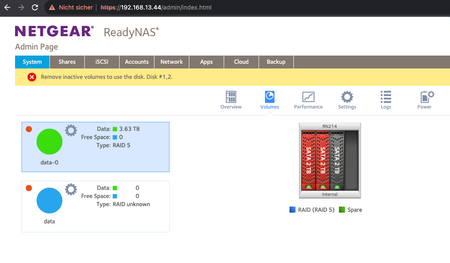
ReadyNAS 214 after reboot 'Remove inactive volumes to use the disk #1.2
Hello I have a problem with my ReadyNAS 214 it has 3 2TB WD Red HDD in it running RAID5. I haven't used it for a year and i rebooted it yesterday and after that i got the error message 'Remove inac...
tomino
Nov 08, 2023Aspirant
yes i hope it doesn't make it worse
well i found the download logs button, but where do i find the cloud storage?
the zipped log is 2.4MB
thank you

StephenB
Nov 08, 2023Guru - Experienced User
tomino wrote:
but where do i find the cloud storage?
FYI, dropbox, google drive, icloud, onedrive all work (as do several others).
- SandsharkNov 09, 2023Sensei
The reason you are seeing two volumes is that the OS can't figure out how to concatenate all the drives into one. So, it see's two data volumes. But since there cannot be two volumes with the same name, it is calling one data-0 (which is the name of the MDADM RAID on which the BTRFS volume resides) Both of these contain your data, though fractured such that you can't get to it. So, whatever you do, don't think that destroying one will help. That would actually make recovery impossible, which StephenB hopefully can help you with once he looks at your logs.
- tominoNov 09, 2023Aspirant
ah ok, i sent him the logs. I cross the fingers and hope for a solution.
I won't touch anything

Related Content
NETGEAR Academy

Boost your skills with the Netgear Academy - Get trained, certified and stay ahead with the latest Netgear technology!
Join Us!
