NETGEAR is aware of a growing number of phone and online scams. To learn how to stay safe click here.
Forum Discussion

Rottenweiler
Feb 15, 2024Guide
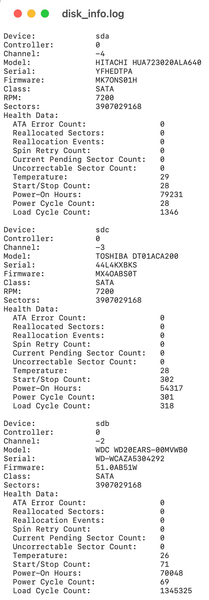
ReadyNAS 426 Negative Channel Numbers Disk Info Log Disks NOT showing
Struggling with a secondhand (new to me) ReadyNAS 426. (FW 6.10.9) Does ANYone have any insight as to WHY does this chassis want to assign/persists in assigning NEGATIVE disk channel numbers? (See ...

Sandshark
Mar 01, 2024Sensei
Did this start when you updated the OS? ReadyNAS know where to find the drives (and other configuration items) based on the model number, which is in the DMI on OS6 Intel systems. Your NAS is showing up as the correct model, so that isn't the problem. So, that leaves something wrong in the database (or whatever) the OS uses to look up the configuration for that model. If a USB recovery and factory default don't correct it, I can only assume that Netgear screwed something up in that database at some point in the update process. Based on what you are seeing, most users probably wouldn't notice until they had to do a factory default; which could explain why this has been reported by only one other forum user.

Rottenweiler
Mar 03, 2024Guide
Probably, but not 100% sure? After I got the unit, I added drives, it started up. All "seemed" normal.
If it was on a much older OS I would have updated to 6.10.9 rebooted and then factory defaulted. (just by my usual startup steps)
(I will try and go back to the video and pics I took while receiving and setting up to find out for certain).
Do you see/can you think of any way forward IF it is in the model database? I would guess any support is not going to be coming from Netgear at this point... sadly.
I just assumed (incorrectly) that doing a Factory Reset would put ALL of the configs and files back to zero and it would just work. (Didn't).
It's such a weird issue... thank you for any thoughts or ideas. I appreciate your help very much.
Thanks, Patrick
Related Content
NETGEAR Academy

Boost your skills with the Netgear Academy - Get trained, certified and stay ahead with the latest Netgear technology!
Join Us!
