NETGEAR is aware of a growing number of phone and online scams. To learn how to stay safe click here.
Forum Discussion

lbucci
Nov 02, 2020Aspirant
READYNAS-PRO-6 Replaced Failing disks Not Rebuilding
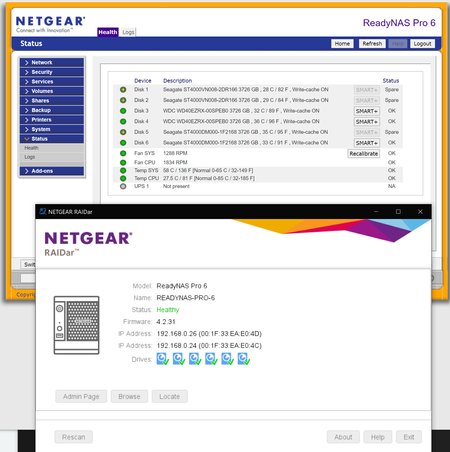
I have the Readynas READYNAS PRO 6 All of the six drive bays have 4TB ST4000 Seagates Iron wolfs or WD 4TB and all about eight years old and has never missed a beat I lost access to the NAS in W...

StephenB
Nov 03, 2020Guru - Experienced User
Though it isn't clear on what exactly happened, it sounds like you tried to replace multiple drives at once (replacing a second drive before the first had resynced, and then repeating that mistake with two more drives). RAID can't handle that, so you likely lost your volume. It can't rebuild at this point.
You can confirm by looking that the volume page in the web ui.
If you don't have a backup of the data, you will need data recovery of some kind. Netgear does offer a service for that: https://kb.netgear.com/69/ReadyNAS-Data-Recovery-Diagnostics-Scope-of-Service
Another thing you could try is to power down the NAS, and install the original drives in their original slots. Then power up the NAS, and see if the volume can be mounted. The challenge here is that the more things you try, the more difficult data recovery becomes.
lbucci wrote:
The log file is a zip file I cannot open. All zip programs present an error when trying to un-zip. I've redownloaded the file several time with the same result.
Something odd here, that isn't something I've seen before. What error are you seeing?
- lbucciNov 04, 2020Aspirant
Another thing you could try is to power down the NAS, and install the original drives in their original slots. Then power up the NAS, and see if the volume can be mounted. The challenge here is that the more things you try, the more difficult data recovery becomes.
I was thinking this maybe an option and will try. I'll let you know how it goes.
Just to be clear, I swapped the first disk and it went to a spare after say for a day or so that recovery was 6% and was not moving. On the third day the NAS advised me that drive 3 was failing and needed to be replaced, so I did, it immediately went to spare no recovery was started. At some point within a few hours, drive 6 started showing up as a spare? Drive 6 log on the web-interface showed it wanted to be replaced as it was failing as well.
I work in a data centre, in my entire life I have never seen a three-drive failure, never ever. The two disk failures are rare but have had some over a year and very common is one disk failure on any raid. I believe there is more at play here. Having said that, for the last 5 days it all stable with the layout in the photos, but cannot access the data and drives sitting on spare.
I'll let you know how replacing the drives go. Thank you for your assistance
- SandsharkNov 04, 2020Sensei
Volume re-sync is a drive intensive process and could drive more than one drive over the cliff to failure. But you may be right and there is actually somehting wrong in the NAS itself that's causing the drives to appear unhealthy.
- lbucciNov 04, 2020Aspirant
Well! I see?
I replaced the drives back to the original slots and this below I believe means "all gone" So much for RAID 6
Whilst the drives 1 & 2 showup as Dead, they are actully okay, in the sence that RAID can format and use these two drives.
- StephenBNov 05, 2020Guru - Experienced User
You could attempt data recovery (or engage a service). Netgear does offer one: https://kb.netgear.com/69/ReadyNAS-Data-Recovery-Diagnostics-Scope-of-Service
As far as the drives go, I've found that even the long test in Seatools (and Lifeguard) won't find all drive problems. I have had drives that pass the long non-destructive test, but fail the full erase test. (I've also had at least one drive that passed the erase test, but failed the non-destructive test). While I agree that 3 failures during a sync is really unusual, having a second drive fail during a resync certainly does happen. One factor (as Sandshark points out) is that a sync does stress the remaining drives. Another is that usually disk failures aren't detected until you try to read or write the bad sectors. A sync needs to read all the sectors on every drive.
If the logs haven't rotated, you might be able to see what errors triggered the behavior - perhaps look in system.log and kernel.log during the time the resync was done.
Two slightly off-topic comments:
- If you do need to start over due to data loss, you should consider converting your NAS to run OS-6. 4.2.x firmware has some expansion limits that aren't present in OS-6. Plus OS-6 supports SMB 3, and current TLS. If you need more information on that, just ask.
- If you do end up replacing some disks, be careful that you don't end up with SMR drives - they aren't well-suited for NAS, and folks here have had trouble with syncs in particular. In the case of Seagate, the VN (Ironwolf) models are all fine. But many of the Barracudas are not (including the ST4000DM004). In the case of Western Digital, the Red Plus and Pro lines are all ok. But the Red Line is all SMR - so I recommend avoiding them.

Related Content
NETGEAR Academy

Boost your skills with the Netgear Academy - Get trained, certified and stay ahead with the latest Netgear technology!
Join Us!
