NETGEAR is aware of a growing number of phone and online scams. To learn how to stay safe click here.
Forum Discussion

john-geidi
Sep 03, 2021Aspirant
ReadyNAS RN10400-100AJS keeps on saying storage is full
We have a NAS onsite and we're setting up network scan from a printer and destination is the NAS. We kept on getting an error, and upon checking, NAS keeps on saying that it is full, however, when w...
john-geidi
Sep 05, 2021Aspirant
Thanks StephenB.
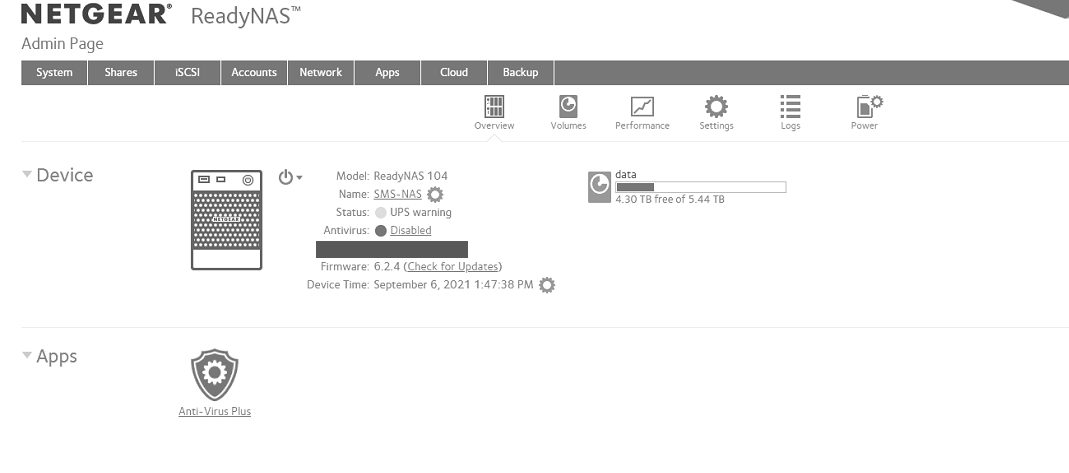
Attached is the screenshot of system > overview screen.
Snapshot is not enabled in volume level but from folder level, however, it is not enabled on the folders that are used when getting an error.
Regards,
John

StephenB
Sep 06, 2021Guru - Experienced User
Your screen shot says you are running 6.2.4 firmware (released in April 2015). The fact that it's long outdated will make troubleshooting more complicated. But we need to figure out what's happening before you try to update your firmware.
As I tried to say earlier, there are two very different things that might be getting full - the OS partition and the volume itself. Can you post the actual errors you are seeing from the log page?
Also, do you have the antivirus service enabled?
john-geidi wrote:
Snapshot is not enabled in volume level but from folder level, however, it is not enabled on the folders that are used when getting an error.
I'm not sure what you mean by this. If snapshots are enabled for a share, then deleting files in that share will not save any space (unless you also delete the snapshots). If snapshots aren't enabled for a share, then deleting files in that share will save space.
Related Content
NETGEAR Academy

Boost your skills with the Netgear Academy - Get trained, certified and stay ahead with the latest Netgear technology!
Join Us!