NETGEAR is aware of a growing number of phone and online scams. To learn how to stay safe click here.
Forum Discussion

MikeBob
Sep 21, 2015Aspirant
ReadyNas104 Adding a new hard drive
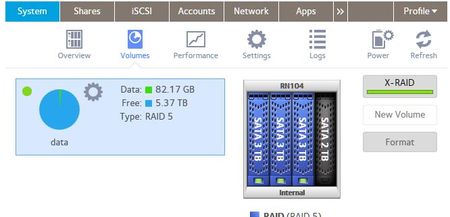
I originally setup my ReadyNas104 with three 3TB WD Red drives using X-RAID. Everything is working perfectly with that setup. I am now trying to add a new unformatted 2TB WD Red drive. The drive ...
 Sep 21, 2015
XRAID requires the new drive to be the same size or bigger than the existing drives. So it can't add in your 2 TB drive.
You can switch to flexraid, and create a new volume for the 2 TB drives. It won't be protected by RAID, but you can create shares on it.
You can also destroy the current volume and create a new one. You'll lose all the data on the current volume. If you do that, you probably should uninstall all the apps first (and reinstall them when you have a new volume created).
MikeBob
Sep 22, 2015Aspirant
I see, thanks for the detailed reply, that was very helpful. I was very confused as the Negear RAID Calculator tool led me to believe I could do this and use the 2 TB drive. (http://rdconfigurator.netgear.com/raid/index.html) And in reading the documentation it states that (page 21) "you must add a second disk that is at least as large as the first." but then states on page 22 "Installing additional disks increases your storage space." without reference to it having to be of equal or greater size.
When you say "You can also destroy the current volume and create a new one." to what end? Are you saying I could use this configuration as one volume if it was initially setup that way?
Thanks again

meverz
Sep 23, 2015Apprentice
MikeBob wrote:When you say "You can also destroy the current volume and create a new one." to what end? Are you saying I could use this configuration as one volume if it was initially setup that way?
Yep. If you destroy the volume and start again, you can use the 2TB drive. You will have to install it first, then add the other 3TB drives, wait for it all to resync, and then you will be good to go, with approx. 8TB of storage space.
Related Content
NETGEAR Academy

Boost your skills with the Netgear Academy - Get trained, certified and stay ahead with the latest Netgear technology!
Join Us!
