NETGEAR is aware of a growing number of phone and online scams. To learn how to stay safe click here.
Forum Discussion

jimk1963
Jan 16, 2023Virtuoso
RN528 - how to determine RAM config
Found this post: https://community.netgear.com/t5/New-ReadyNAS-Users-General/528x-ram-memory-upgrades/m-p/1410735 User runs "hwinfo" and "dmidecode" to determine his RN528 RAM config. I've o...

StephenB
Jan 16, 2023Guru - Experienced User
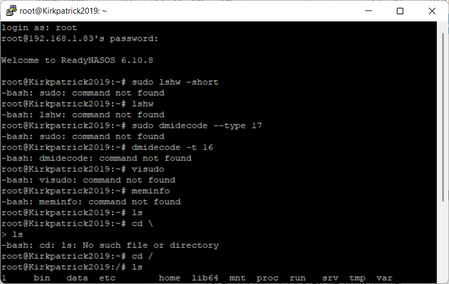
You don't need sudo, since you are logging in as root.
You can install dmidecode if you like with
apt-get install dmidecode
My RN526x has one DIMM module installed.
root@NAS:~# dmidecode --type 17
# dmidecode 2.12
SMBIOS 3.0 present.
# SMBIOS implementations newer than version 2.8 are not
# fully supported by this version of dmidecode.

Handle 0x005B, DMI type 17, 40 bytes
Memory Device
        Array Handle: 0x0059
        Error Information Handle: Not Provided
        Total Width: 72 bits
        Data Width: 72 bits
        Size: 4096 MB
        Form Factor: DIMM
        Set: None
        Locator: DIMM_A1
        Bank Locator: NODE 1
        Type: Other
        Type Detail: Synchronous
        Speed: 2133 MHz
        Manufacturer: Undefined
        Serial Number: 0013EAFE
        Asset Tag: DIMM_A1_AssetTag
        Part Number: TS512MLH72V1H
        Rank: 1
        Configured Clock Speed: 1866 MHz
        Minimum voltage:  Unknown
        Maximum voltage:  Unknown
        Configured voltage:  0.003 V
...
Googling the part number indicates this is a Transcend part - DDR4 ECC Long-DIMM 4 GB
 jimk1963Jan 17, 2023Virtuoso
Thanks StephenB , appears I do in fact have 2 16GB modules in the NAS already. Part# 36ASF2G72PZ-2G1B1, which is a 16GB module. I guess senility is creeping in... can't find a purchase receipt anywhere for these modules.
SMBIOS 3.0 present.
# SMBIOS implementations newer than version 2.8 are not fully supported by this version of dmidecode.Handle 0x0049, DMI type 17, 40 bytes
Memory Device
Array Handle: 0x0047
Error Information Handle: Not Provided
Total Width: 72 bits
Data Width: 72 bits
Size: 16384 MB
Form Factor: DIMM
Set: None
Locator: DIMM_A1
Bank Locator: NODE 1
Type: <OUT OF SPEC>
Type Detail: Synchronous
Speed: 2133 MHz
Manufacturer: Micron
Serial Number: 14F961EF
Asset Tag: DIMM_A1_AssetTag
Part Number: 36ASF2G72PZ-2G1B1
Rank: 2
Configured Clock Speed: 1866 MHz
Minimum voltage: Unknown
Maximum voltage: Unknown
Configured voltage: 0.003 VHandle 0x004B, DMI type 17, 40 bytes
Memory Device
Array Handle: 0x0047
Error Information Handle: Not Provided
Total Width: Unknown
Data Width: Unknown
Size: No Module Installed
Form Factor: DIMM
Set: None
Locator: DIMM_A2
Bank Locator: NODE 1
Type: <OUT OF SPEC>
Type Detail: Synchronous
Speed: Unknown
Manufacturer: NO DIMM
Serial Number: NO DIMM
Asset Tag: NO DIMM
Part Number: NO DIMM
Rank: Unknown
Configured Clock Speed: Unknown
Minimum voltage: Unknown
Maximum voltage: Unknown
Configured voltage: 0.003 VHandle 0x004C, DMI type 17, 40 bytes
Memory Device
Array Handle: 0x0047
Error Information Handle: Not Provided
Total Width: 72 bits
Data Width: 72 bits
Size: 16384 MB
Form Factor: DIMM
Set: None
Locator: DIMM_B1
Bank Locator: NODE 1
Type: <OUT OF SPEC>
Type Detail: Synchronous
Speed: 2133 MHz
Manufacturer: Micron
Serial Number: 15FCB730
Asset Tag: DIMM_B1_AssetTag
Part Number: 36ASF2G72PZ-2G1B1
Rank: 2
Configured Clock Speed: 1866 MHz
Minimum voltage: Unknown
Maximum voltage: Unknown
Configured voltage: 0.003 VHandle 0x004E, DMI type 17, 40 bytes
Memory Device
Array Handle: 0x0047
Error Information Handle: Not Provided
Total Width: Unknown
Data Width: Unknown
Size: No Module Installed
Form Factor: DIMM
Set: None
Locator: DIMM_B2
Bank Locator: NODE 1
Type: <OUT OF SPEC>
Type Detail: Synchronous
Speed: Unknown
Manufacturer: NO DIMM
Serial Number: NO DIMM
Asset Tag: NO DIMM
Part Number: NO DIMM
Rank: Unknown
Configured Clock Speed: Unknown
Minimum voltage: Unknown
Maximum voltage: Unknown
Configured voltage: 0.003 V
Related Content
NETGEAR Academy

Boost your skills with the Netgear Academy - Get trained, certified and stay ahead with the latest Netgear technology!
Join Us!
