NETGEAR is aware of a growing number of phone and online scams. To learn how to stay safe click here.
Forum Discussion

waynerp
Dec 30, 2015Aspirant
XRaid and Storage Size ??
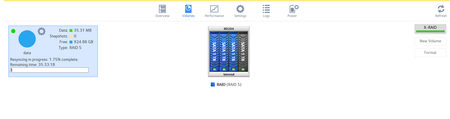
Hi All. I am new to ReadyNAS and have moved from a HP Microserver running WHS2011 I have added 4 1TB HD's and am now waiting for an enternity for it to 'resync', something i am not liking about thi...

JennC
Dec 30, 2015NETGEAR Employee Retired
Hello waynerp,
With 4x1TB, it should be around 3TB, you can use RAID calculator for checking volume capacity of combined sizes of disks in a RAID.
Did you just add disk to existing RAID or all are new?
If this is your initial setup and the disks are new, they all should be empty with no partitions. It is better inserting them all at the same time then factory reset the NAS to let the NAS format the disks and start building the volume with the disks at the same time.
Regards,
 waynerpDec 30, 2015Aspirant
Hi
Thanks for reply
The 4 disks were the ones i previuosly used in my old NAS. I did a quick format of all the disks in windows and inserted 2 disks first, the the other 2 1 by 1.
- JennCDec 30, 2015NETGEAR Employee Retired
Hello waynerp.
If that is the case then this means the disks do not have files anymore.
If it is taking too long which I think it is because it seems it is doing it with one disk at a time, try doing the factory reset from the boot menu while the disks are inserted. Doing this will allow the NAS to format all the disks and install the OS to the disks.
Regards,
Related Content
NETGEAR Academy

Boost your skills with the Netgear Academy - Get trained, certified and stay ahead with the latest Netgear technology!
Join Us!
