NETGEAR is aware of a growing number of phone and online scams. To learn how to stay safe click here.
Forum Discussion

Vivantje
Dec 19, 2024Aspirant
How to recover/read data on 4 X-Raid2 disks
My Readynas NV+ (RND4000) is dead. Even with a new power supply he's not starting. I need to recover all the data (my whole life on photo's and music is stored there). How can I do this? I had 4 ...
- Dec 21, 2024
A lot of supplies have eliminated the white wire, so you have an unused pin across from the grey one. Try popping out the blue pin or cutting the blue wire and see if your NAS will then power up with no drives. Without doing that, the -12V is shorted to the +12V, which will typically cause the power supply to not power up. But it not powering up is what causes it to do no damage when you didn't remove the -12V.
I don't know what I was thinking when I said the +4 has two 12V wires. You are correct, it has but one. But you can generally get enough power with just two, so put that yellow one from the +4 in place of the blue or in the currently empty spot across from the grey. But if the CPU connector cable is long enough, also putting one of those yellow ones in the other position is best.

Sandshark
Dec 19, 2024Sensei
Is this an RND4000-100 (NV+) or RND4000-200 (NV+V2) unit? The former is silver in color with an internal supply and the latter is black with an external supply and includes "V2" on the front label. The V2 does label it's implementation of XRAID as XRAID2.
The advice given by StephenB for recovery outside of the NAS still applies. But if there is a problem with the volume, it may make a difference. It will also make a difference in how/if you try to resurrect the NAS or purchase a used replacement into which to put your volume.
What supply did you purchase to try and fix your NAS? For both versions, there are supplies that appear to be suitable replacements but are not.
Vivantje
Dec 19, 2024Aspirant
Hi,
The NAS have a silver color with NV+ on the front with internal powersupply. The old and new one have the same modelnumber: ST-220FUB-05E. The only difference is that the new powersupply didn't have a button on the back but a fan.
My disks where 2x Barracuda seagate 2000GB and 2x Western Digital 2TB. But I don't think there's something wrong with the disks.
 StephenBDec 19, 2024Guru - Experienced User
Vivantje wrote:
The NAS have a silver color with NV+ on the front with internal powersupply. The old and new one have the same modelnumber: ST-220FUB-05E. The only difference is that the new powersupply didn't have a button on the back but a fan.
So you have two NV+?
If one still works, you can just power it down and migrate the disks to the working one. Label them by slot as you remove them.
- VivantjeDec 19, 2024Aspirant
Nu I have one NV+ with 4 disks
- SandsharkDec 19, 2024Sensei
The ReadyNAS power supply, while not manufactured by Netgear, has Netgear-specific wiring but typically still has the manufacturer's standard label. If you just bought an off-the shelf ST-220FUB-05E, not listed as modified for the ReadyNAS, then it's not going to work. Fortunately, it usually doesn't harm anything, either.
If your new supply has a blue (-12V) and/or white (-5V) wire, then it's not modified. Those need to be replaced with a yellow (+12V) one. You can simply pop out those pins or cut the wires to test if the NAS will power up without drives, but you'll need the extra power for the drives. The best way to do that is to buy one that has a "20+4" pin connector, where the 4-pin section can be removed, and use the two yellow wires in the +4 section in place of the blue and white. But since you already bought a power supply, you can use the two yellow ones from the 4-pin CPU connector. If popping out and in pins isn't something you can do (it's a lot easier with a special tool) or those wires aren't long enough, you can just cut and solder. So if you cut them for the purposes of testing, make sure you leave enough to solder to.
Make sure you fully protect the removed blue and white wires from shorting against the case.
You should also remove the fan and swap out the cover from your original for the new one and install the air dam to insure the air flow is right, since the case blocks that fan.
- VivantjeDec 21, 2024Aspirant
Hi,
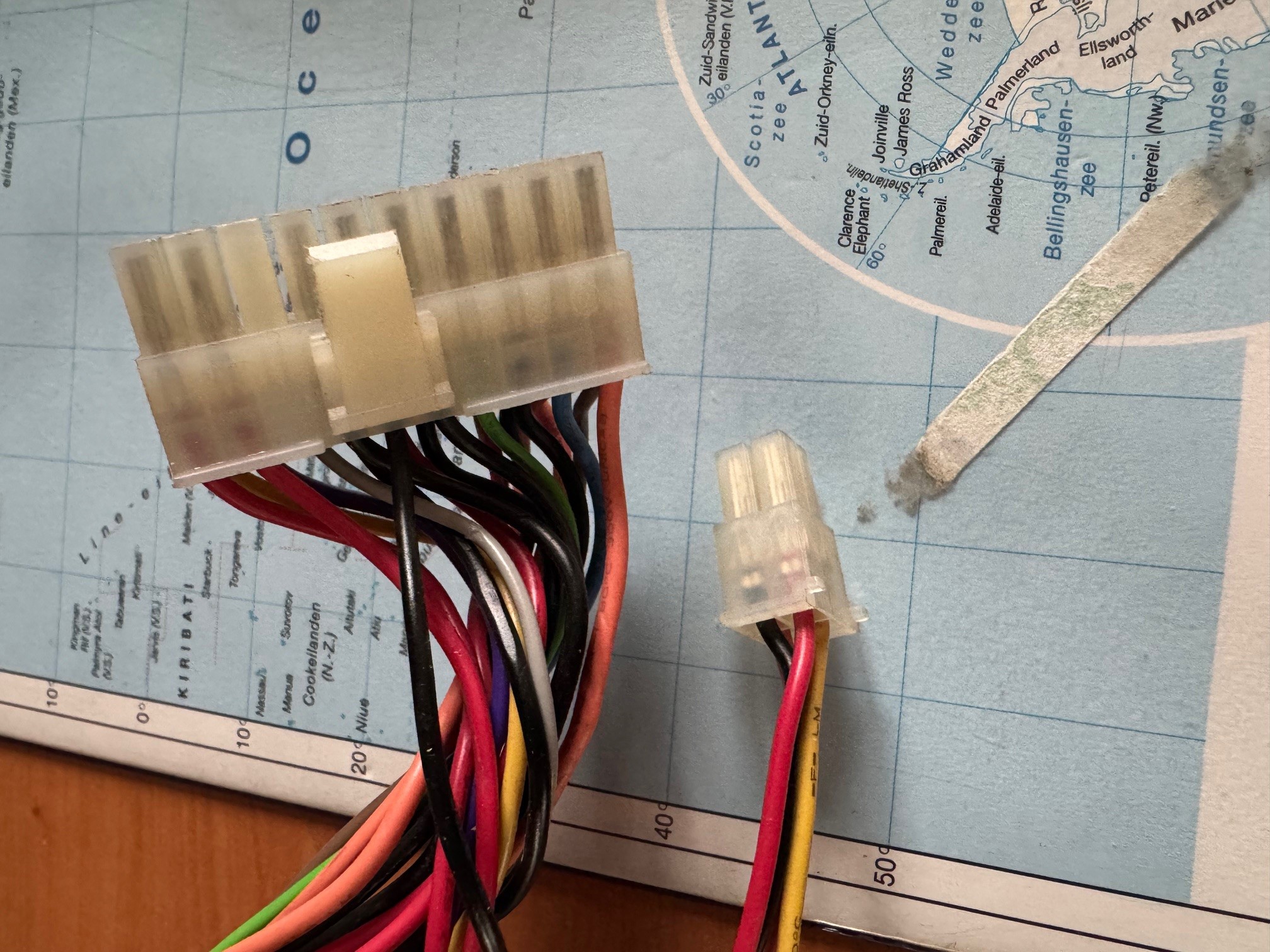
Indeed it's a not modified supply with more cables as the original. It's a 20+4, the old one only 20 pins. But I don't have a white one (but a gray one). In the 4 pins connector I've only 1 yellow. I attach a photo.
- SandsharkDec 21, 2024Sensei
A lot of supplies have eliminated the white wire, so you have an unused pin across from the grey one. Try popping out the blue pin or cutting the blue wire and see if your NAS will then power up with no drives. Without doing that, the -12V is shorted to the +12V, which will typically cause the power supply to not power up. But it not powering up is what causes it to do no damage when you didn't remove the -12V.
I don't know what I was thinking when I said the +4 has two 12V wires. You are correct, it has but one. But you can generally get enough power with just two, so put that yellow one from the +4 in place of the blue or in the currently empty spot across from the grey. But if the CPU connector cable is long enough, also putting one of those yellow ones in the other position is best.
Related Content
NETGEAR Academy

Boost your skills with the Netgear Academy - Get trained, certified and stay ahead with the latest Netgear technology!
Join Us!