NETGEAR is aware of a growing number of phone and online scams. To learn how to stay safe click here.
Forum Discussion

jc2010
Jan 28, 2011Aspirant
Backup Connection Error
I'm trying to backup my PC (Windows Vista, 64-bit) using Frontview. The PC and ReadyNAS are both on my local home network, and I don't have a login/password on my computer. I've selected "Remote: Wi...

PapaBear1
Apr 02, 2011Apprentice
Old Man - I looked at your setting and it does not match the choices available on my NV+. I don't know how you selected CIFS as that is not one of the choices.
Here is a screenshot of a test job I set up for another discussion:
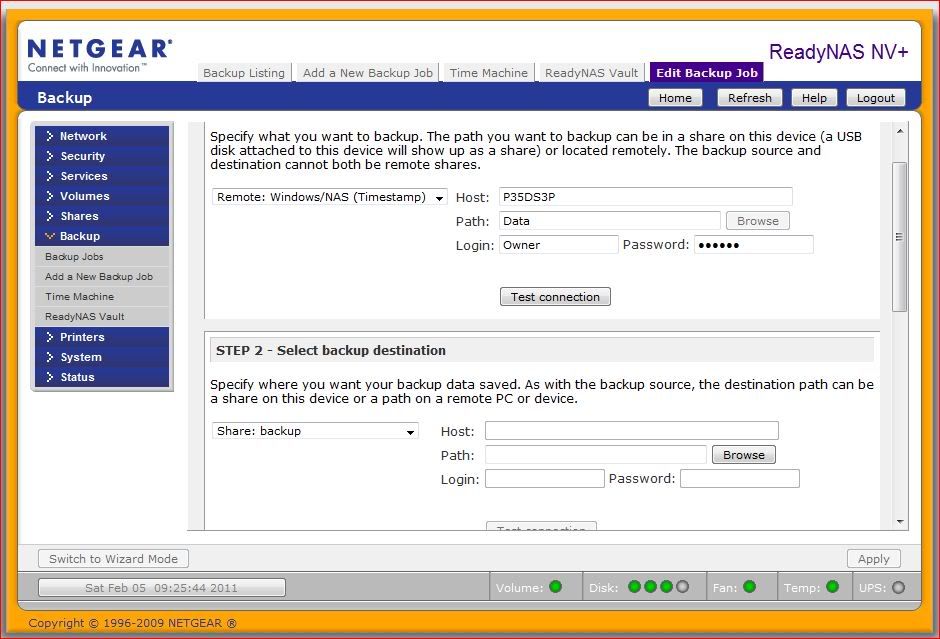
In the host blank P35DS3P is the computer name, but the IP could be used as well. I generally use the name for the computers, but eh IP addresses for the NASes on the network. The path does not include C: which is the root in Windows. That is not stated in Linux but understood. In my example Data is a first level directory. Lower level directories would be separated by a forward slash. An example could be: Data/Documents/Legal.
The above example was set up as a test, P35DS3P is my main desktop and primarily runs Windows 7 Home Premium (64 bit), however, it still has Vista Home Premium (32 bit) on another drive and I ran the test on it as well. The test connection was successful and I copies about 3 GB of data into the directory Data (set up only for the test) and the backup ran and completed successfully. I always do better with examples, and thought you could use one.
Here is a screenshot of a test job I set up for another discussion:
In the host blank P35DS3P is the computer name, but the IP could be used as well. I generally use the name for the computers, but eh IP addresses for the NASes on the network. The path does not include C: which is the root in Windows. That is not stated in Linux but understood. In my example Data is a first level directory. Lower level directories would be separated by a forward slash. An example could be: Data/Documents/Legal.
The above example was set up as a test, P35DS3P is my main desktop and primarily runs Windows 7 Home Premium (64 bit), however, it still has Vista Home Premium (32 bit) on another drive and I ran the test on it as well. The test connection was successful and I copies about 3 GB of data into the directory Data (set up only for the test) and the backup ran and completed successfully. I always do better with examples, and thought you could use one.
Related Content
NETGEAR Academy

Boost your skills with the Netgear Academy - Get trained, certified and stay ahead with the latest Netgear technology!
Join Us!
