NETGEAR is aware of a growing number of phone and online scams. To learn how to stay safe click here.
Forum Discussion

AJTID
Jul 30, 2015Aspirant
Best Practices for file sharing
Hello Colleagues, Do we have a best practice guide available in order to comfort different usage scenarios ? I have searched the forum and also found the below guide. http://kb.netgear.com/a...

JennC
Jul 31, 2015NETGEAR Employee Retired
Hello AJTID,
Setting up permission to the shares of the NAS when the NAS is integrated to AD needs not much config on the admin page, it's just share should be set to Everyone with read/write access and Allow anonymous access should not be marked as enabled. Then the rest of the permissions should be configured on the Windows server using the administrator account that you entered on the admin page's Authentication to set it to AD.
Make sure also that when you switch to Local users under Authentication you have no local user listed that has the same name with one of the shares and/or one of the domain users.
See also step 3 at http://kb.netgear.com/app/answers/detail/a_id/12261/related/1 for permissions setup.
Regards,

AJTID
Aug 04, 2015Aspirant
JennC,
We followed the instructions on the page you gave even before posting.
When we try to do that we always get read/write permissions for domain users AND domain admins.
However we want general domaun users to have only read privileges, Folder and group Owners should have read/write privileges.
But as group owners doesnt mean "Domain users" or "Domain groups" only.
Hope thats not to confusing.
- JennCAug 04, 2015NETGEAR Employee Retired
Hello AJTID,
Thanks for responding.
This is a setting on the AD server already. It may be best for us to wait for suggestions from others in the community who are also using AD server with the NAS.
Regards,
- AJTIDAug 05, 2015Aspirant
Hello JennyC,
I will open a support case ID.
Hopefully this will lead quicker to a success ;-)
We have spent already more than a week on this.
Something is quirky or buggy.
- AJTIDAug 06, 2015Aspirant
JennyC,
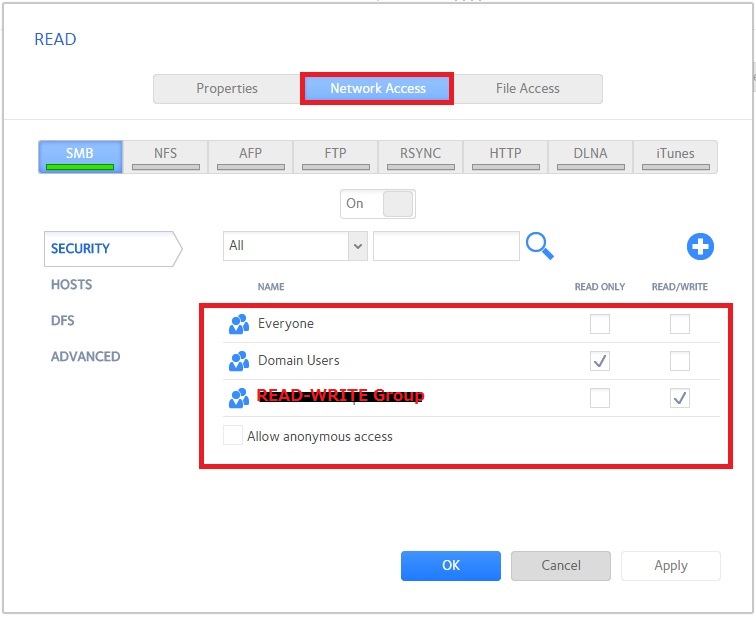
The way we were able to make it work is different from the manual we found at
1) In our case we dont touch File access in Menu Shares>> Shares>> <Foldername> >> Settings
2) In Network access tab we add the "read only" group.
3) save it
4) In Network access tab we add the "read write" group.
5) Save it
Lessons learned:
- Saving the config at each step is important.
- Wait until each step is completed. Sometimes the NAS starts a script, pauses than continues the script until complete.
Allow amble time before proceeding to next step. Make sure the action is settled.
JennyC,
kindly reconfirm our findings.
If you think they are correct It might be worth updating the guide.
I think many users are confused beacuse they don't realize they might have to manually add the user group or user for the network access.
- If you change interface options please update the manual.
- Mention in the manual for which firmware version it applies.
- Please create a workshop style setup scenarios
Related Content
- Nov 12, 2018Retired_Member
NETGEAR Academy

Boost your skills with the Netgear Academy - Get trained, certified and stay ahead with the latest Netgear technology!
Join Us!
