NETGEAR is aware of a growing number of phone and online scams. To learn how to stay safe click here.
Forum Discussion

StephenB
Sep 23, 2015Guru - Experienced User
Crashplan JRE update needed
Crashplan released an update on 21 September 2015 (4.4.0) which fails to install on my pro-6 (running 4.2.28).
The issue is that the new service requires jre 1.7 or jre 1.8, and my system was r...
 Dec 03, 2015
Here's for those who boldly go ...
https://rnxtras.com/add-ons/update/glibc6-2-13-readynas-os-4-x86-only-60494
Have fun!
-Stefan

StephenB
Sep 29, 2015Guru - Experienced User
Deleting all the 1*.* files and folders in usr/local/crashplan/upgrade is safe, you don't need to leave any of them in place.
At the moment there is no windows 4.4.x download available, so you do need to look at the logs to tell the status.

rugene
Sep 29, 2015Guide
As stated by others you must upgrade to jre 1.7 or better for the crashplan 4.4 upgrade to complete. Once you upgrade java don't forget to set the default version. Commands look something like this:
java -version
......
apt-get install openjdk-7-jre
......
$ sudo update-alternatives --config java
(and select the jdk you want to use.)
but after the upgrade completes I am finding that I can no longer connect to the engine remotely. Has anyone solved this issue yet?
I am hoping that when the window's client gets upgraded to 4.4 that the remote client connect issue will be fixed......ugh
- StephenBSep 29, 2015Guru - Experienced User
rugene wrote:
... but after the upgrade completes I am finding that I can no longer connect to the engine remotely. Has anyone solved this issue yet?
I am hoping that when the window's client gets upgraded to 4.4 that the remote client connect issue will be fixed......ugh
The current version on my linux system is 4.4.1 (there was a second update pushed).
The windows client isn't available yet (per crashplan support), and should solve the connection issue. You will need to reset the application token on the PC (as the software upgrade changes the token on the linux system).
- StephenBOct 02, 2015Guru - Experienced User
The 4.4.1 windows client is available now at https://www.code42.com/crashplan/thankyou/
It did a complete reinstall on my PC, so I needed to re-enter my crashplan account info and then needed to re-configure .ui_info
 jamestx10Oct 03, 2015Aspirant
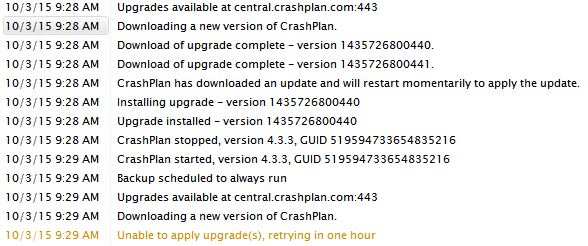
I am still having an issue getting the update to install.
java -version
java version "1.8.0_51"
Java(TM) SE Embedded Runtime Environment (build 1.8.0_51-b07, headless)
Java HotSpot(TM) Embedded Server VM (build 25.51-b07, mixed mode
Looks like Java 1.8 is installed fine but
update-alternatives --config java

There is only 1 program which provides java
(/usr/lib/jvm/java-6-sun/jre/bin/java). Nothing to configure.
Related Content
NETGEAR Academy

Boost your skills with the Netgear Academy - Get trained, certified and stay ahead with the latest Netgear technology!
Join Us!
