NETGEAR is aware of a growing number of phone and online scams. To learn how to stay safe click here.
Forum Discussion

Superdan186
Apr 21, 2016Tutor
Delete a Bond Network cost Nas to crash everytime
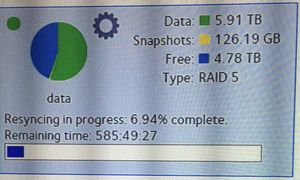
Two day ago I delete a bond network and my ReadyNas RN104 Crash again. I was running 6.4.2 when I have my first crash that was a few week ago Nas was very slow. Then I was told to upgrade FW to 6.5.0...

Retired_Member
Apr 21, 2016I don't think 585 hours is an expected time to resync a 4 HDD RAID5, even for 10TB on an ARM unit... It should be much faster than that.
On a 104, the limitation is usually the CPU. Do you have anything else running on the NAS? Like applications, backup jobs, etc?
Do you have anything in the logs?
Did you try to gracefully reboot the NAS from the web interface to see if the resync speed is different afterwards?
When the NAS was "crashed" were the buttons and LCD responsive?
What type of bond are you currently using?
 StephenBApr 21, 2016Guru - Experienced User
I agree it is longer than it should be. Perhaps someone from Netgear will want to take a look (esp. since this is on the beta firmware).
 Superdan186Apr 21, 2016Tutor
I just check my Nas yes I have 3 apps running Virus, Plexmedia and Photo II. I turn Plex and Photo II Off now take
.
. I have a (Linksys SE3016 16-Port Gigabit Ethernet Switch) I think is unmanage switch. I have my Bond setting as Active Backup. Then want to try change setting to Round-Robin Then it crash. I still confuse which setting should I use for more faster performance.
- mdgm-ntgrApr 22, 2016NETGEAR Employee Retired
The RN104 isn't powerful enough to have a performance benefit from NIC teaming/bonding and anyway you need multiple client machines simultaneously accessing the NAS to get a performance benefit for the teaming modes that provide it.


Related Content
NETGEAR Academy

Boost your skills with the Netgear Academy - Get trained, certified and stay ahead with the latest Netgear technology!
Join Us!
