NETGEAR is aware of a growing number of phone and online scams. To learn how to stay safe click here.
Forum Discussion

ksp100
Feb 22, 2024Aspirant
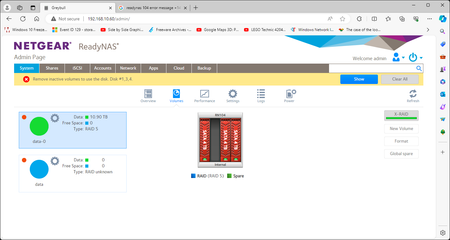
Dreaded "Remove inactive volumes" message
Hi, Reading other posts, I am hoping someone is able to help me out with a problem. First the background. I have Readynas 104 with 4 x 4TB disks operating in X-RAID. All was going fine until at t...

StephenB
Feb 22, 2024Guru - Experienced User
Start by downloading the full log zip file.
There will be more clues in the full zip than you see on the screen. But the information can be overwhelming.
if you'd like, I can take a look. Put the full zip into cloud storage (google drive, drop box, etc), and then PM (private message) me a link, using the envelope icon in the upper right of the forum page. Make sure the permissions are set to anyone with the link can download.
Also, I suggest testing the disk you think failed. Do that in a Windows PC with vendor tools (Dashboard for WDC, Seatools for Seagate). You can connect the disk to the PC using either SATA or a USB adapter/dock.
- ksp100Feb 23, 2024Aspirant
Thanks for the offer but I may not need it. So, this morning I powered it up again to download the logs but this time removed the 'failed' drive before switching on. And it recognised the array straight away, and identified it was back in the degraded state. So, I have put in my spare drive and it is now 8% through a resyncing operation. It appears that powering it up with a drive that was in some way detected, if not working, confused it.
I have checked the original drive and that is definitely passed its best. It once detected in Device Manager but now won't detect there or in the WD Dashboard.
Regards,
Kevin
- StephenBFeb 23, 2024Guru - Experienced User
ksp100 wrote:
Thanks for the offer but I may not need it. So, this morning I powered it up again to download the logs but this time removed the 'failed' drive before switching on. And it recognised the array straight away, and identified it was back in the degraded state. So, I have put in my spare drive and it is now 8% through a resyncing operation.
A better path would have been to back up the files before starting the resync. You have no RAID redundancy at the moment, so any issues with the original drives would result in a failed volume.
After everything is restored, I suggest running the disk test from the volume settings wheel.
Also, I recommend putting a backup plan in place. RAID isn't enough to keep your data safe.
- SandsharkFeb 23, 2024Sensei
Those "removals" are a sign of drive failure since you didn't actually remove it. The NAS cannot monitor drive removals when it's off, it can only see them when on, or at power-on. So if you think your NAS was off at those times, check the NAS clock, especially the time zone.
One bad drive can sometimes affect the entire SATA subsystem, which appears to be your case. Once you removed the offending drive, the NAS could then properly access the rest.
If the rest of the drives are of the same age, you should probably be prepared to replace others as they fail. Or even replace them before they do, if they are very old. A re-sync puts a lot of stress on drives, and a second failure during a re-sync will truly kill your volume.

Related Content
NETGEAR Academy

Boost your skills with the Netgear Academy - Get trained, certified and stay ahead with the latest Netgear technology!
Join Us!
