NETGEAR is aware of a growing number of phone and online scams. To learn how to stay safe click here.
Forum Discussion

wifiuk
Aug 26, 2015Aspirant
Error : Duplicate file already exists ReadyNAS 102
Hi guys and gals,
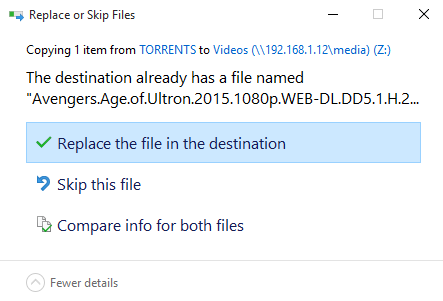
For the last few weeks ive been getting the following error come up.
When ever i try to copy any file over to my NAS i get the following error.
Click on repla...

StephenB
Sep 26, 2016Guru - Experienced User
jcsdkx51 wrote:
... connected to my ReadyNAS Duo ...
jcsdkx51 wrote:
... 6.5.2...
One of these is wrong (likely the first). There is no Duo that runs OS 6. Can you provide your NAS model (possibly a RN102, RN202, RN212, RN312)
How is the USB drive formatted?

jcsdkx51
Sep 26, 2016Aspirant

- mdgm-ntgrSep 27, 2016NETGEAR Employee Retired
Looks like there is no/very little data on your NAS?
Can you send in your logs (see the Sending Logs link in my sig)?- jcsdkx51Sep 28, 2016Aspirant
Correct, most of my data was already on the USB 3.0 drives and I am waiting to upgrade the drives in the NAS to larger ones but had to toss in my 2TB drives to set it up so it acts as the middle man before my pictures and other media are sorted into the folders on the external devices. I sent the logs according to your directions. Please let me know what else may help.
- mdgm-ntgrSep 28, 2016NETGEAR Employee Retired
Have you tried disabling IPv6?
Well normally we wouldn't recommend this, but seeing there is next to no data on the NAS you might wish to power down, disconnect the USB disks, do a factory default (wipes all data, settings, everything), verify it has come up fine, configure the NAS again, reconnect the USB disks etc.
If you prefer perhaps I could have a remote look at the NAS to see what I can find?

Related Content
NETGEAR Academy

Boost your skills with the Netgear Academy - Get trained, certified and stay ahead with the latest Netgear technology!
Join Us!
