NETGEAR is aware of a growing number of phone and online scams. To learn how to stay safe click here.
Forum Discussion

Laserbait
Jun 28, 2023Luminary
Getting a hold of ReadyNAS support
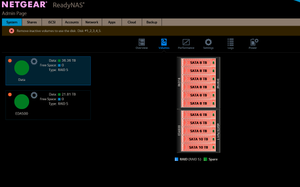
Hi there! I had a power outage incident about a week ago. And ever since then my NAS is showing red for the volumes: I'd like to use the recovery service (https://kb.netgear.com/69/Rea...

Sandshark
Jul 13, 2023Sensei
I recommend running a scrub and balance just to be sure everything is really fine.

- LaserbaitAug 02, 2023Luminary
SandsharkI did the scrub, and it didn't seem to find any errors. I followed it up with a balance and a defrag, and those seemed to run very quickly.
Aug 01, 2023 07:36:54 PM Volume: Defragmentation complete for volume Data.
Aug 01, 2023 06:35:11 PM Volume: Defragmentation started for volume Data.
Aug 01, 2023 06:34:41 PM Volume: Balance complete for volume Data.
Aug 01, 2023 06:34:40 PM Volume: Balance started for volume Data.
Aug 01, 2023 06:33:49 PM Volume: Balance complete for volume Data.
Aug 01, 2023 06:33:47 PM Volume: Balance started for volume Data.
Aug 01, 2023 08:25:48 AM Volume: Scrub completed for volume Data'.
Jul 27, 2023 12:48:35 PM Volume: Scrub started for volume Data.
One thing I find concerning though is I am seeing a lot of these btrfs errors:
[ +0.157155] BTRFS error (device md127): bdev /dev/md127 errs: wr 428870, rd 266, flush 0, corrupt 0, gen 0
[ +0.000228] BTRFS error (device md127): bdev /dev/md127 errs: wr 428871, rd 266, flush 0, corrupt 0, gen 0
[ +20.614028] BTRFS error (device md127): bdev /dev/md127 errs: wr 428872, rd 266, flush 0, corrupt 0, gen 0
[ +0.000481] BTRFS error (device md127): bdev /dev/md127 errs: wr 428873, rd 266, flush 0, corrupt 0, gen 0
When I did the scrub, it seems to have only scrubbed the /md/md127 object, and not the btrfs volume.root@RN316:/home/admin# btrfs scrub status /dev/md127
scrub status for 961dadcb-5a64-4702-b0fd-4a84956dda1d
no stats available
total bytes scrubbed: 0.00B with 0 errorsShould I try a btrfs scrub?
- LaserbaitAug 03, 2023Luminary
Hello Stephen,
Running a disk test now. There is nothing in those logs preceding the BTRFS errors, no hardware or software errors. The only thing that I can correlate it to is when trying to record/play shows on Plex. Plex has it's own share on the 316 (PlexDVR). I can access all the other shares without BTRFS errors appearing.
Another anomaly that I have seen is that I can't back up that PlexDVR share to my RN204 using ReadyDR, but I can with all the other shares. Every time I try, it errors out with:
Aug 03, 2023 05:59:17 AM ReadyDR: ReadyDR job failure: Operation not permitted [PlexDVR]And the log files just say the same thing. Doesn't say what "operation" isn't permitted, or any further details about the failure.
- LaserbaitAug 09, 2023Luminary
Ran the disk test, no errors were presented or reported as fixed. The btrfs errors continued for the next couple of days, and have now ceased for some reason. Very, very odd... I wonder if btrfs was fixing those errors as it was seeing/reporting them. Can it even do that?
- schumakuAug 09, 2023Guru - Experienced User
Laserbait wrote:
Aug 03, 2023 05:59:17 AM ReadyDR: ReadyDR job failure: Operation not permitted [PlexDVR]
And the log files just say the same thing. Doesn't say what "operation" isn't permitted, or any further details about the failure.
ReadyDR is a snapshot based disk storage replication. Taking the snapshot from the volume holding the PlexDVR shared folder should be always possible. What is (or probably was?) configured in ReadyDR? local->local, local->remote, remote->local https://kb.netgear.com/31229/ReadyDR-Backup-Options - the ReadyDR history window shows a read-only view of what snapshots have been sent or received as part of the ReadyDR job.FMI.
 StephenBAug 09, 2023Guru - Experienced User
Laserbait wrote:
Ran the disk test, no errors were presented or reported as fixed. The btrfs errors continued for the next couple of days, and have now ceased for some reason. Very, very odd... I wonder if btrfs was fixing those errors as it was seeing/reporting them. Can it even do that?
The disk test doesn't attempt to fix errors. It just runs the smart long test on all the disks. You should have gotten a completion message when it finished.
As far as the errors go, there's no indication that BTRFS tried to retrospectively fix those either. All you know for sure is that you aren't getting any more errors at the moment. I'd keep an eye out, and see if any new errors are reported.
Have you recently run a balance? (I deleted the log you sent in June, so I can't see the history of your maintenance functions).
- StephenBAug 09, 2023Guru - Experienced User
Laserbait wrote:
Another anomaly that I have seen is that I can't back up that PlexDVR share to my RN204 using ReadyDR, but I can with all the other shares. Every time I try, it errors out with:
Aug 03, 2023 05:59:17 AM ReadyDR: ReadyDR job failure: Operation not permitted [PlexDVR]And the log files just say the same thing. Doesn't say what "operation" isn't permitted, or any further details about the failure.
No other errors of any kind around the time the backup job was run? What logs have you looked in?
Were you able to back it up before the power issue in June?

Related Content
- Jan 17, 2024Retired_Member
NETGEAR Academy

Boost your skills with the Netgear Academy - Get trained, certified and stay ahead with the latest Netgear technology!
Join Us!
