NETGEAR is aware of a growing number of phone and online scams. To learn how to stay safe click here.
Forum Discussion

AmalW
Dec 06, 2020Aspirant
Ready NAS RNDP200U - Not Reading Disks
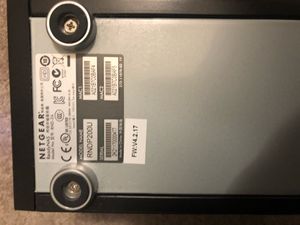
Dear All, In desperate need of some help! Setup: My ReadyNAS Model Name: RNDP200U (Model No: RND-2A) is not reading the two disks. Using Raidar 4.3.0. X-Raid2 Setup - I believe as I did no...

Sandshark
Dec 06, 2020Sensei
Since you had no luck with (I am assuming a known good) scratch drive, then the likely problems are a bad SATA subsystem and a bad internal power subsystem (converts the power brick 12V to the required internal voltages). Neither of those is repairable.
Unfortunately, the NAS you chose to purchase is very much not like your old one. It has a different processor and runs a different version of the OS. Compatible desktop units would be the Ultra2, Ultra2Plus (which is what you have), Pro2, Ultra4, Ultra4Plus, Pro4, Ultra6, Ultra6Plus, Pro6, ProBE, and Pro Pioneer. The NVX is also compatible, but not really a good choice because of it's 32-bit archetecture. There are also some rack-mount models. Many of those for sale have already been converted to run OS6, so you'd have to re-convert back to OS4.2.31 to mount your volume, assumning it's still intact and not damaged by whatever took out the NAS chassis.
Moving forward with recovery outside the NAS is probably your best choice.
 StephenBDec 06, 2020Guru - Experienced User
Sandshark wrote:
Since you had no luck with (I am assuming a known good) scratch drive, then the likely problems are...
Might be worth revisiting that after AmalW recovers the data. I'm not clear on exactly what was done with the scratch drive.
- AmalWDec 07, 2020AspirantSandshark/ Stephen,
I have not done anything with the two original drives, except for taking them out and putting them back in the NAS.
By scratch disk do you mean one of the two originals? Is it likely that both disks would fail at the same time?
If it is a hard disk mechanical fault , sre there people who can repair them in the UK?
I am expecting the the back up USb & internal Seagate 8Tb drives to arrive late today so I can start to recover?
All your advise appreciated. Thanks- StephenBDec 07, 2020Guru - Experienced User
AmalW wrote:
By scratch disk do you mean one of the two originals?No, it means a spare disk - that is not part of your array. The disk would be reformated, so anything currently on it would be lost.
AmalW wrote:
Is it likely that both disks would fail at the same time?If you mean the original disks, then it can happen. Though one aspect here is that you often don't discover that a disk is bad until you try to read or write to the bad sectors on it. So the failure can be hidden for a long time. When you replace a disk, the NAS is reading every sector of the remaining disks, and any hidden problem will come to light.
AmalW wrote:
If it is a hard disk mechanical fault , sre there people who can repair them in the UK?Hard disks generally can't be repaired, so it would need to be replaced.
AmalW wrote:
The compatible drives {NAS} you mention ... ; If I get one of those you listed, would that be plug and play without risk of disk erasure?
"Compatible desktop units would be the Ultra2, Ultra2Plus (which is what you have), Pro2, Ultra4, Ultra4Plus, Pro4, Ultra6, Ultra6Plus, Pro6, ProBE, and Pro Pioneer."
Is there any harm in running the Seatools utility on the disk first ...
You should test the disks first, since that will clarify whether the NAS itself has failed or not.
Note any NAS you purchase will be at least 7 years old (and could be as old as 12). The model you have is actually the newest model that runs 4.2.x firmware. So if you recover the data using R-linux, then you should consider whether you should purchase a new NAS or get a used one that might not last very long.
- AmalWDec 07, 2020Aspirant
Hi Sandshark,
The compatible drives you mention in your response; If I get one of those you listed, would that be plug and play without risk of disk erasure?
"Compatible desktop units would be the Ultra2, Ultra2Plus (which is what you have), Pro2, Ultra4, Ultra4Plus, Pro4, Ultra6, Ultra6Plus, Pro6, ProBE, and Pro Pioneer."
Is there any harm in running the Seatools utility on the disk first as suggested by Stephen?
Thanks Amal
Sandshark wrote:Since you had no luck with (I am assuming a known good) scratch drive, then the likely problems are a bad SATA subsystem and a bad internal power subsystem (converts the power brick 12V to the required internal voltages). Neither of those is repairable.
Unfortunately, the NAS you chose to purchase is very much not like your old one. It has a different processor and runs a different version of the OS. Compatible desktop units would be the Ultra2, Ultra2Plus (which is what you have), Pro2, Ultra4, Ultra4Plus, Pro4, Ultra6, Ultra6Plus, Pro6, ProBE, and Pro Pioneer. The NVX is also compatible, but not really a good choice because of it's 32-bit archetecture. There are also some rack-mount models. Many of those for sale have already been converted to run OS6, so you'd have to re-convert back to OS4.2.31 to mount your volume, assumning it's still intact and not damaged by whatever took out the NAS chassis.
Moving forward with recovery outside the NAS is probably your best choice.
Related Content
NETGEAR Academy

Boost your skills with the Netgear Academy - Get trained, certified and stay ahead with the latest Netgear technology!
Join Us!
