NETGEAR is aware of a growing number of phone and online scams. To learn how to stay safe click here.
Forum Discussion

TCHol95
Feb 05, 2025Guide
ReadyNAS 2120 Stuck Starting Up
Have a ReadyNAS 2120 that has been getting slow to access. This morning the web interface prompts for login, but eventually times out after entering user/pw. Running RAIDar shows status "System sta...
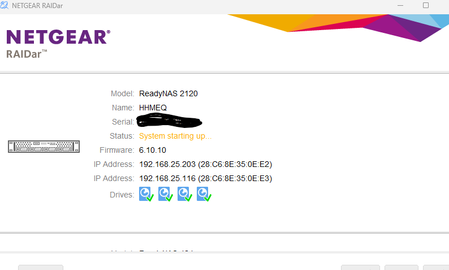
TCHol95
Feb 05, 2025Guide
I reseated the drives and now it's up with a status of Volume data is syncing. Now that I can access the web interface I saw this
Replacing that drive will be my first order of business.

Sandshark
Feb 06, 2025Sensei
Hopefully, it will complete. Or if it doesn't, it won't do any harm in trying. Doing a re-sync with a known bad drive is risky. That's why StephenB was recommending you check the drives -- so you could replace the bad one before it started trying to re-sync.
- TCHol95Feb 06, 2025Guide
So far it's doing it's thing and is accessible via SMB. Just won't load the admin web page. I have an external hooked to it that it was backing itself up to, so there's that. I'm still going to copy some important stuff to another NAS I have while waiting for a new drive. I think as a matter of course I'm going to replace the rest of the drives over the next week or two since they are all the same age.
- TCHol95Feb 07, 2025Guide
Installed a new drive and it started a resync that is going much faster than before. Can get to the web interface now and can access all files.
Related Content
NETGEAR Academy

Boost your skills with the Netgear Academy - Get trained, certified and stay ahead with the latest Netgear technology!
Join Us!
