NETGEAR is aware of a growing number of phone and online scams. To learn how to stay safe click here.
Forum Discussion

naweedqadir
May 24, 2016Aspirant
ReadyNAS 312 - SMB disabled after 6.5.0 Upgrade
Hi Everyone,
I had all my ReadyNAS shares configured in my Windows devices as accassible drives. After the 6.5.0 update I noticed my SMB service is disabled and it cannot be enabled.
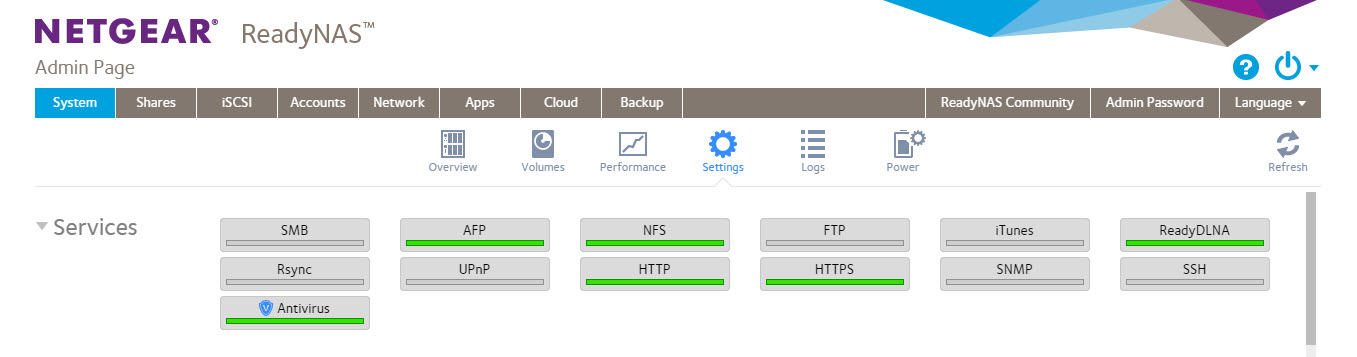
I am quite desperate to gain access to my file over the Windows network.
Is there a fix for this situation? I don't have additional external hard drive to take backup. So no option for complete reset of the system.
Please help.
Regards,
Naweed
10 Replies
Replies have been turned off for this discussion
- BrianL2NETGEAR Employee Retired
Hi naweedqadir,
Welcome to the community!
Which Firmware are you on before you did the update? Are you getting the same behavior on another browser or PC?
Kind regards,
BrianL
NETGEAR Community Team naweedqadirAspirant
Hi Brian,
I had 6.4 on it before upgrading to 6.5.
I had drives mapped to the shares I created in my Windows computers. e.g. Z: \\NASBOX\Documents
I had no issues accessing the shared drives before upgrading to 6.5. I can access the administrator console over the browser but the files needs to be accessible over the mapped shared.
Regards,
Naweed
- mdgm-ntgrNETGEAR Employee Retired
If you still see the problem can you send in your logs (see the Sending Logs link in my sig)?
- naweedqadirAspirant
Thanks for your Email. My Netgear system Log can be downloaded from here - https://app.box.com/s/lis8ys7le2tieztw2wtimn73cdun8r3q
Regards,
Naweed
- mdgm-ntgrNETGEAR Employee Retired
Ah, naweedqadir you didn't email them in.
I'm seeing messages such as
May 24 19:56:07 NAS-QADIR readynasd[2747]: Can't load /etc/samba/smb.conf - run testparm to debug it
May 24 19:57:31 NAS-QADIR systemd[1]: smb.service: main process exited, code=exited, status=1
May 24 19:57:31 NAS-QADIR systemd[1]: Unit smb.service entered failed state.in the logs.
Can you email a config backup (System > Settings > Configuration Backup) of your system in please (see the Sending Logs link in my sig)?
 pixelrifficAspirant
The 6.5.0 also killed Windows networking on my RN102. SMB appears to be enabled, but the Windows returns a "not found" error. Was working fine before the update. Oh how I wish I didn't do this one! I wonder if there is way to roll back?
SMB appears to be enabled on the device web gui. Enabling and disabling does nothing.
I do hope they issue a fix soon. Otherwise I am hosed.
 StephenBGuru - Experienced User
pixelriffic wrote:
SMB appears to be enabled, but the Windows returns a "not found" error. Was working fine before the update.
Did you try accessing it by IP address? Or are you just using the name?
- pixelrifficAspirant
I tried both the name and ip address. It does appear under Network in Explorer btw.


Related Content
NETGEAR Academy

Boost your skills with the Netgear Academy - Get trained, certified and stay ahead with the latest Netgear technology!
Join Us!
