NETGEAR is aware of a growing number of phone and online scams. To learn how to stay safe click here.
Forum Discussion

naweedqadir
May 24, 2016Aspirant
ReadyNAS 312 - SMB disabled after 6.5.0 Upgrade
Hi Everyone, I had all my ReadyNAS shares configured in my Windows devices as accassible drives. After the 6.5.0 update I noticed my SMB service is disabled and it cannot be enabled. I am...

pixelriffic
May 29, 2016Aspirant
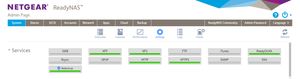
The 6.5.0 also killed Windows networking on my RN102. SMB appears to be enabled, but the Windows returns a "not found" error. Was working fine before the update. Oh how I wish I didn't do this one! I wonder if there is way to roll back?
SMB appears to be enabled on the device web gui. Enabling and disabling does nothing.
I do hope they issue a fix soon. Otherwise I am hosed.

StephenB
May 29, 2016Guru - Experienced User
pixelriffic wrote:
SMB appears to be enabled, but the Windows returns a "not found" error. Was working fine before the update.
Did you try accessing it by IP address? Or are you just using the name?
- pixelrifficMay 29, 2016Aspirant
I tried both the name and ip address. It does appear under Network in Explorer btw.
Related Content
NETGEAR Academy

Boost your skills with the Netgear Academy - Get trained, certified and stay ahead with the latest Netgear technology!
Join Us!
