NETGEAR is aware of a growing number of phone and online scams. To learn how to stay safe click here.
Forum Discussion

pranavg
Oct 24, 2018Aspirant
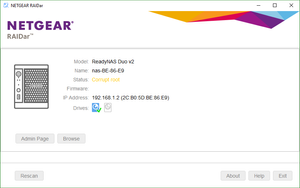
ReadyNAS Duo v2 corrupted root
Hello,
Please help me to solve below problem.
I have started the NAS after 2 years so i performed a factory rest as initially it did not boot.
I also tried installing a forma...

StephenB
Oct 25, 2018Guru - Experienced User
Try testing the disk with vendor tools in a Windows PC (Seatools for Seagate, Lifeguard for Western Digital). If the disk looks ok, then use those tools to zero the disk.
Then reinsert the disk in the NAS and power it up. It should do a factory install automatically (without using the boot menu controls).
pranavg
Oct 26, 2018Aspirant
Hi Zeroing a 2nd disk and doing a factory reset help
It turns out one of the other disks is bad.
Thank you for your support
Related Content
NETGEAR Academy

Boost your skills with the Netgear Academy - Get trained, certified and stay ahead with the latest Netgear technology!
Join Us!
