NETGEAR is aware of a growing number of phone and online scams. To learn how to stay safe click here.
Forum Discussion

Yoda1492
Oct 30, 2016Luminary
ReadyNAS Pioneer Pro corrupt flash no boot menu
HELP! When I power on my ReadyNAS Pioneer Pro, the LED screen just says ReadyNAS (does not show the drive LEDS) and the yellow activity light (on the front of the system above the USB port) lights a...
- May 19, 2017
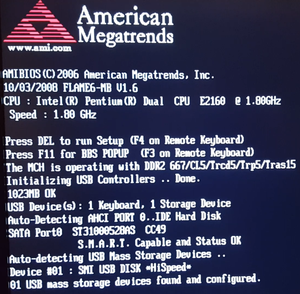
Hello. I found some time to work on this NAS. The issue may now be permanently resolved. I moved the NAS to a place where I could get a monitor and keyboard on it. I created a video of the boot sequence and took pictures of all the BIOS settings. While I was in the BIOS, I did enable Wake-On-LAN as previously requested. I also turned off the NAS from coming back on after a power hit; that was annoying as the power would go off and then on and then off again and that is bad for electronics and data volumes. I will get an UPS sometime this year.
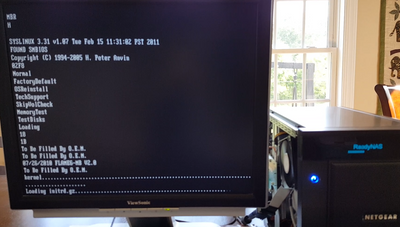
First, I will start with some information on those tick marks that were going across the NAS LED infinitely when the NAS would not boot. As shown in the picture below, that is from the Kernel loading and the initrd.gz loading:
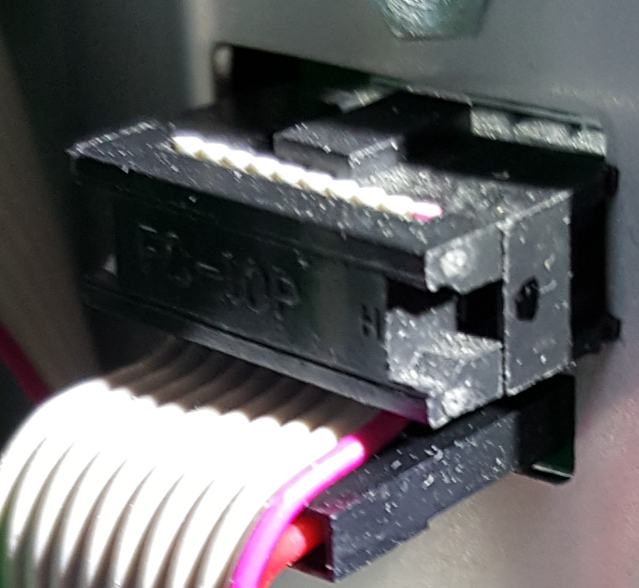
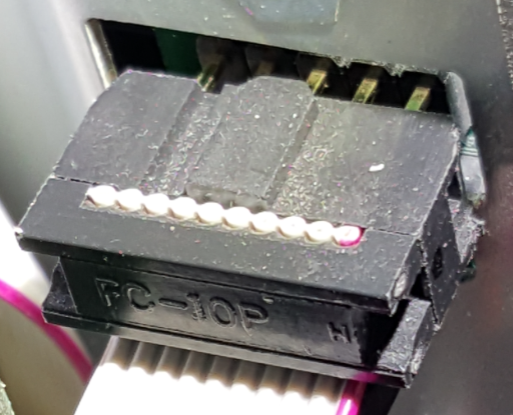
I kept going back to what someone said about it being a hardware problem. Armed with that and the clue that the NAS was shipped as part of a move and never worked consistantly after it was plugged in after the move, I looked more closely at the hardware. I took off both sides of the NAS and when I was inspecting all the cables, I saw this:
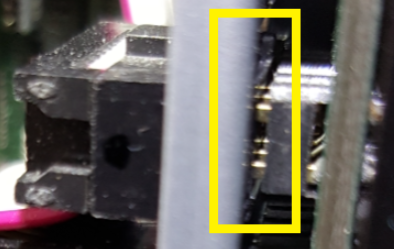
At first glance, it looks mostly ok. However, that top connector is supposed to go all the way through the cutout hole in the metal and fully into the circuit board on the other side of the metal. On the other side of the metal, you can see that the connection is not fully made:
Pulling the connector out just a little bit shows that it has no chance of making this connection without hitting the metal:
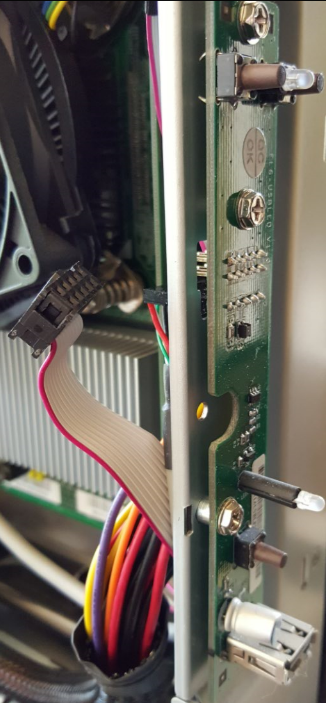
The NAS was then taken even further apart. There are 3 screws on each side of the NAS that holds the front panel of the NAS in place. All of those screws were taken out and that provided access to the cicrucit board behind the front panel that this cable plugs into. The circuit board looks like this:
The board has three screws holding it into place. However, the board has a lot of play with regards to how it lines up with the cutout hole in the metal. The connector was pushed through the hole and fully connected it to the metal pins. Then the screws were put back in for the circuit board and now the connector makes a full connection with these pins. The NAS was reassembled and it has booted ten times in a row. The power was disconnected for a few hours and the NAS booted fine after power was reapplied. I can not explain why the NAS would boot some times and not boot other times when the cable was partially connected. The NAS will be tested over the next several days before declaring this a permanent fix.

Yoda1492
Dec 22, 2016Luminary
Sandshark, thanks for the information that other ReadyNAS Pro's have their only DIMM in DIMM slot 2. DIMM slot 2 is definitely more accessible than DIMM slot 1 (which is close to a lot of cables).
All - I checked the logs and the NAS has been booted 16 times in a row with no issues. The last NAS power off was 5 days ago so I decided to try the NAS this morning. I powered the NAS on this morning and the LED just said "READYNAS", the USB activity light by the backup button stayed lit solid the whole time, the link light on the rear of the NAS for the NIC was not lit, and the row of tick-marks below the word READYNAS kept going from left to right like the picture below for 45 minutes.
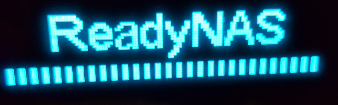
As you can see from the previous postings in this thread, this has happened before and is the periodic non-boot issue that I am trying to fix. It looks like replacing the 3V battery did not resolve the issue. When the system is in this state, it can not be accessed by RAIDar. I powered the NAS off, waited 10 seconds, powered the NAS on, and it booted fine. Why it boots sometimes and not others, remains a mystery.

Sandshark
Dec 22, 2016Sensei
The "ReadyNAS" on the display is the default. All you need is 5V from the power supply for that to be there. It certainly takes some action to start the progress bar moving, but it likely doesn't take any to sustain it. You are getting no clues on the VGA as to the status at that point?
No lights on the NIC is interesting. Do you have WOL enabled? If not, enable it when you do get it to boot and then verify ou have NIC activity when the unit is off. The NIC uses the standby power bus in order for WOL to work, but I don't know what else also uses it.
It's possible it's a power issue. You can use a standard ATX supply externally to check and see if that makes a difference. If it does, the supply is readily available and you will find messages here about that. Not enough evidence to say it's power for sure, so I wouldn't recommend buying a replacement supply until you've tried the external method to see if it will make a difference unless ou just don't have a supply to use for that. Power supplies on older units are starting to go, as attested by messages here about that. I bought one that I was pretty sure only needed a replacement supply, and I was right. And one of my others had the supply fail.
- Yoda1492Dec 29, 2016Luminary
All - I decided to move the memory from DIMM 2's slot to DIMM 1's slot. I did this with a grounding strap and with the NAS unplugged. The NAS booted fine with the memory in DIMM 1's slot. I will continue to do power-on tests and reboots to see if moving the memory helps or not. If there is a race condition, I would expect the motherboard to check DIMM 1's slot before DIMM 2's slot.
Sandshark - the BIOS settings were reset to factory default recently. If the system does not boot again, I will check WOL and enable it if it is disabled. I like to only change one variable at a time to identify the root cause of the issue. I have several new and used spare power supples from/for PCs. I already tried another Seasonic power supply with the same model number of the existing power supply and that yielded the same results. I get what you are saying though and I will keep this in mind as testing continues. Thanks for the input.
With a PC style power supply added to the testing list, I am down to three things to try.
- Yoda1492Jan 02, 2017Luminary
I powered on the NAS today and it did not boot. It just said READYNAS and the row of neverending tickmarks. Therefore, moving the only DIMM to DIMM slot 1 did not resolve the issue. Note, it has only been 3 days since my last post, so in this case, it did not take too long to reproduce the issue. For grins, I swapped the powercord with another powercord that has equal current ratings. I just wanted to get that off the list of things to try. I doubt that will make a difference.
- Yoda1492Jan 07, 2017Luminary
After several power-on tests, I was able to prove that the issue still happens with the replacement power cord. This time it was the infinite rows of tick marks issue (as previous described). The next chance I get I will put a monitor and keyboard on it again to look for any new clues during a failed boot sequence. I will check the WOL setting then as well. I am also going to open it up again and look around more inside. I am down to two things to try to resolve this.
- FramerVJan 09, 2017NETGEAR Employee Retired
Hi Yoda1492,
Thanks for updating, please keep us posted as well.
Regards, - Yoda1492Jan 26, 2017Luminary
Just a small update. I had at least 10 good boots in a row over the last several days. I used the NAS, wrote data to it at 111MB/sec, and updated the firmware to the new verson that came out. All of that was fine day after day. Today, the NAS does bot and does the infinite row of tick marks. I tried to boot it at least 10 times. I will put a monitor and keyboard on it this weekend and open it up to look for more clues.
- Yoda1492May 19, 2017Luminary
Hello. I found some time to work on this NAS. The issue may now be permanently resolved. I moved the NAS to a place where I could get a monitor and keyboard on it. I created a video of the boot sequence and took pictures of all the BIOS settings. While I was in the BIOS, I did enable Wake-On-LAN as previously requested. I also turned off the NAS from coming back on after a power hit; that was annoying as the power would go off and then on and then off again and that is bad for electronics and data volumes. I will get an UPS sometime this year.
First, I will start with some information on those tick marks that were going across the NAS LED infinitely when the NAS would not boot. As shown in the picture below, that is from the Kernel loading and the initrd.gz loading:
I kept going back to what someone said about it being a hardware problem. Armed with that and the clue that the NAS was shipped as part of a move and never worked consistantly after it was plugged in after the move, I looked more closely at the hardware. I took off both sides of the NAS and when I was inspecting all the cables, I saw this:
At first glance, it looks mostly ok. However, that top connector is supposed to go all the way through the cutout hole in the metal and fully into the circuit board on the other side of the metal. On the other side of the metal, you can see that the connection is not fully made:
Pulling the connector out just a little bit shows that it has no chance of making this connection without hitting the metal:
The NAS was then taken even further apart. There are 3 screws on each side of the NAS that holds the front panel of the NAS in place. All of those screws were taken out and that provided access to the cicrucit board behind the front panel that this cable plugs into. The circuit board looks like this:
The board has three screws holding it into place. However, the board has a lot of play with regards to how it lines up with the cutout hole in the metal. The connector was pushed through the hole and fully connected it to the metal pins. Then the screws were put back in for the circuit board and now the connector makes a full connection with these pins. The NAS was reassembled and it has booted ten times in a row. The power was disconnected for a few hours and the NAS booted fine after power was reapplied. I can not explain why the NAS would boot some times and not boot other times when the cable was partially connected. The NAS will be tested over the next several days before declaring this a permanent fix.
- mdgm-ntgrMay 19, 2017NETGEAR Employee Retired
Thanks for the update. Glad this is now resolved. You may wish to mark your post as the solution.


Related Content
NETGEAR Academy

Boost your skills with the Netgear Academy - Get trained, certified and stay ahead with the latest Netgear technology!
Join Us!
