NETGEAR is aware of a growing number of phone and online scams. To learn how to stay safe click here.
Forum Discussion

MCEComputers
Oct 16, 2022Apprentice
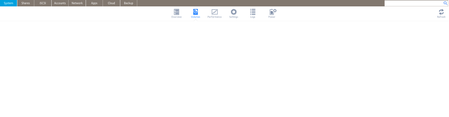
Readynas Pro 6 "volumes" screen is blank
I am having the same issue reported in this thread. I have a ReadyNAS Pro6 running 6.10.8. There are four 4tb Lenovo branded Seagate EXOS ST4000NM0035 drives installed. When I log in to the admi...
MCEComputers
Oct 17, 2022Apprentice
All four of the drives were tested and cleared of data prior to being installed in the NAS. All of the drives worked as expected.
The NAS appears to be working correctly with the Seagate/Lenovo drives installed with the exception of the above issues with the admin pages of the browser interface.
The problem appears to be only with the browser interface to the admin pages.
With nothing showing up on the System/Volumes page I am unable to access the volume settings or the X-Raid/New Volume/Format/Global Spare buttons.
With nothing showing on the System/Performance page I am unable to see the fan speeds and system/cpu temperatures and I cannot see or change the fan control profile (Quiet/Balance/Cool).
I have installed Shell-in-a-box and can access the CLI. I do not know what to explore from there.
I have checked the drives using smartctl which shows no errors on any of the drives. It does identify the drives as: Device Model: ST4000NM0035 03X4440 Lenovo.

StephenB
Oct 17, 2022Guru - Experienced User
Can you check the RAID status with cat /proc/mdstat ?
- MCEComputersOct 17, 2022Apprentice
Sure, here is the output:
root@nas-EA-0C-93:~# cat /proc/mdstat
Personalities : [raid0] [raid1] [raid10] [raid6] [raid5] [raid4]
md127 : active raid5 sda3[0] sdd3[3] sdc3[2] sdb3[1]
11706506496 blocks super 1.2 level 5, 64k chunk, algorithm 2 [4/4] [UUUU]
md1 : active raid6 sda2[0] sdd2[3] sdc2[2] sdb2[1]
1047424 blocks super 1.2 level 6, 64k chunk, algorithm 2 [4/4] [UUUU]
md0 : active raid1 sda1[0] sdd1[3] sdc1[2] sdb1[1]
4190208 blocks super 1.2 [4/4] [UUUU]
unused devices: <none>- StephenBOct 18, 2022Guru - Experienced User
MCEComputers wrote:
Sure, here is the output:
root@nas-EA-0C-93:~# cat /proc/mdstat
Personalities : [raid0] [raid1] [raid10] [raid6] [raid5] [raid4]
md127 : active raid5 sda3[0] sdd3[3] sdc3[2] sdb3[1]
11706506496 blocks super 1.2 level 5, 64k chunk, algorithm 2 [4/4] [UUUU]
md1 : active raid6 sda2[0] sdd2[3] sdc2[2] sdb2[1]
1047424 blocks super 1.2 level 6, 64k chunk, algorithm 2 [4/4] [UUUU]
md0 : active raid1 sda1[0] sdd1[3] sdc1[2] sdb1[1]
4190208 blocks super 1.2 [4/4] [UUUU]
unused devices: <none>This says that the RAID group for the data volume (md127) has been created and synced.
Are you seeing it mounted on /data? (ls /data should show you the default shares).
- MCEComputersOct 18, 2022Apprentice
Yes, the /data directory exists and contains the default shares. (Documents home Music Pictures Videos).
All of the default shares show under the Shares tab of the Admin Page.
The NAS and all of the shares are accessible through Files on Ubuntu as Windows shares.
Again, the only issues are with the missing displays and controls on the Volume and Performance sections of the Admin Page System tab. All other functions appear to be working as designed.
Related Content
NETGEAR Academy

Boost your skills with the Netgear Academy - Get trained, certified and stay ahead with the latest Netgear technology!
Join Us!
