NETGEAR is aware of a growing number of phone and online scams. To learn how to stay safe click here.
Forum Discussion

ivan_aviles
Sep 15, 2021Aspirant
Remove inactive volumes to use the disk. Disk #1,2,3,4.
This happened after I rebooted the NAS. It is running the version 6.9.6 of the firmware. I searched in the forums about this error and I have tried several solutions but none worked. All of the disks...

StephenB
Sep 15, 2021Guru - Experienced User
ivan_aviles wrote:
I don't have NetGear support, can anyone help me with this issue
There are several ways this can happen, so using paid support is my general recommendation. You can get a contract if you are the original purchaser.
If you have a backup, you can also recreate the volume and restore the data from the backup.
rn_enthusiast sometimes helps out in these situations, so maybe see if he chimes in.
 ivan_avilesSep 17, 2021Aspirant
Thanks for the reply StephenB.
Would it be possible to change the defective drive and attempt to reconstruct the RAID?
We have backups but we want to try to recover the information.
Regards.
- StephenBSep 17, 2021Guru - Experienced User
ivan_aviles wrote:
Would it be possible to change the defective drive and attempt to reconstruct the RAID?
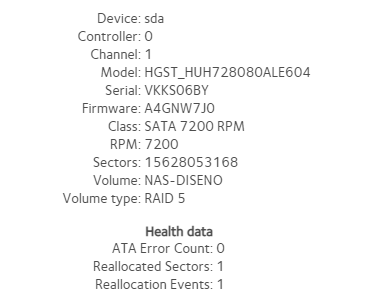
I don't think that will work. One aspect is that we don't really know if the reallocated sector is the cause.
The volume is failing to mount - one common cause is that the RAID array is out-of-sync (which can happen due an unclean shutdown. Another possibility is that there is some file corruption in BTRFS.
While Netgear support is often able to force the array to mount, some corrupted files often remain on the volume.
If you are familiar with the linux command line (plus mdadm and btrfs) you can try to fix it yourself. But it's not something that's easily guided in a forum.
Related Content
NETGEAR Academy

Boost your skills with the Netgear Academy - Get trained, certified and stay ahead with the latest Netgear technology!
Join Us!
