NETGEAR is aware of a growing number of phone and online scams. To learn how to stay safe click here.
Forum Discussion

soupboy
Aug 06, 2018Tutor
Replacing Drive after Failure - OFFLINE/UNKNOWN state
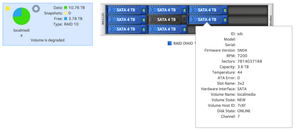
Screenshots below: We have 8 drives in a RAID 10 structure.
The drive in channel 6 failed and was in OFFLINE state. We then removed it, and replaced it with a new 4TB drive.
Ideall...

StephenB
Aug 06, 2018Guru - Experienced User
soupboy wrote:
From my understanding when the drive was inserted, it should have automatically been taken care of, and should have started receiving data and gone ONLINE within a few hours.
If the replacement disk is blank, then after it is inserted the NAS should run a disk self-test, then begin a RAID resync.
But if the disk is formatted, the NAS will not do that. With a formatted disk, you either need to format it in the NAS, or remove the partitions on a PC (so the NAS would see it as a blank disk).
There is another possibility - in some cases the linux disk drivers will disable the SATA port when a drive fails (it depends on exactly how it failed). I ran into this myself a few years back in my Pro-6. In those cases, you need to reboot the NAS. So I suggest powering down the NAS, and then disconnecting it from the main power for a few minutes - the idea here is to clear out any "live" state that is in the bios. Then restart the NAS and see if the system starts to resync.
Related Content
NETGEAR Academy

Boost your skills with the Netgear Academy - Get trained, certified and stay ahead with the latest Netgear technology!
Join Us!
