NETGEAR is aware of a growing number of phone and online scams. To learn how to stay safe click here.
Forum Discussion

CHA-JD
Jan 20, 2022Aspirant
RN104 Expansion
I have experiance with readynas devies, and have expanded volumes with larger drives previously with great success. I originally had the 104 populated with 4* 500gb drives, giving 1.5tb raw w...

Marc_V
Jan 20, 2022NETGEAR Employee Retired
There shouldn't be an issue with expanding X-RAID. Also, you started just fine with the first two.
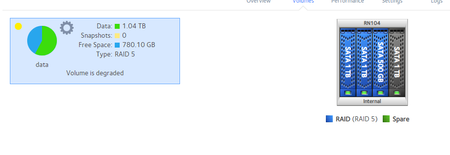
Have you tried reformatting the drive on a Windows PC and putting it back on the NAS? The volume is in degraded status. Replacing the 4th drive first would be best based on the screenshot you have provided.
You can download the logs and send me a link in private. We will download it and check what happened.
Make sure to backup your data just in case anything happens. Another option if you have a backup is to reset the NAS with the 4x1TB drives in then transfer back the data.
- CHA-JDJan 21, 2022Aspirant
Hi Marc
Thanks for the reply, so after disks 1 and 2 were replaced, one by one, and allowed to resync, I replaced disk 3, but the resync didn’t start, I removed disk 3, placed it into a windows PC and looked at the volume in disk manager. It had created a 500gb partition another smaller partition and had some unpartitioned space. I deleted all volumes, had just 1 unpartitioned volume of 1tb and then placed back into the NAS in bay 3.
The same occurred with the resync not starting. I placed the 500gb disk back in and the sync started and completed. I tried with the 1tb drive again, in bay 3, the same occurred, the resync didn’t start.
To get the nas healthy I placed the 500gb drive back in and all was ok.
I then the same disk in bay 4, same problem, so tried a different disk in bay 4, same happened, removed the drive deleted partitions in windows placed in bay 4 again, still no sync started.
I then tried using the format button on the volume screen with just the 1TB disk, thinking perhaps it would help get it to start rebuilding but no.
Currently the NAS has from bays 1-4 1TB, 1TB 500GB 1TB, the first three disks appear blue implying they are a part of the raid 5, the fourth is black/grey.
Logs are attached.
I can reset the nas with 4*1tb disks, but if possible would like to avoid that, its purpose is a veeam repository, so not easy to back up the data on it, but equally not critical data, so can be wiped if needs be.
My logs are a zip which the forum wont take, how can i DM you a link?
Thanks
James

Related Content
NETGEAR Academy

Boost your skills with the Netgear Academy - Get trained, certified and stay ahead with the latest Netgear technology!
Join Us!

