NETGEAR is aware of a growing number of phone and online scams. To learn how to stay safe click here.
Forum Discussion

mattk91
Apr 06, 2021Aspirant
RNR-4B Changed permissions on its own
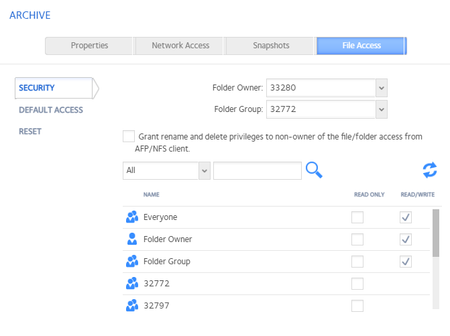
Pic 1 shows how in the netgear portal, our shares have anonymous access … we did not set them up like this. This changed sometime in the last few weeks. Pic 2 shows the folder owner changed to...
mattk91
Apr 06, 2021Aspirant
I recieve an error when trying to reset the permissions. It says another change is in progress.

schumaku
Apr 06, 2021Guru - Experienced User
Based on that first unshared folder with this unreal 16777xxx TB ... something is broked with the file system...
 StephenBApr 06, 2021Guru - Experienced User
schumaku wrote:
Based on that first unshared folder with this unreal 16777xxx TB ... something is broked with the file system...
Turn off quota on the volume settings wheel, and then turn it back on again.
On the share owner issue, the numeric values indicate that there is no NAS user account or group with the UID/GID - so it is just showing you the UID/GID. You can pick any NAS user account and group from the pulldown. Then as Sandshark says, just hit reset, and the permissions will be applied recursively to everything in the share.
 rn_enthusiastApr 06, 2021Virtuoso
schumaku wrote:Based on that first unshared folder with this unreal 16777xxx TB ... something is broked with the file system...
This is "just" BTRFS Quotas being wonky. As StephenB said, disable quotas and re-enable them. Might need to reboot inbetween.
Related Content
NETGEAR Academy

Boost your skills with the Netgear Academy - Get trained, certified and stay ahead with the latest Netgear technology!
Join Us!
