NETGEAR is aware of a growing number of phone and online scams. To learn how to stay safe click here.
Forum Discussion

Laserbait
Jun 18, 2024Luminary
The many, MANY days of scrubbing.
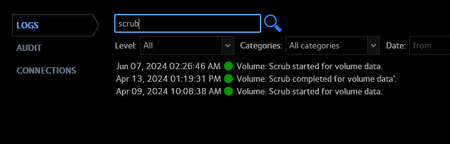
RN516 - OS 6.10.9 Intel XEON E3-1265L V2 @ 2.50GHz 16GB RAM 6 x 10 TB HGST HUH721010ALE601 disks in a RAID 6 So, I decided to do a little preventative maintenance on my RN516, LOL: ...

Laserbait
Jun 18, 2024Luminary
Hey there! The volume is 36.4TB (6x 10 TB disks in a RAID 6). I didn't see any SMART errors. What log do I find disk errors in?
I checked dmesg, and the last messages that I see are from the resync of md127, and that completed in a pretty reasonable amount of time:
[Fri Jun 7 02:23:13 2024] md: requested-resync of RAID array md127
[Fri Jun 7 02:23:13 2024] md: minimum _guaranteed_ speed: 30000 KB/sec/disk.
[Fri Jun 7 02:23:13 2024] md: using maximum available idle IO bandwidth (but not more than 200000 KB/sec) for requested-resync.
[Fri Jun 7 02:23:13 2024] md: using 128k window, over a total of 9761587136k.
[Mon Jun 10 20:04:40 2024] md: md127: requested-resync done.
There's nothing after that.
I checked the status of the btrfs scrub, and it's diligently ticking away, no major errors reported:
root@RN516:/home/admin# btrfs scrub status -R /dev/md127
scrub status for 3e0931f1-84c5-45a4-9db5-e1d7f61ce675
scrub started at Fri Jun 7 02:26:46 2024, running for 278:22:08
data_extents_scrubbed: 498981037
tree_extents_scrubbed: 2327562
data_bytes_scrubbed: 32294854987776
tree_bytes_scrubbed: 76269551616
read_errors: 0
csum_errors: 0
verify_errors: 0
no_csum: 1019
csum_discards: 0
super_errors: 0
malloc_errors: 0
uncorrectable_errors: 0
unverified_errors: 0
corrected_errors: 0
last_physical: 32481801666560

StephenB
Jun 19, 2024Guru - Experienced User
Laserbait wrote:
I checked dmesg, and the last messages that I see are from the resync of md127, and that completed in a pretty reasonable amount of time:
So it is just the BTRFS scrub that is glacially slow. Looking at "Data Bytes Scrubbed", it appears to be 80% done (completing 32 TB out of 40). At that rate it would have about 68 hours to go from the time you measured that status. So 2-3 more days to go.
Generally with BTRFS, the time it takes balance and scrub operations to complete depends on how much work the file system needs to do. So the next time you run it, it should go much quicker (likely completing before the mdadm sync). If you've never run a balance, then that could also take a long time the first time you run it.
It can be canceled from ssh if necessary. But if you can live with the performance hit a bit longer, it might be better to let it finish.
Laserbait wrote:
What log do I find disk errors in?
First, I doubt you'll find any. They would have shown up during the mdadm sync, and should have been in the smart errors.
When you are using ssh, you can just use journalctl to look at the logs. I usually reverse the order with -r to display the newest entries first. You can add --no-pager and then pipe the output through grep to find specific info.
When looking at the log zip, disk errors could be in dmesg.log, system.log, kernel.log, and systemd-journal.log.
- SandsharkJun 19, 2024Sensei
I have found that there are a couple of things that can really slow down a scrub: highly fragmented files and very large files. I have a very large Veracrypt volume on my main NAS, and the scrub grinds to a very slow rate when it gets to that file. Like with yours, the kworker processes jump to close to 100% (where they typically run in the low 90's) and the BTRFS process drops to around 0.3% (typically around 5%). But once it gets past that file, the speed jumps back up again. So, hopefully, yours has also hit something that slows it down but will speed up again once it gets past it.
- LaserbaitJun 20, 2024Luminary
Yeah, this volume/array is all very large files with a lot of change data. You know, now that you mention it, the last scrub that I did, I had run a balance and defrag shortly before the scrub, and the scrub only took 2ish days.
So I might have to test that out!
And the scrub is almost done!- LaserbaitJun 20, 2024Luminary
It's a super scrub! 😄
It's probably due to the all the writes/changes/snapshots on the array since the scrub started. But this is getting ridiculous...

Related Content
NETGEAR Academy

Boost your skills with the Netgear Academy - Get trained, certified and stay ahead with the latest Netgear technology!
Join Us!
