NETGEAR is aware of a growing number of phone and online scams. To learn how to stay safe click here.
Forum Discussion

wooj
Feb 25, 2017Aspirant
very old Readynas nv bay or drive failure please help
HI, I have a very old but up until now reliable readynas nv. Recently one drive failed to the point you could physically hear it wasn't spinning. I purchased another seagate drive hoping I could get ...

wooj
Feb 26, 2017Aspirant
Thank you StephenB that has helped isolate the problem.
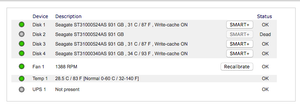
Every step worked and I insterted the new disk back into drive 2 and left last night. Unfortunatly it hasnt resynced. The act light flashes occasionally and drive2 is flashing yellow continually and is reported as dead in frontview.
Not sure what steps to take next, I dont really want to factory reset as don't want to lose data.


Sandshark
Feb 26, 2017Sensei
I don't think you understood what StephenB suggested. He asked you to insert the new drive alone, after removing all the others with the power off. Then do the factory reset with just that drive installed. The volume on your uninstalled drives will be just fine (though still no longer redundant).
Your picture shows you left the old drives installed.
 StephenBFeb 26, 2017Guru - Experienced User
Sandshark wrote:
I don't think you understood what StephenB suggested. He asked you to insert the new drive alone, after removing all the others with the power off. Then do the factory reset with just that drive installed.
Correct.
If you do that in slot-1, and the reset succeeds, then the drive is good. If the reset fails, then the drive is at fault.
If it's not the drive, then power down, and try moving that drive to slot 2 (with a normal boot). If that boot fails, then the slot in the NV+ has failed. If it succeeds, the hardware (chassis and drive) are fine.
- woojFeb 26, 2017Aspirant
Nope I've done all the steps as outlined and both the drive and the disk are fine. But when I place the drive back into the original raid with all three previous disks I get the outcome described above?
- StephenBFeb 26, 2017Guru - Experienced User
Is the new drive also an ST31000524AS?
If not, what is the model number? Note that the NV+ is limited to drives of 2 TB or smaller.
Related Content
NETGEAR Academy

Boost your skills with the Netgear Academy - Get trained, certified and stay ahead with the latest Netgear technology!
Join Us!
