NETGEAR is aware of a growing number of phone and online scams. To learn how to stay safe click here.
Forum Discussion

Pianissimo84
Jun 29, 2016Aspirant
Windows 10 can't access from one user's login
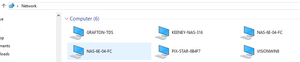
I have 2 Win10 PCs and can access the ReadyNAS shares and map network drives from both users on one machine but only one user on the other machine. The NAS is running the latest OS (6.5.1). Some thin...

Pianissimo84
Jun 29, 2016Aspirant
- Regarding your first question, it doesn't appear so as one of the ethernet images is grayed out and shows Bandwidth:NULL (see screenshot image below).
- Should I disable IPV6?
- I don't understand your second point. On one computer I am able to have both users (actually 3 different users) successfully see the ReadyNAS volume and map to shares. On the other computer, only one user can.


StephenB
Jun 29, 2016Guru - Experienced User
Pianissimo84 wrote:
- I don't understand your second point. On one computer I am able to have both users (actually 3 different users) successfully see the ReadyNAS volume and map to shares. On the other computer, only one user can.
Can you clarify this just a bit? Are you saying that you have three different windows users on the first computer, and that all three can log on with their respective accounts and access the NAS? And that all three can see the ReadyNAS volume? Or are you saying something different?
- Pianissimo84Jun 29, 2016Aspirant
Yes, and it's been that way ever since I have used ReadyNAS, even an old legacy unit with WInXP.
- StephenBJun 29, 2016Guru - Experienced User
Pianissimo84 wrote:
Yes, and it's been that way ever since I have used ReadyNAS, even an old legacy unit with WInXP.
Then all three accounts are set up to use the NAS admin credentials when accessing the NAS. That is the only way you see the volume.
Try going into the windows credentials manager on the second PC - deleting NAS credentials that are there, and creating new ones.
- Pianissimo84Jun 29, 2016Aspirant
There aren't any NAS credentials there. Nor are there any for any of the other users on either computer. (BTW, I already tried that.)
Related Content
NETGEAR Academy

Boost your skills with the Netgear Academy - Get trained, certified and stay ahead with the latest Netgear technology!
Join Us!
