NETGEAR is aware of a growing number of phone and online scams. To learn how to stay safe click here.
Forum Discussion

Chuck-IV
Mar 31, 2023Guide
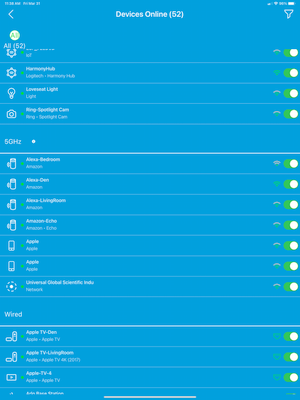
Anyone know how to get back to this look for the app...
So after the app update(when they broke the security portion, I started getting a Blue background view where the devices were split by how they were connected(2.4g/5g/wired) and had a Allow access sl...

FURRYe38
Mar 31, 2023Guru - Experienced User
Orbi and Most various NH Routers support Armor and SPC.
Chuck-IV
Mar 31, 2023Guide
I don't know then. I think it is because for parental controls, it sets up Profiles. It automatically set up a HOME profile for me, even though I don;t use or subscribe to Parental Controls. I can't seem to get rid of that profile either. I think if it didn't have any profiles and didn't force the integration with Parental controls, I may see the Blue screen version instead.
- FURRYe38Mar 31, 2023Guru - Experienced User
Only last thing to try would be a factory reset on the RBR and setup from scratch using a Wired PC and web browser. Don't use Orbi app at all. I would probably sign out of the Orbi app, and maybe even un-install the app. Then after the RBR is setup again using a web browser, try the Orbi app and check Device Manager for background. I would hope the blue background should return if Armor and SPC were not enabled on Orbi app and they were blown away by the FR and setup from scratch using a PC and web browser. My 8 series has been FR and setup from scratch many times since Armor and SPC trials ran out long ago.
Been asked to help test Armor so I maybe coming back to this. 🙄