NETGEAR is aware of a growing number of phone and online scams. To learn how to stay safe click here.
Forum Discussion

BenjaminNYC
May 22, 2022Apprentice
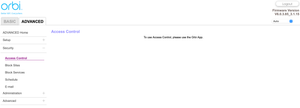
To use Access Control, please use the Orbi App
This is what I see when trying to access Access Control. I strongly suspect it's because accidentally activated the trial of Smart Parental Controls. Even though I've turned it "off" in the app, it's...

KevinLiT
Nov 18, 2022NETGEAR Moderator
Hello radesix78 ,
Thank you for your post!
I understand that you are having difficulties with disabling the SPC on your Orbi router.
When navigating to the following: Orbilogin.com> ADVANCED> Access Control.
Does it direct you to use your Orbi app?
Best,
Kevin
Community Team
BenjaminNYC
Nov 18, 2022Apprentice
KevinLiT yes it tells me to use the Orbi app, which is one of numerous problems having SPC enabled on my account.
- radesix78Nov 18, 2022Guide
BenjaminNYC Based on my experience - even if you could get the Access Control GUI to show up - the underlying functionality won't work.
It would just appear to work... until your kid comes home with a new device from school and has no problem attaching to the network and surfing the internet even though the access control status would show blocked for that device. Then you could go to the Orbi app and try to pause said device and watch in frustration as your kid continues to surf the web, play games, and use social media unhindered.
Then your only option is to resort to physical access control by taking the device away and hiding it somewhere in the house where he can't reach or think to look... like in the safe 🙂
But i'd rather just have access control do what its supposed to do.
- BenjaminNYCNov 18, 2022Apprentice
Got it. So, KevinLiT, what we need is SPC removed from our account. Not from our router, but from our account. As evidenced by radesix78's experience, even getting a new router will not fix the issue, because SPC is registered onto our account. Therefore, factory reset is not a viable nor effective solution. Thank you.
- radesix78Nov 18, 2022Guide
KevinLiT Not exclusively... we do have iOS devices in the house but the school issues Chromebooks and it doesn't block them either. He has a friend that came over the other day with an Android phone and I noticed it too was on the network.
The chromebooks are the real problem. They cant just come up with a new iOS device but they have figured out they can tell IT at school there is something wrong with the Chromebook and get issued a new one.
- BenjaminNYCNov 21, 2022Apprentice
A friend on Reddit, facing the same issue, has DM'ed me his solution, which he said worked.
High level, it involves canceling your Netgeat account, creating a new one, registering the system to the new account, then downgrading/upgrading the firmware to rid any remnants of SPC.
He investigated the code, and confirmed that there is a flag in our accounts that triggers SPC, even if you have new equipment. Netgear seems incapable or unwilling to address this, so this may be the only way.
Here are the steps:
- First things first you’ll want to unregister your products from your Netgear account.
- Afterwards make a new Netgear account with a new email.
- Delete and reinstall Orbi application.
- Login under new account, it should automatically register your router to your new account.
- Then delete your old account completely (check registration page once more to be sure the product is fully unregistered).
- Now delete the Orbi app once more.
- Next up routers.
- If you were on latest firmware you would have to revert, and go forward, which I had to. Thankfully you are on old firmware. (He was referring to me.) So you get to skip the revert process.
- Factory reset your router on your old firmware (the one you currently have).
- Do so as well for your satellites.
(DON'T FORGET TO BACKUP YOUR OLD SETTINGS IF YOU HAVE CUSTOM NAMES AND OTHER TEDIOUS STUFF YOU DONT WANT TO RECONFIGURE.)
- Now setup from scratch on random setting, your access page still won’t work but you are prepping the environment for a proper firmware upgrade.
- Now upgrade your firmware on satellites first, then your router. Manually, of course.
- Once complete, even access page will now be working, do another factory reset. To rid yourself of any remaining code from the previous firmware.
- Now setup your router and satellites to your liking.
- Once everything is synced up and connected you DNS and Access Page will work just fine. Same with Orbi app.
- And finally make sure to never use any subscription services such as Armor or Parent Control, or this time you’ll have to do it all over again.
New firmware: https://kb.netgear.com/000065263/RBRE960-RBSE960-Firmware-Version-6-3-7-5
And if you break it again accidentally, here’s the old one for future reference: https://kb.netgear.com/000064563/RBRE960-RBSE960-Firmware-Version-6-0-3-85
A personal note: It is extremely frustrating that (1) Netgear has programmed SPC this way, and that (2) even L3 support is so incompetent that they are unable to realize this solution. Netgear makes amazing hardware, but their software is absolutely garbage.
- radesix78Nov 22, 2022GuideWow… that’s quite a process. I’d almost rather switch to another manufacturer. Let me kick around whether I want to do this or not. I have other products like a ReadyNAS and another Orbi network so it isn’t just moving one device to a new account. Thanks for the potential solution.
- BenjaminNYCNov 22, 2022Apprentice100%. But it’s really just:
1. New Netgear account
2. Downgrade/upgrade firmware
3. Factory reset.
I’m still hopeful for an official solution. Not going down this path now. For me, there is no other mesh hardware besides my 960 that can get through my 1 foot thick concrete walls. - radesix78Nov 22, 2022GuideBut I have to move other devices too… and I paid for premium support which is also attached to the current account. It sounds straight forward but I see the potential for more headaches given the extra variables for me.
- BenjaminNYCNov 22, 2022ApprenticeTotally. Let’s see what “L3” yields. So far, crickets.
- TSNosrednaNov 29, 2022Tutor
I just ran into this issue today in my efforts to "block new devices" and I have the RBK763S (RBR760) setup.
I find this all horrifying (though not at all unusual from my experiences with Netgear home devices over the years), but I just barely fell for the carrot of $29 for a year subscription and thought I'd give it a try (no, I never would have done that if I knew about this ahead of time).
So, here I am now, and I do love the amount of detailed info I can get from the parental controls.
So, I may have figured out a kludgy work-around and wanted to see what you all thought. I have 100s of devices and I KNOW this is a crappy option, BUT, if you're kinda stuck and don't want to switch brands...
In the Orbi App's Parental Access, what if you create a new profile (call it "MyHome" or whatever), and move all of the devices currently in the "Home" profile to that, then pause the "Home" profile's internet access?
My thought is that any new device will continue to get assigned to the default "Home" profile (and thus be "blocked"). Once you approve the device, you can move it to your new "MyHome" profile (or wherever they "should" be) and life will continue on. At least until the day you let your subscription expire and Netgear has either fixed this or you are stuck doing the whole "setup a new Netgear account, backup current config, downgrade firmware, factory reset, upgrade firmware, restore saved config" thing.
Just a thought...
- Clintdawg24Nov 29, 2022TutorThat's what I've been doing as well and it seems to work just fine. The only difference is my parental controls created a profile for "Always On Devices", which I've been putting approved devices into and I just keep the home locked down. The good thing is that I'm only on the 30 day trial, so I'm waiting for that to expire and if I can't get it back to normal, then I go full nuclear on it and wipe out everything and start over. It seems to me that this method is more or less identical but Netgear found a way to charge us for it. That's the reason they're in no hurry for a solution.
- BenjaminNYCNov 29, 2022ApprenticeThis doesn’t resolve the issue of removing SPC from our Netgear account and the disabled Access Control and DNS settings.
- BenjaminNYCNov 29, 2022ApprenticeThe trial expiring will absolutely NOT return things to normal. You are stuck permanently with the limitations of SPC on the orbilogin interface.
- TSNosrednaNov 29, 2022Tutor
No, but it may provide you with, maybe good enough, interim functionality that's essentially equivalent to the access control.
And I don't know what you mean, about the DNS settings, as mine are still there (unless you are referring to other DNS settings that I can no longer see 😣😞
- radesix78Nov 30, 2022Guide
Just a quick update to this thread... My case is still in L3 support with the engineering team... and I did have a good conversation with Bernard from L2 support the week before last so I'm confident they finally understand the real issue and are working on it. The problem for me is I have no idea how long it will take them to issue a fix.
That being said, I'm not a typical end user of computing products. I'm more of a prosumer than a regular consumer. I've been a Netgear customer for a really long time and I own mulitple Netgear products include a ReadyNAS 314 which I have always loved. But this issue (the horrible implementation of SPC/Access Control) and the length of time it has taken to 1) get Netgear to understand the problem 2) get to a legitimate fix (which hasn't happened yet) caused me to start looking for better options.
I have felt the firmware in the Netgear routers has been lacking for quite some time. Over the holiday break I spent some time looking for "prosumer" routers and ran across Firewalla Gold. This thing seems to have a LOT of features that I have been craving in a router for a long time. I'm probably not going to get rid of the Orbi because I do have good WiFi coverage in the house with the satellites; however, I feel at this time I'm just going to put this turd into bridge mode and only use it for WiFi while I delegate all other features of a router to Firewalla. I paid $660 for the Orbi 750 with 2 satellites and I think that is extremely expensive for just WiFi 6 and no real use of any of the normal firmware features and capabilities for a router. There are cheaper options out there that probably provide comparable coverage in my house but I don't have the inclination to start buying and experimenting with other vendors. I just want my network to work properly.
There are so many cool features in the Firewalla for a prosumer like myself - including out of the box "new device quarantine", parental controls, better traffic monitoring, quality of service controls, and even being able to run Docker containers directly on the router - which makes it an open platform.
I will continue to work with Netgear engineers to troubleshoot and resolve this issue until hopefully a fix is provided and others in the community don't have to experience this or take the approach I'm taking by stepping the router down into bridge mode and buying another piece of equipment but I think I'm done with Netgear router features and functions.
For those of you wanting more advanced network monitoring, security, and control... I'd recommend checking out Firewalla. My device is in the mail!
To Netgear.. the Orbi line is good but way too expensive for what it is. If you would work toward including all of the capabilities that Firewalla Gold has into your Orbi line.. then maybe $700, $1000, or $1500 (the latest Orbi 960) might be justified... but not as it exists today. The value just isn't there especially when experiencing the issues I and others have experienced with SPC/Access Control. If this were to happen in Enterprise grade equipment you would be out of business.
- TSNosrednaNov 30, 2022Tutor
So, my little work-around just failed to block devices and word on the street is that you have to factory reset to "resolve" it for a couple of days. I've had an Orbi for the last 10 years and after all the struggle and difficulty with Netgear Support, I've finally had enough.
I've just ordered a Deco mesh to replace my Orbi and the Firewalla Gold.
- radesix78Nov 30, 2022Guide
Factory reset doesn't work. Even returning the Orbi to the store and getting a whole new Orbi doesn't work. Its something tied to your Netgear account that is persistent across devices once SPC has been activated. It's ruthless.
So, do I read correctly that you just ordered a Firewalla Gold?
- TSNosrednaNov 30, 2022Tutor
Yep. That and a TP-Link Deco XE5300 to go behind it.
Overall, it should all be just a little more than the Orbi RBK763S originally cost me.
Who knows if the TP-Link will be as good coverage, but it looks good on paper and is much cheaper.
I’m so fed up that I just want the Orbi gone.
- radesix78Nov 30, 2022Guide
I hear you. Glad to see you pick up the Firewalla. I'm pretty excited about the unit.
- Clintdawg24Dec 08, 2022TutorJust an FYI. I waited for my premium parental controls 30 trial to expire. Once it did, I was able to use Access Control again via the web client. I'm not sure why it's been so much trouble for everyone else. I hope resolution is coming soon.
- radesix78Dec 08, 2022GuideYou can see it. But it doesn’t actually work. It does not block new devices from joining and using the network. They will show up as blocked… but still be able to access the internet freely. The mere display of the access control page isnt the final resolution. It needs to actually work
- BenjaminNYCDec 16, 2022Apprentice
radesix78 how's it going with L3 support on this issue? I noticed a new firmware 6.3.7.5, wondering if that fixes it.
- radesix78Dec 16, 2022GuideStill haven’t heard back from L3 😕
Yesterday I explained the situation to Best Buy and they took the Orbi back.
Unfortunately I had to move on to other equipment. - BenjaminNYCDec 16, 2022ApprenticeMakes sense. What a shame their software and support is so bad. Hardware is so good.