NETGEAR is aware of a growing number of phone and online scams. To learn how to stay safe click here.
Forum Discussion

AnyToddy
Feb 12, 2017Aspirant
Unable to login Router settings for WNDR4300v2 via Genie
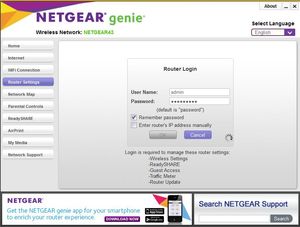
Their is only one function could not be used normally shown as below. When I want to check settings for the router(WNDR4300v2),it is always sticking to this page. Even if I click "Cancel"...

michaelkenward
Feb 12, 2017Guru - Experienced User
You seem to be connecting over a wireless network (NETGEAR43).
Are you connected to the wifi?
It is usually easier to do that sort of thing wired.
AnyToddy
Feb 12, 2017Aspirant
Yes, my pc connects to router wirelessly.:manhappy:
- michaelkenwardFeb 12, 2017Guru - Experienced User
Have you signed into the wifi before you try the genie?
Remember, the wifi password is not the same as the router password.
- michaelkenwardFeb 12, 2017Guru - Experienced User
Start at the WiFi Connection tab.
Check that you are connected.
If not, Connect.
- AnyToddyFeb 15, 2017Aspirant
I'm fully sure that the computer connects to the wifi, since I'm watching video and chatting with friend via skype now ~
- michaelkenwardFeb 15, 2017Guru - Experienced User
But does the Netgear genie know that?
Any reason why you didn't go to the tab I suggested?
If it does show that you are connected, then you can rule that out.