NETGEAR is aware of a growing number of phone and online scams. To learn how to stay safe click here.
Forum Discussion

jesusm07
Sep 09, 2018Guide
GEO-FILTER FILTERING NOT WORKING
When I am playing Call of Duty and I set the Geo-Filter to Strict Mode and Filtering Mode it doesn't always block players or servers outside of my set filter range. Sometimes it does and sometimes it...
jesusm07
Sep 10, 2018Guide
Ok I understand now what you mean why players outside if my radius are able to join while I have it set to "Filtering & Strict Mode". It makes sense. My main concern is why am I on several occasions thrown into games with the server outside of my radius when I am on Strict & Filtering Mode. Those modes when enabled are supposed block any server/host outside of my geo filter circle. I am supposed to be guaranteed to be in a game with the host/server inside my radius not outside.
I live in California and on several occasions have enabled those modes yet I get in games where the server/host is in the East Coast or outside of the country.


Netduma-Fraser
Sep 10, 2018NetDuma Partner
The server in the UK is whitelisted - it has a circle around it and are required to connect to the online service. Did you enable the Geo-Filter after you were already on the game as that would explain the icons outside your radius.
- jesusm07Sep 10, 2018Guide
I'm familiar with the UK server required. No, not that one. None of the servers had a circle around them. I enabled the geo filter well before I began to search for a match. When I do enable the geo filter I always go to the main menu of the game, change the settings to , then I search for the game a minute or two later.
- Netduma-FraserSep 10, 2018NetDuma PartnerSet the Geo-Filter before you boot up the game, does that resolve the issue?
- jesusm07Sep 10, 2018Guide
I'll try that next time it happens. As I mentioned it does not do it all the time but it does do it frequently. Next time it gives me that problem I will close the game down completly, then set the geo filter and see if that works. It shouldn't have to be that way in order for it to work I don't believe. It never used to do that before when I first got it which was back in May. This problem started about a month or two ago.
- Netduma_JackSep 11, 2018NetDuma Partner
Let us know how it goes! We'll advise you further once you're able to try it. Feel free to ask any questions or if anything else happens :)
- mncomputerguySep 11, 2018Tutor
I think I know what the problem is, I just bought an xr500 (a buddy of mine had one and it worked fine for the last week or so since he got it). During the initial setup it upgraded the firmware to 2.3.2.32 and speeds were terrible, enabling geo filtering would knock my xbox offline, clicking on players/servers would not show ping etc. Found out his router was on 2.3.2.22, I downgraded mine to that and did a factory reset to clear out any settings and its been working fine for the last 2 days.
2.3.2.32 appears to be a buggy firmware, I would check and see if you have it and go back to 2.3.2.22 if you do, it fixed all my problems.
- Netduma_JackSep 12, 2018NetDuma Partner
Thank you for letting us know your solution - we have confirmed that a bug exists within the new firmware that is causing slow speeds after upgrading. We're working with Netgear on a solution to this issue, and we hope to have it resolved so you can enjoy the new firmware soon :)
- jesusm07Sep 12, 2018Guide
thank you for that information. Will check to see what firmware I am running.
- jesusm07Sep 19, 2018Guide
I played Call of Duty for the first time in several days and I had my Geo-Filter on strict & Filtering mode before searching for game. I got thrown into a match with the server way outside of my radius circle. I live in California with a 691 radius set. I got thrown in a match with the server in Florida. See picture attached. That picture was taken in the middle of a match.
- Netduma_JackSep 20, 2018NetDuma Partner
Hmm, it's possible that server is mis-located. Technically it's within your Geo-Filter radius (since that is its true location) but it's appearing in Florida on the map. This seems like the most likely cause of this issue.
Please post the ID of this server, as well as the distance and ping shown by the ping graph. We'll check whether this server needs to be moved!
Another cause of course could be that you're accidentally using Spectating Mode instead of Filtering Mode, meaning that your settings won't block any servers.
- jesusm07Sep 20, 2018Guide
How is it technically within my geo-filter radius when you can see in the picture I'm set in California and the server is in Florida. The radius I have it set at 691 miles. Florida is over 2500 miles away from California.
Also how can I accidently be using "Spectating Mode" when you can see in the picture it's clearly in "Filtering Mode".
I don't change the settings in the middle of the game. I set it before searching for a game. I've also at times set it even before opening the game application and it's given me the same problem.
I don't have a screenshot saved showing the serve ID as well as the ping but next time it happens I will take a picture of it. Again though you can see my location in the picture, the server being in a state (FL) over 2500 miles away from me & that I have it in "Filtering Mode". - Netduma-FraserSep 20, 2018NetDuma PartnerBy " I had my Geo-Filter on strict & Filtering mode before searching for game" do you mean that once you got onto the game you enabled it or do you mean before you booted up the game from the console dashboard? If you mean the former then thats likely the cause as the game pings all available servers at the beginning so if it pinged and got a response that connection would be alive and allow you to join it if you searched quickly.
- jesusm07Sep 20, 2018Guide
Both. It's happened while I am only in the main menu of the game, I set my settings to change the mode to "strict & filtering" before searching for any game matches. ALSO when I've had the modes ALREADY in strict & Filtering BEFORE launching and booting up the game it's given me that problem.
It does not happen every single time. There are several times where it does block servers outside my radius when I have it set on those 2 modes regardless if I set it while just at the main menu before searching for a match or before even booting up the game.What it does for example I can be playing say for example 4 game matches in a row & have all the servers outside of my radius blocked & it shows that it blocks them and all of a sudden on the 5th game it doesn't block a server outside my radius. It does it at random times.
The problem has not been of when I set my modes to block the servers outside my radius. The problem has been that it doesn't block them during random games. Again I can be playing 1, 2, 3, 4, etc game matches in a row then all of a sudden I get thrown into the next game and the geo-filer didn't work and I get a server outside my radius. - Netduma-FraserSep 20, 2018NetDuma PartnerHave you got any servers allowed in the Deny & Allow section on the Geo-Filter? When the server appears outside the radius that you play on does the server icon have a circle around it?
- jesusm07Sep 20, 2018Guide
No. I don't have any servers in the Deny & Allow section. There is also no circle around it. Also in the picture I included you can see there is no circle around the server icon.
- Netduma-FraserSep 20, 2018NetDuma PartnerOkay interesting, can you flush the cloud in the Geo-Filter Map options to update the cloud database and see if that resolves the issue please.
- jesusm07Sep 22, 2018Guide
Ok I did what asked which was "flush the cloud" on the Geo-Filter. I had the modes both on "Strict & Filtering Mode" before loading up the game. It was blocking servers outside of my radius when searching for a game match and next thing I know I got thrown into a match once again with the server over 2500 miles away from where I live.
I took a screenshot during the middle of the match that shows the server info. You can also see I have my radius set at 691 miles and the server was no where near my circle. See attached picture. - Netduma_JackSep 22, 2018NetDuma Partner
Could you take some more screenshots when this happens please:
- The top of your Geo-Filter page (the Device panel)
- Your Geo-Filter Map Options
- Your Allow & Deny Panel at the bottom
It's pretty much impossible for this to happen unless there is a setting allowing it, so this should hopefully be straightforward to fix.
- jesusm07Sep 22, 2018Guide
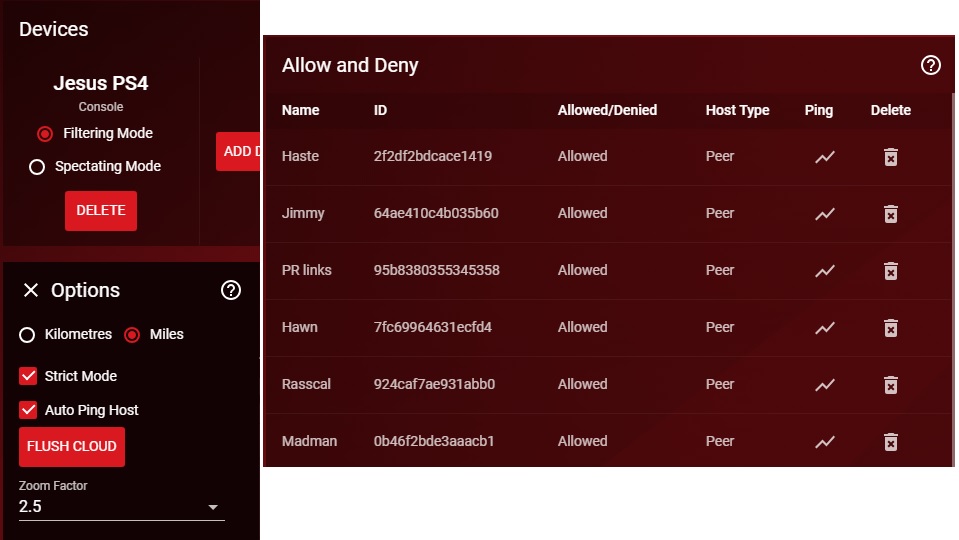
I've alredy mentioned what options I have set but here you go a screenshot of what I have selected. As well as my friends allowed list. I dont have anybody on "deny" list.
When I have it on "filtering" mode some of my friends were not able to connect to me either throuigh the playstation chat and the game unless I put them on my "allowed" list first and open it to "spectating mode" first. Once they join me then I can set it back to filtering mode.
However the problem that I'm having has been having happens wether I play solo or with them. The screenshot I showed where the server was outside of my radius I was playing by myself.
One last thing in my allowed list if you look at my friend named "Haste" he lives in California about 150-200 miles north of me but the Geo-Filter map always shows him in somewhere by Oklahoma or maybe Kansas can't remember which state but one of those 2. Again he lives in Northern California. - Netduma_JackSep 23, 2018NetDuma PartnerEverything looks good with your setup. How often are you seeing a server allowed through from outside your radius? I’m wondering if when you booted the game up with spectating mode (to allow your friends in), you enabled a connection with that server. Even if you then switch to filtering mode it will maintain that connection until it’s dropped. This would be a very rare event, so unlikely to happen often.
As for allow & deny - you’re doing it perfectly. That’s exactly what it’s for, to whitelist friends outside your radius.
As for your friend in the wrong place, this can sometimes happen if we have the IP address in the wrong place in our IP database (mislocated). We can fix this is if you can post it here: http://forum.netduma.com/topic/25406-cloud-incorrect-server-locations/
Thanks. - jesusm07Sep 23, 2018Guide
This happens I would say on average 2-3 times each time I play. It does block the servers most of the time when I have it on filtering mode regardless if I set it before booting up the game or while it's already booted but set it before searching for a match. Most of the time I play alone and it's done it even when I have it set on filtering mode prior to booting up the game.
I notice it mostly does it when it's taking a while to find a game it eventually throwns me into a match with a server outside of my radius. By a while I mean 3-5 minutes. There are times that I keep getting servers in the UK or East coast every single time and have terrible hit detections. When situations like that happen I stop playing, close the game application, change the mode to "filtering". What I notice it then does is block all servers outside my radius for a few minutes then if a match is not found withing a few minutes it throws me into the same servers I was playing on that I am trying to avoid.
There are times that it works perfectly and blocks the servers outside of my radius every single time. It's just not as consistent in blocking them as it was in the first few months that I got the router which was back in May. - Netduma-FraserSep 23, 2018NetDuma PartnerFrom our point of view there should be no possible way this should be happening so do you have the ability to record the interface and if possible the console at the same time so we can see it working and then not working?
- jesusm07Sep 23, 2018Guide
I have a screen capture software that will allow me to record the interface but not a way to record both at the same time. Even recording it, which I have no problem diong so, it doesn't seem to be a solution that will stop the problem. I've shown the screenshots if the problem. All me recording it will show is what the screenshots I've attached in previous messages show. The screenshots have shown me having it on strict and filtering mode and the server showing outside of my radius.
If I provide a recording of it happening will that provide something different that will enable a solution to be found? Again I have no problem recording it and be happy to provide the recording. I just don't understand how that will help. - Netduma-FraserSep 24, 2018NetDuma PartnerIf you record it, showing that the settings are all correct and that at first it works and then it doesn't without changing anything then that will allow us to confirm its a potential bug and then we can try to see why this is happening
- ImpulseJan 15, 2019AspirantI have the same issue, on top of it, there aren't any servers or peers on the map when searching for a game.
- ImpulseJan 15, 2019AspirantI'm facing the same issue of being put into lobbies outside of my radius, on top of it, no servers or peers show up on my map and if they do, they disappear withing a second.