NETGEAR is aware of a growing number of phone and online scams. To learn how to stay safe click here.
Forum Discussion

DidiChoozRght
Apr 29, 2020Aspirant
XR500 Gaming Router Playstation 4 showing as offline, Newest Firmware 2.3.2.56 no fix?
So I have seen a lot of posts on different forums about this! ( Netgear, Dumos, Reddit ) It has been close to 2 years now. Device offline issues in the device manager software as well as not being mo...

Netduma-Fraser
May 02, 2020NetDuma Partner
Did the connection method of that PS4 since you made that static/reserved IP?
DidiChoozRght
May 04, 2020Aspirant
Im not sure i understand the question?
1. The wireless Ps4 connected byitself on a different address after i had set the reserved IP address in the Lan setup menu. So that didnt work for wireless reserved IP, but software seems to keep recognizing it as the correct device when it connects on a different address. So I just deleted that reserved address.
2. The hardwired ps4 is still on the same reserved IP but i have not powered it off yet only put it in standby or power save mode. I still need to power it down completely and see if it connects to the reserved address when i power it back on.
1. The wireless Ps4 connected byitself on a different address after i had set the reserved IP address in the Lan setup menu. So that didnt work for wireless reserved IP, but software seems to keep recognizing it as the correct device when it connects on a different address. So I just deleted that reserved address.
2. The hardwired ps4 is still on the same reserved IP but i have not powered it off yet only put it in standby or power save mode. I still need to power it down completely and see if it connects to the reserved address when i power it back on.
- Netduma-FraserMay 04, 2020NetDuma PartnerSorry, I meant had the connection method of the PS4 changed since you had made the IP reservation. E.g. It was connect to 2.4GHz, you made the reservation then you connected it via 5GHz. Are they still showing as offline on the device manager?
- DidiChoozRghtMay 06, 2020Aspirant
No, the wireless Ps4 connects on the 5Ghz band all the time. It was connected to xxxxxx.142. I set the reserved address while it was connected to that address on 5Ghz band. The device was turned off after awhile and when we turned it on later in the evening it connected on 5Ghz band but on a different IP address xxxxxx.105. It always connects on 5Ghz band. It does show online and connected in 5Ghz band in the device Manager now. But I deleted the reserved address for this device because it didn't seem to work.
I still have some hiccups with some of the other devices though.
1. I have a third device showing online as a Ps4, that clearly isn't, I still need to track down that MAC address and figure out what device that is.
2. My EX7700 extender has been showing offline in the device menu for days now, even thought it is connected and working. I have a device plugged into it that appears to be working also. The Device manager doesn't show any devices connected to the extender. It just shows it offline.
3. I downloaded the nighthawk mobile app and when I signed into that it says 'No devices connected to your router"? There seems to be a few device recognition issues with this hardware/ software not sure which.
The only good news is the hardwired PS4 appears to be sticking to the Reserved IP that I assigned. I powered it off completely and when I started it back up later in the evening it connected to the same address.
I'm going to monitor things and see what does and doesn't work. I may attempt the FW rollback. But if rolling back the Firmware 2 versions is the solution to all these issues, it seems like this might be a lost cause.. I have about another week to decide if this is a headache I want to purse or if I'm going to switch to something more stable. Unfortunately I work a lot and I don't have a lot of time to mess with this stuff. I prefer something that I can just turn on and it works..
Thanks for all the quick replies and all the help! It is appreciated...
- FURRYe38May 06, 2020Guru - Experienced User
Have you downgraded FW to v32 yet?
- Netduma-FraserMay 06, 2020NetDuma PartnerThe device could be a PC, if you accessed PSN online then it may have detected you were using a console - a false flag. Does one reboot put everything back to online status? We didn't make the Nighthawk App so can't advise on that one unfortunately. I would suggest rolling back sooner rather than later if it isn't working as expected while you wait for 3.0 where it should be much more stable.
- DidiChoozRghtMay 07, 2020AspirantNot yet. I have to find a laptop with an ethernet port. My Macbook Air and Microsoft surface dont have an ethernet port. Reading instructions I have to connect a PC to the router via ethernet port to download the FW file and run the upload process. I maybe able to get one tomorrow.
- DidiChoozRghtMay 07, 2020AspirantI dont recall ever connecting or visiting PSN network on any other device. So I dont think its a false flag. Im trying to get a hold of a laptop with ethernet port to do the firmware downgrade. None of my laptops have an ethernet port to connect to the router to perform the downgrade.
- FURRYe38May 07, 2020Guru - Experienced User
You can try sending the FW file over wifi. Just be sure your near the router while sending it.
I recommend getting a USB to ethernet adapter for your macbook air. One thing I miss on new Mac is the LAN port. :smileywink:
- Netduma-FraserMay 07, 2020NetDuma PartnerAs above you can do it via WiFi - just remember you may need to manually connect back to the WiFi before you connect to the interface again, it might not auto connect. Hopefully everything appears correct after the downgrade.
- DidiChoozRghtMay 08, 2020AspirantThanks guys. I ordered a usb to ethernet adapter. Im not to eager to try it over wifi. Its working ok right now and i dont want to mess it up. the less problems for me the better because im busy with other stuff rn. The only issues I have had recently are the Extender is still showing offline and we turned on the wireless ps4 yesterday and it didnt recognize it. My daughter said she was getting kicked from chats and her ping was all over the place. I signed into DumaOs and it showed it offline even though she was connected. I had her restart and watched it popup on the device manager. it worked fine after that. My hardwired Ps4 appears to be holding strong on the static IP. I will attempt the FW rollback as soon as my adapter shows up. Thanks again!
- DidiChoozRghtMay 10, 2020Aspirant
Well... Rolled back the FW and Factory reset. Seemed promissing at first. Started naming devices setting up QOS, antibloat etc.. Slowly started adding in devices it appeared everything was ok. Wifi connecting, recognizing most of the devices. Set static IP for Lan connected PS4. Wireless PS4 Static IP didnt work again, so I deleted that. EX7700 extender connected and is working, but still shows offline. Somewhere in the middle of setting everything up, after I had named most of the devices the router shutdown dropped everything and rebooted. After it came back online and started connecting to everything. The devices I named all showed offline. Everything connected again, all named "Uknown Device" and now there was double the number of devices ( like 50+) in the device manager which sent my QOS distribution crazy. So many devices i couldnt read them. all the online devices showed uknown device. I deleted all the offline devices and logged out. By that time I was pretty upset. Its just wasted time and effort. It looks like its doing the exact same thing. Its a device recognition issue between hardware and what shows up in Device manager.
- FURRYe38May 11, 2020Guru - Experienced User
Well seems like you may have a bad unit, even after downgrading. Something I would return or contact NG support and ask about an RMA.
What version of FW is your EX7700 using?
- DidiChoozRghtMay 12, 2020Aspirant
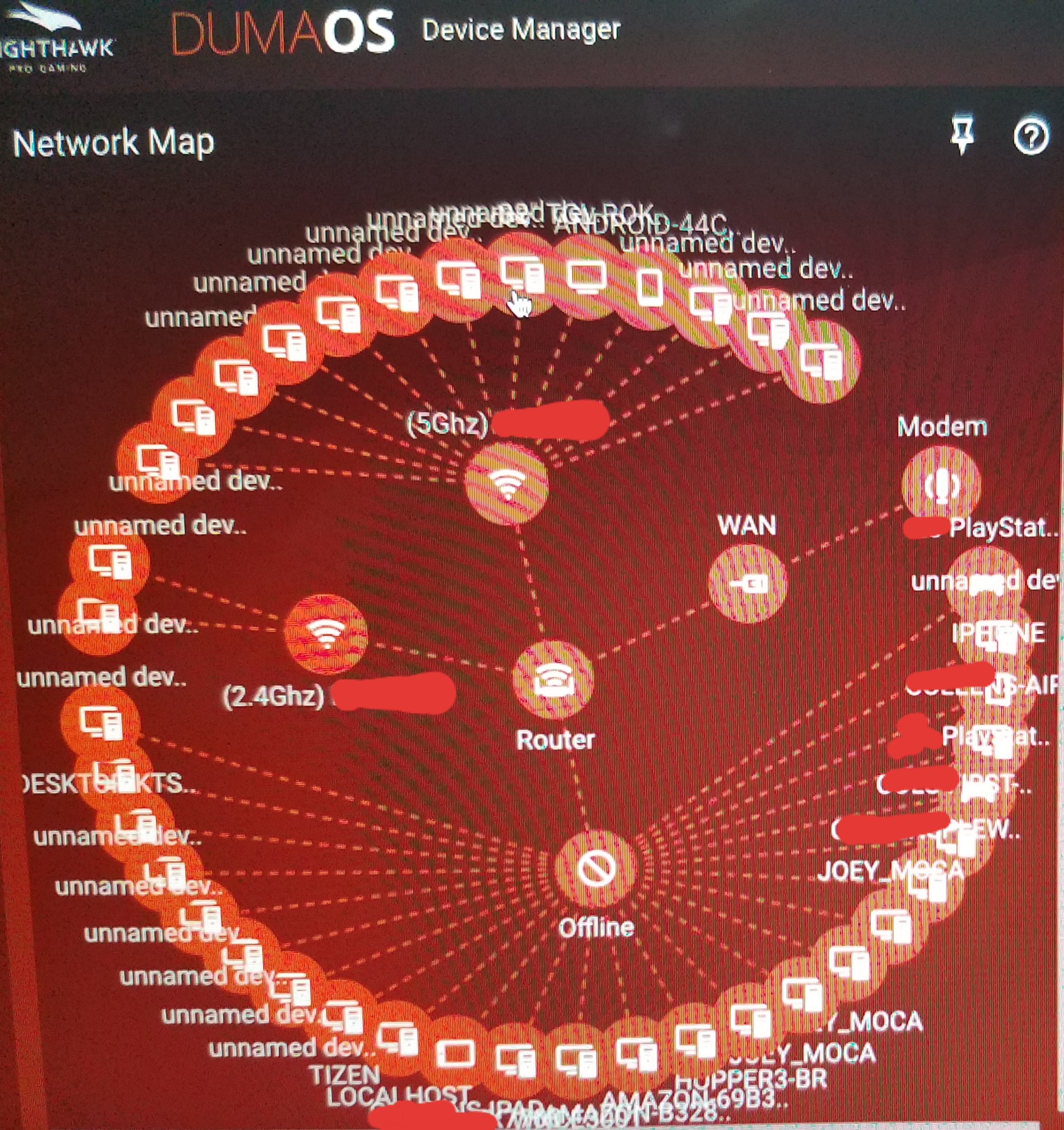
Not sure what FW Ex7700 is using. It has been showing offline in device manager with both .32 and .56 FW on XR500. I dont ever recall it showing connected ever.. I'm assuming it's most current firmware version because it came inside the XRM570 bundle and the XR500 was preloaded with v2.3.2.56 firmware. And correction to my previous comments, its not "unknown device" its "unnamed device" popping up in device manager. It seems like the device manager is now assigning a new "unnamed device" profile to every mac address when connects. In the .56 version I noticed some device profiles had multiple similar mac addresses ( last four digits were the same), based on how they connect I'm assuming? It seems like the device manager is now creating an "unnamed device" profile for every Mac address. Instead of consolidating similar Mac Id's within one device profile. I don't know, I'm not an IT person but this seems stupid. shouldn't it recognize all the Mac Ids and consolidate them in that one profile? This device recognition seems to be even worse now that I rolled back FW. The newest version v2.3.2.56 seemed to be consolidating Mac IDs better after it was running for awhile... I don't know, I might try to upgrade FW back to .56 and do a factory rest again... Does what I'm saying about Mac addresses make sense? Again I'm no IT person... Any more Ideas?
- FURRYe38May 12, 2020Guru - Experienced User
Seems the the FW is not getting or acquiring correct device mfr model information from the devices via ARP process, thus setting up unnamed device in the UI.
Log into the EX7700 and you can find out what version of FW is loaded on it.
- Netduma-FraserMay 12, 2020NetDuma PartnerSorry to hear this is still an issue. Could you try putting the EX in AP mode and then enabling the one wifi name feature to make it the same as the XR and then see if devices appear online correctly?
- DidiChoozRghtMay 13, 2020Aspirant
FURRYe38 wrote:Seems the the FW is not getting or acquiring correct device mfr model information from the devices via ARP process, thus setting up unnamed device in the UI.
So the ARP process issue.. Thats gonna be a Firmware issue? It is more of an issue now that I downgraded to v.32 but it was still somewhat present in the originaly loaded v.56. I think that had something to do with my original problem. Im going to upgrade back to v.56 and factory reset again when I get a chance to see if I can stop this madness.
Question... How would/could the hardware be affecting the ARP process? should I replace this unit?
- DidiChoozRghtMay 13, 2020Aspirant
Netduma-Fraser wrote:
Could you try putting the EX in AP mode and then enabling the one wifi name feature to make it the same as the XR and then see if devices appear online correctly?I think it is in the one wifi name mode from startup if i'm not mistaken. It is the XRM570 mesh bundle. The setup process has you power it up and link to XR500 before you change factory password so it pushes to the extender. Also to put it in AP mode doesn't it have to be wired to the router? That kind of defeats the purpose of me having a wireless extender on the other side of my the house if I have to Lan cable it to the router. It recognized the extender at first because the offline device says EX7700. And it appears to be working because all the lights are light up on it.. I think it all has to do with the same Device manager issues that all these other threads are reporting...
How is the Device Manager issue going to get fixed in the next version v3.0, if you don't know whats wrong with it?
- DidiChoozRghtMay 13, 2020Aspirant
FURRYe38 wrote:
Seems the the FW is not getting or acquiring correct device mfr model information from the devices via ARP process, thus setting up unnamed device in the UI.
Checkout the unnamed devices in the pic! Uuuuuggggghhhhh.
- Netduma-FraserMay 13, 2020NetDuma PartnerI get that, if you could put it into AP mode and it works then we can put it down to the specific repeater mode that is causing the issue which will then allow us to reproduce the issue and resolve it. We have an EX so we can investigate. We are making general optimizations to DM regardless as we can see this in other scenarios.
- DidiChoozRghtMay 13, 2020Aspirant
Netduma-Fraser wrote:
I get that, if you could put it into AP mode and it works then we can put it down to the specific repeater mode that is causing the issue which will then allow us to reproduce the issue and resolve it. We have an EX so we can investigate.I'll see if I can mess with it this weekend. I updated FW back to v.56 and did factory rest. I setup network again and basic settings for QOS, GEO filter, and a static IP for Wired PS4 this morning. That was about all I had time for. I will let it run for a couple days. I dont have a lot of time, paitence, and/or desire to mess with it right now. I'll see what it looks like when I log in this weekend and decide how much more time I want to put into it...
- FURRYe38May 14, 2020Guru - Experienced User
Be sure to make a backup configuration to file for safe keeping. This saves time if a reset is needed again.
- Netduma-FraserMay 14, 2020NetDuma PartnerTotally understand that, let us know when you can and we can go from there.