NETGEAR is aware of a growing number of phone and online scams. To learn how to stay safe click here.
Forum Discussion

Huthayfa
Jul 16, 2018Guide
XR500 QoS, UPnP issue with VLAN tagging.
Hi,
recently I have got my XR500 with DumaOS. I discovered an issue, I am using fiber connection that requires VLAN tagging on WAN to get the internet working. when I put my fiber ONT in full brid...
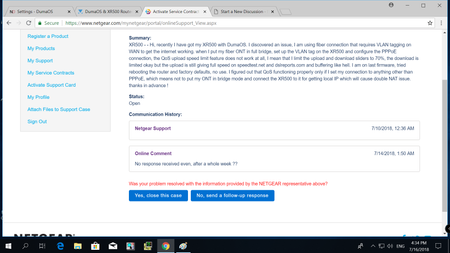
- Aug 30, 2018
this issue has not been fixed yet, and guess what? seems like there is no fix at all.
for everyone else having VLAN setup, be careful while cosndering the XR500 for your setup since you will find some main feaures not working properly.
thanks.
Jacksonite
Sep 05, 2018Aspirant
NVM!. it worked for a few seconds then it stopped again. All my devices and content work fine when i disable QOS. This is clearly a firmware issue with the QOS. I hope i dont have to return this router :(
Netduma_Jack
Sep 06, 2018NetDuma Partner
Could you walk me through your setup please:
- How are the affected devices connected? Wired?
- What are the total bandwidth speeds you have entered into Anti-Bufferbloat?
- What are the Anti-Bufferbloat sliders set to?
- What Anti-Bufferbloat mode do you have it set to?
- In Bandwidth Allocation, is Share Excess enabled on both upload and download (click the options menu to check)?
- Did you manually add any rules to Traffic Prioritization?
Thanks
- JacksoniteSep 06, 2018Aspirant
The affected devices are connected through a cat6.
The total bandwidth speed is at 97.5 on download and 9.8 upload.
The Anti-bufferbloat is set to "when high priority traffic is detected" at 83% on both download and upload.
Share Excess is enabled on both areas.
I manually added a rule for the xbox one only.
- Netduma-FraserSep 09, 2018NetDuma PartnerIf you disable Traffic Prioritization completely by disabling DumaOS Classified Games and your manual rule does that resolve the issue?
