NETGEAR is aware of a growing number of phone and online scams. To learn how to stay safe click here.
Forum Discussion

Nigel_Holland
Nov 17, 2019Guide
XR700 r-apps not loading
Hi Guys, Looking for some help on r-apps not loading on the XR700. I see there is a closed thread on this already but does not give me much information. Is anyone able to help on this one? ...
- Nov 17, 2019Hi Nige, what pages is this happening on? In System Information on the R-App panel, change in the options the retries to 5 instead of 3 and then reboot the router.

Netduma-Fraser
Jan 22, 2020NetDuma Partner
We (Netduma) don't charge for our support and we don't offer phone support but I understand your frustration. I'll ask for an update on the situation.

jhylton
Jan 26, 2020Tutor
Netduma-Alex said he had a hotfix for this problem three days ago and asked that we send him a private message to receive it. I did. Still haven't received the hotfix... What is going on over there that this is acceptable?
- Netduma-FraserJan 26, 2020NetDuma PartnerSorry for the delay, I've sent you a PM with the firmware instead.
- AveGuysGamingJan 26, 2020Tutor
Is this firmware private to only people have the issue? I have rolled mine back but i still have issues where i lose total internet connection for no reason. It doesnt matter how many people on my network, I have lost connection when im the only 1 using my network.
- HartsgroveJan 26, 2020ApprenticeDude they told me a month ago this was a major issue they were heavily investigating and rolling out an update for a month later nothing is done just like any other problem that I’ve had with this router. I don’t know how they are legally allowed to take $500 of our money and have something like this happen to where the router is a paperweight and there’s nothing we can do to get our money back and they do nothing to fix it.
- Netduma-FraserJan 26, 2020NetDuma PartnerI've sent you both a PM with the firmware, hopefully it will help with your issues.
- HartsgroveJan 27, 2020ApprenticeNo they just never put the firmware version out there not doing anything about it. I literally lose Internet connection 25 times a day on every single version of the firmware. I have literally done every single thing every Advisor has told me to do with zero lock on every firmware version and had level two support Netgear remotely access all three RMA routers and do 5,000,001 things you could think of and nothing worked
 Nigel_HollandJan 27, 2020Guide
- jhyltonJan 27, 2020Tutor
Hartsgrove, the hotfix that Netduma-Alex sent me fixed my problems with the R-Apps. I initially got irritated at the hotfix because it seemed like it was an update, as it was labeled v1.0.1.22, and I believe we currently have v1.0.1.20. Every time I tried to upload it to my router it would act like it was updating, but would restart my router every time, like it was crashing. I tried five times on a PC, twice via my iphone and once from a Macbook. Did the same thing every single time! That's when I blasted Netduma-Alex for this PoS update (prematurely), however, I never re-checked the R-Apps functionality, because I thought the hotfix was crashing the router, and the version still said v1.0.2.20, but while I was waiting for a response from the Netduma guys, I got bored and clicked on QoS and Device Manager and everthing worked. I felt stupid..... I hope this works for you Hartsgrove , and THANK YOU Netduma-Alex and Netduma-Fraser . Hopefully everything continues to work after the next update. Should I turn my automatic updates off now?
- Netduma_AlexJan 28, 2020NetDuma Partner
I'm glad it worked! If everything's working then i'd turn off automatic updates. I can imagine (what with it being a hotfix) that the router might decide to replace the firmware with the latest stock firmware if automatic update is on.
- Nigel_HollandFeb 09, 2020Guide
Hi There,
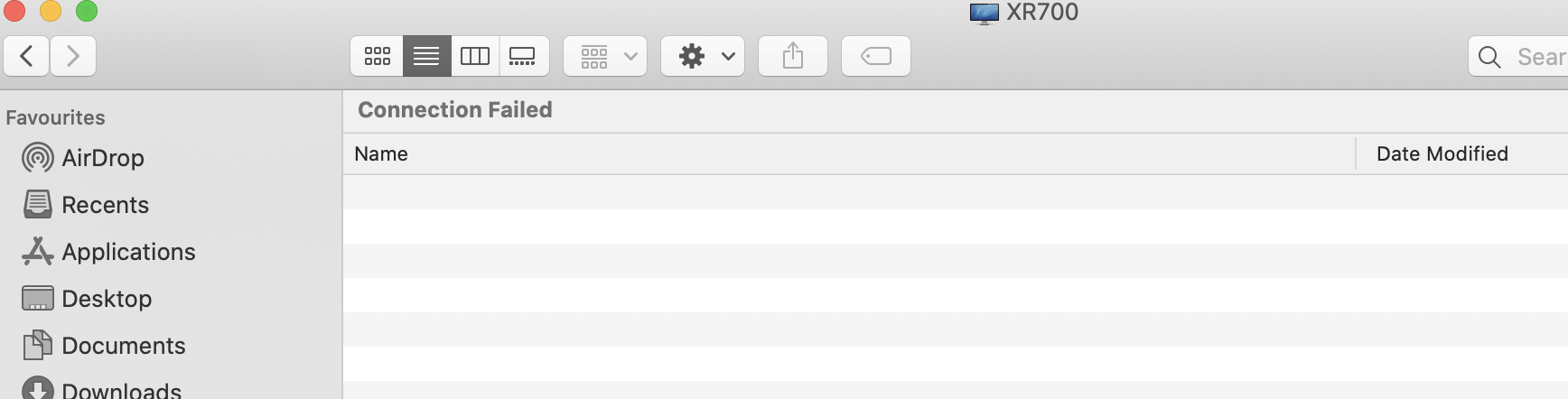
So I have been running the hotfix for a while and so far all good however it seems to have introduced a network share bug. i can see the router in the Network area of OSX however when I try to connect I get a failed error.
Any ideas?
Nige
- Netduma-FraserFeb 09, 2020NetDuma PartnerHave you enabled ReadyShare in the router settings?
- Nigel_HollandFeb 09, 2020Guide
Hi Netduma-Fraser ,
Yeah these settings are on and I have a network share configured. It is a bit odd.
Nige
- Netduma-FraserFeb 09, 2020NetDuma PartnerSo just to confirm, you have a USB storage device connected to the router? Are you using admin password protection for the //readyshare?
Double check you have File Sharing enabled in System Preferences specificaly "Share files and folders using SMB". - SolidusGhostFeb 19, 2020Aspirant
Hello There, would it be possible to get the hotfix as well? I am having the same issue as described on this thread.
Regards.
- Netduma-FraserFeb 19, 2020NetDuma PartnerI've sent you the hotfix so hopefully that will resolve the issue.
- HartsgroveFeb 19, 2020ApprenticeSo your advice to everybody is do the stupid hot fix which clearly still did not fix my issue my router has been unplugged in the box for over two months I was promised by duma os and I was promised by Netgear that you were working very closely together to come out with a new update to fix this issue. I have been told countless times please be patient we’re working on it we’re fixing it we’re coming out with an update and you were doing nothing but lying to the public. I did every single step you people told me to do I did every single step with Netgear level two support they have documented over eight hours of data they got from the router with remote access over a seven days span. So the new advice is put this hot fix on there hopefully it works if it doesn’t then they made out with $500 who cares.
- Netduma-FraserFeb 19, 2020NetDuma PartnerDid you perform a factory reset after applying the hotfix as that is recommended. We're not throwing it out and just leaving it at that, if it still isn't resolved then we'll keep working on it. There is also another firmware for a security fix that would encompass this fix as well so I would advise upgrading to that anyway https://kb.netgear.com/000061714/XR700-Firmware-Version-1-0-1-24-Hot-Fix
- HartsgroveFeb 19, 2020ApprenticeYou obviously already know the answer to your own question if you go back and you read the 55 comments you will see every piece of troubleshooting was done yes for the ninth time that I’ve been asked if I reset after the update yes yes yes yes I did I absolutely did I won hundred percent did I don’t know how many other ways I can say yes. I’m also on replacement number 4 XR700. Again they told me back in November you were coming out with an update your company told me in November and December over 25 times you were working on the update to be patient it would be out before Christmas now here we are going into March and you guys still have no idea what you’re doing or what’s going on that should’ve literally tell every customer on this form that you guys don’t give a **bleep**.
- Netduma-FraserFeb 19, 2020NetDuma PartnerWe will keep working on the issue as the hotfix hasn't worked for everyone. Most likely DumaOS 3.0 will come first and so should be resolved once that is released.
- HartsgroveFeb 22, 2020ApprenticeLet me ask this question in all seriousness I’ve been trying every single day for about two hours a day playing around with all the settings and still nothing has worked. Myself and Netgear today with remote access tried the hot fix again multiple factory reset restored settings we even did it with factory reset not restoring settings still no luck. One of the major problems no matter what I said to Geo filter range even if I turn the Geo filter range off My ping for modern warfare or fortnight is always over 50 60 even 70. Even if I said the G arrange to 500 miles I still have a high ping 50 60 70. I will occasionally have 1 outta 30 games 20-30 ping. If I unhook this router and hook up my Comcast router or my R9000 router my pain is always between 15 and 30 never seen it go over 30. As soon as I hook up this XR700 I for some reason cannot keep my ping away from 50 60 70. I’m even having issues where I see a jump in to 700 at times in a video game. All settings were quadruple checked by level III support engineers from Netgear and was told countless and numerous times the settings are perfectly fine I am on my third RMA xr700. Some reasonable help would be nice and please for the love of God read all the comments and responses before asking me the same question 35 times I would greatly appreciate it.
- Netduma-FraserFeb 22, 2020NetDuma PartnerIt's hard to keep track of what has been suggested to who when we're trying to support multiple people in one topic. Perhaps it would be best to make your own topic and we can focus on you easier.
What is your exact physical setup? Are there devices connected to the comcast router instead of the XR router? What are your bandwidth speeds? What QoS settings are you using? - HartsgroveFeb 22, 2020ApprenticeA majority of these responses are for me so it wouldn’t be hard to go back and look at what I wrote and what I did. But I have Comcast Gig internet, ps4 pro Xbox one x 2 Nintendo switch’s (and yes I chanced the device names on both Nintendo switches). I also have two gaming pc’s. My ps4 pro is the main go to system hook up through Ethernet also port forwarded and dmz. Nat type is open. IPv6 enabled. Unpn enabled. I have tried every firm ware Version with a factory reset after install and also Netgear has done every single setting with me multiple managers with remote access level two support. I enable Geo filter and set a range to the game I am playing. No matter what I put the geo filter range if I play fortnite then my chat to any one does not work at all in filtering mode. Only way any chat will work is if I put it in spectating mode and that defeats the purpose of having Geo filter on and this is all on my ps4 and or Xbox. Only fortnite chat won’t work again on any mile 0-1 million in filtered and the ping is always 50-60-70. Call of duty modern warfare chat always works no matter what mike I set the range but agin the ping is always 50-60-70 if not higher. Again if I in hook the XR 700 and use my comcast router or my R9000 my ping is always 15-25 any game I play all chat functions work in fortnite. When I use the xr700 router my comcast modem is on bridge mode by the way. Also these problems are not new Netgear has known about these issues since the day I got the XR700 months ago as well as this form. I’ve posted on several forms and talk to you and a couple other guys and it’s always the same group of people who ask the same questions over and over LOL it’s just really annoying.
- Netduma-FraserFeb 23, 2020NetDuma PartnerBy using port forwarding, UPnP & DMZ you run the risk of port conflicts which could have adverse affects like ping rising. Disable all apart from UPnP to start with please. Also disable IPv6. Fortnite chat is this with people who are in your party? Have you added them to the Geo-Filter allow list? Where are you looking at the ping on the Geo-Filter or in the game? What is your ping if you do speedtest.net with no other devices connected?
- HartsgroveFeb 23, 2020ApprenticeFirst if I run just you and p.m. First if I run just unpn When I play on Consol and my kids are playing we always run into an issue where a consul is strict or moderate because they’re trying to use the same ports at the same time I tried every work around this with level two support on remote access and there was nothing that can be done besides using unpn and port forwarding. The fortnite chat never works with friends or anybody my actual mic button is gone when the Geo filter is turned on again with a mile from zero all the way to 1 million it does not matter the only way my mike will pop up is if I put the Geo filter to spectating mode and fortnite is the only game that does it. I even tried adding friends to the allow list but every time I turn my system off or restart the game it makes me Rhiannon and before you ask they have a static IP so there’s no reason it should be doing that it does it with any friends in any region from Florida to California. My ping when I do a speed test is 8 so it really doesn’t make much sense for every game I get into to have a ping 50-60-80 or even higher and that’s not me joining friends or anything that’s just a public server every single time. I think it’s pretty safe to say the software has major flaws.
- Netduma-FraserFeb 23, 2020NetDuma PartnerIn WAN Settings change NAT from Secured to Open, that should resolve the NAT issue. There must be something blocked on the map then if it is doing that, are you zoomed out of the map, can you see anything being blocked at all? If you can all you need to do is add it to your allow list. After you've added them and then add them again does another entry for them appear or are the IDs the same and so has the name you gave it previously?
Saturate your connection with streams/downloads while following this guide and changing Anti-Bufferbloat until you find percentages that lower your ping/keep it as stable as possible http://support.netduma.com/en/support/solutions/articles/16000074717-how-to-test-your-internet-ping
That should help with the ping issue. - HartsgroveFeb 23, 2020ApprenticeI forgot to mention that under WAN it’s open already I always keep that open. Also when I zoom in nothing at all is blocked. And I checked last time I had this issue months ago you guys said make sure the id is the same and they have a static ip. The id is always the same and they have the static ip. It would be nice if duma os can remote access my pc so they can see how bad this router really is for a streamer/ gamer.