NETGEAR is aware of a growing number of phone and online scams. To learn how to stay safe click here.
Forum Discussion

Godsdemon
Dec 27, 2020Aspirant
Need help - had to use the reset button in the back
I had to use the reset button in the back last nite. Since I have done this 2 things have happened. I notice that my internet gaming seems to cycle in waves on any mmo experience that I can have ever...

michaelkenward
Dec 28, 2020Guru - Experienced User
Godsdemon03 wrote:
The modem is a Netgear CM 1000v2.
I thought the router was listed in the bottom of my email sig.
Netgear AC2300 R7000P
Firmware V: v1.3.1.64
I asked about the modem and firmware, not the router. But we now have all the details.
Your firmware on the R7000P is a couple of versions out of date. It might be worth updating that while you are messing around.
The good news is that the modem is a modem-only box, no router bit to get in the way.
You should still take the network through the recommended startup regime (see above).
Godsdemon03 wrote:
I seemed to have forgot the password and my verification secret words weren't working for me either. I had to do the hard reset. I seem to have 2 different accounts on here.
Netgear likes to make life interesting with lots of passwords. The passwords for your router have nothing to do with the passwords you use here. On the router there is just the password for the GUI and the different passwords for the wifi. This place can be completely separate. It is for me.
Fingers crossed that the modem rest fixed things.
Godsdemon03
Dec 28, 2020Tutor
I have tried the self update and it wouldn't update. It might be worth looking into on your end to fix. I can try to update the firmware but I'm hesitant too because I don't want to make it a paper weight if I fail.
I still need to get my armor sync'd to the other email . I don't need to pay for armor 2x
Do you have a link for the firmware?
I still need to get my armor sync'd to the other email . I don't need to pay for armor 2x
Do you have a link for the firmware?
- michaelkenwardDec 28, 2020Guru - Experienced User
Godsdemon03 wrote:
I have tried the self update and it wouldn't update. It might be worth looking into on your end to fix.Your end? I have no idea what that means.
I always update manually:
How do I manually upgrade firmware to my NETGEAR router? | Answer | NETGEAR Support
I do it using an Ethernet connection from my PC. That is safer than relying an an automated process that might crash mid update, especially on a wifi connection.
I have already provided you with a link to the Armor section.
I tried Armor once in a beta test, but don't feel the need to pay for anything like that, so I have no idea how it works for paying customers.
- Godsdemon03Dec 28, 2020Tutor
I am hardwired. Hopefully that will help.
- GodsdemonDec 28, 2020Aspirant
Minor success! I updated the firmware- however my issue hasn't gone away. That would have been sweet if that would have fixed it. I will go thru the whole reboot sequence tomorrow and the cable company will be out on wednesday.
- GodsdemonDec 28, 2020Aspirant
michaelkenward wrote:
Godsdemon03 wrote:
I have tried the self update and it wouldn't update. It might be worth looking into on your end to fix.
I was referring to the router actually auto updating (thus your end to make sure it does it if you work for netgear) instead of manually doing it with the risk of making it a toaster or a very expensive paper weight.
When I read it I felt it made sense but from your perspective I wasn't descriptive enough.Your end? I have no idea what that means.
I always update manually:
How do I manually upgrade firmware to my NETGEAR router? | Answer | NETGEAR Support
I do it using an Ethernet connection from my PC. That is safer than relying an an automated process that might crash mid update, especially on a wifi connection.
I have already provided you with a link to the Armor section.
I tried Armor once in a beta test, but don't feel the need to pay for anything like that, so I have no idea how it works for paying customers.
- Godsdemon03Jan 04, 2021Tutor
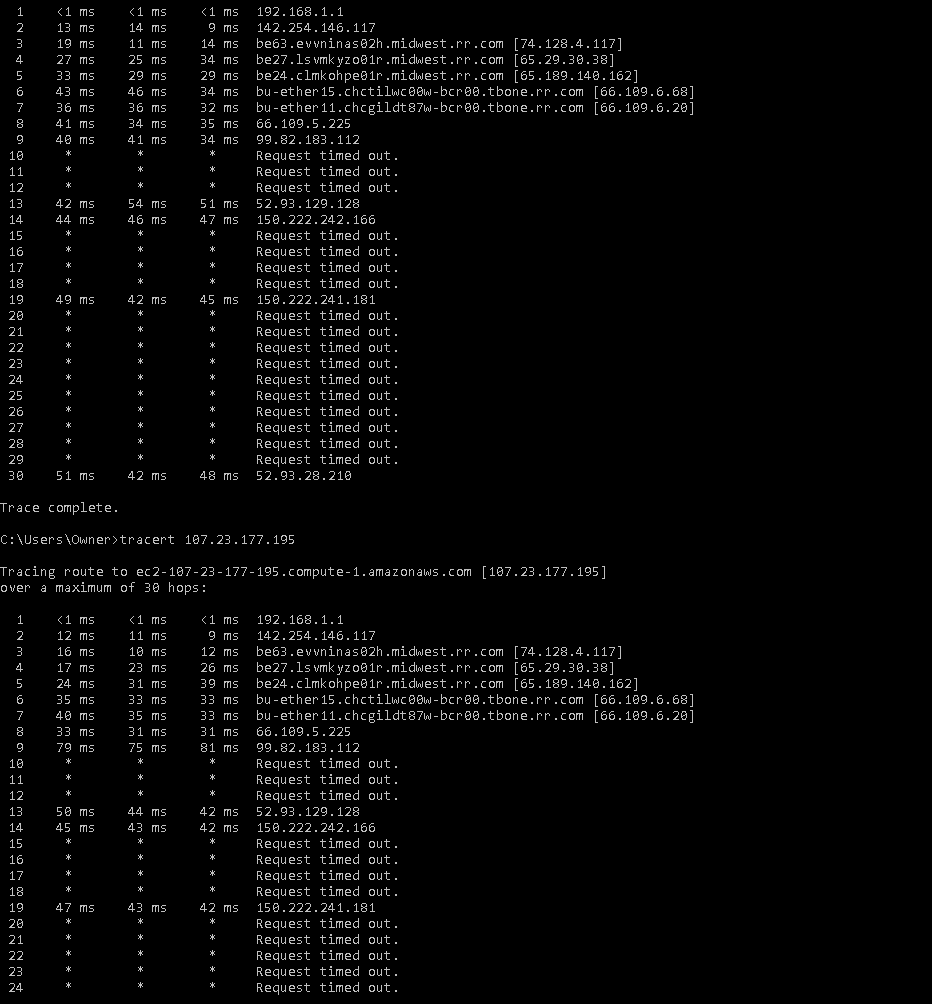
I did a tracert today- here is what I found:
Does this prove that the modem isn't flaking out and that its my ISP ?
- GodsdemonDec 31, 2020Aspirant
No luck. ISP said they are fine coming into the house. Which makes me believe that the hard reset fried my router.
My plan is buy another and drop it in or go thru customer support.
A couple questions before I buy a new one.
Will my armor protection be able to be carried over ?
What is the cost for customer support to have them diagnose the current model?
- michaelkenwardJan 05, 2021Guru - Experienced User
Godsdemon wrote:
Which makes me believe that the hard reset fried my router.
Fried isn't a technical description, but it usually means permanent physical damage. As in "a lightning strike fried my modem".
A factory reset is unlikely to do that. Actually, I'd say it is impossible.
As it is, I am now getting lost in what is going on here.
You have a problem on one gaming site. What about everything else you do?
You are using Armor. Did you get your subscription fixed? What happens if you disable Armor?
None of your problems suggests an issue with your router.