NETGEAR is aware of a growing number of phone and online scams. To learn how to stay safe click here.
Forum Discussion

FURRYe38
Oct 06, 2022Guru - Experienced User
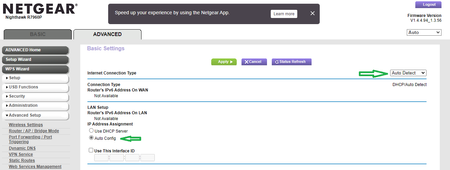
New - R7900P/R7960P/R8000P Firmware Version 1.4.4.94 Released
Security Fixes: 10/06/2022
Fixes security vulnerabilities.
For more information about security vulnerabilities, visit https://www.netgear.com/about/security
NOTE: May have long awaited ...

FURRYe38
Mar 05, 2023Guru - Experienced User
What model router do you have?
What is the Mfr and model# of the Internet Service Providers modem/ONT the NG router is connected too?
Be sure your using a good quality LAN cable between the modem and router. CAT6 is recommended.
Has a factory reset and setup from scratch been performed since last FW update? A complete pull of the power adapters for a period of time after the factory reset then walk thru the setup wizard and setup from scratch. Recommend setting the default DHCP IP address pool range to the following after applying and a factory reset: 192.168.#.100 to 192.168.#.200.
Iv'e switched to 6rd for any IPv6 tunneling configurations. I use Hurricane Electric.

Raptorialand
Mar 05, 2023Aspirant
Router: R8000P
Modem: Arris TG2492S
Cable cant be the issue if it worked 3 days ago?
No i did not do that - does it delete all the settings if i make a factory reset?
Where can i find that? Do you mean dhcp = dns server? Its set to pihole of course.
192.168.x.xx
Thank you
Modem: Arris TG2492S
Cable cant be the issue if it worked 3 days ago?
No i did not do that - does it delete all the settings if i make a factory reset?
Where can i find that? Do you mean dhcp = dns server? Its set to pihole of course.
192.168.x.xx
Thank you
- FURRYe38Mar 05, 2023Guru - Experienced User
If your running PiHole has a DHCP service, did you disable DHCP server on the NH router?
Yes.
Your ISP Modem already has a built in router and wifi. This would be a double NAT (two router) condition which isn't recommended. This would be a double NAT condition which isn't recommended. https://kb.netgear.com/30186/What-is-Double-NAT
https://kb.netgear.com/30187/How-to-fix-issues-with-Double-NAT
Couple of options,
1. Configure the modem for transparent bridge or modem only mode. Then use the NG router in router mode. You'll need to contact the ISP for help and information in regards to the modem being bridged correctly.
2. If you can't bridge the modem, disable ALL wifi radios on the modem, configure the modems DMZ/ExposedHost or IP Pass-Through for the IP address the NG router gets from the modem. https://kb.netgear.com/25891/DMZ-on-NETGEAR-routers
https://kb.netgear.com/24086/How-do-I-set-up-a-default-DMZ-server-on-my-Nighthawk-router
3. Or disable all wifi radios on the modem and connect the NG router to the modem, LAN to LAN configure AP mode on the NG router.
https://kb.netgear.com/20927/How-do-I-change-my-NETGEAR-router-to-AP-modeI believe the Arris supports option #1...
- RaptorialandMar 05, 2023AspirantThank you
The modem is just passing the signal to the nighthawk ... thats the first thing i did while setting up arris.
Called my provider and let them do this- RaptorialandMar 05, 2023AspirantDynamic Ip is retrieved by the provider.
Dns server is set to pihole
Natfilter is set to "safe"
Igmproxy is deactivated
DDNS is deactivated
No vpn
Upnp is activated (?)
Ipv6 is set to 6to4 tunel /automatic by provider/ automatic confic
Need more specific info?