NETGEAR is aware of a growing number of phone and online scams. To learn how to stay safe click here.
Forum Discussion

FURRYe38
Aug 13, 2022Guru - Experienced User
New - R8500 Firmware Version 1.0.2.160 Released - EOL
Security Fixes: 08/05/2022
Fixes security vulnerabilities.
For more information about security vulnerabilities, visit https://www.netgear.com/about/security/
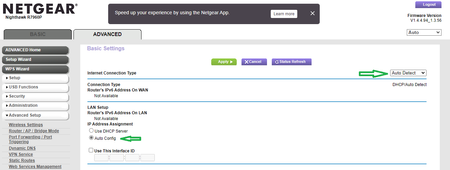
Enable IPv6 Auto if you con...

FURRYe38
Aug 17, 2022Guru - Experienced User
Well, I haven't seen any DNS issues since first day of loading v.160 on my R8500. I did see some on my wired PC, however I believe a reboot of the PC resolved that as since then, I have not seen any DNS issues on web pages. I had noticed that before I left a bunch of tabs open in Opera. Closing Opera and coming back that first day, and reopening Opera some of the tabs were trying to refresh there pages and some tabs saw the DNS Prob message. However since the reboot of the PC which cleared the DNS caches. Closing and reopening the browser at various times hasn't reproduced any DNS Prob or Proxy messages since. IPv6 IS disabled. I had manually loaded the FW and factory reset and setup from scratch.
I've since turned OFF the wifi radios and installed a Orbi 9 series in AP mode behind the R8500. Working well at this time.

DanKI6X
Aug 19, 2022Tutor
Still an issue with the R8500 and the latest .160 firmware. I have to go back to .144 again (year old).
Dan
- FURRYe38Aug 19, 2022Guru - Experienced User
Ya I saw some DNS items yesterday. Still not sure if it was browser cache or something else.
Have you factory reset and setup from scratch?Have you enabled IPv6 on the router as well?
DanKI6X wrote:
Still an issue with the R8500 and the latest .160 firmware. I have to go back to .144 again (year old).
Dan
- StappmeyerAug 22, 2022Aspirant
I have installed this firmware and did a factory reset. I still am seeing the DNS errors. I am thinking it is time to replace the unit as it does not appear that this will be addressed. Reinstalling an old firmware with known issues is not a serious option for me.
Disappointed R8500 owner.
- FURRYe38Aug 22, 2022Guru - Experienced User
Have you enabled IPv6 on the router as well?
Stappmeyer wrote:
I have installed this firmware and did a factory reset. I still am seeing the DNS errors. I am thinking it is time to replace the unit as it does not appear that this will be addressed. Reinstalling an old firmware with known issues is not a serious option for me.
Disappointed R8500 owner.
- DanKI6XAug 22, 2022Tutor
Turning on IPV6 seemed to help some, but then my OPENDNS filtering did not work anymore. Saw that being true with others from some more internet searching. I turned off IPV6 and issue did not get worse. I am going to try .160 for a while. Looks like it is improving with use. I did try some flushing, etc. but surely always something being "remembered" so I am giving it time to settle down. Other PC in house is improving too with very little DNS errors now. Do not have issues with Wi-Fi connected Apple devices, nor many connected home assistants.
Dan
- FURRYe38Aug 22, 2022Guru - Experienced User
Thank you for letting us know. Ya I found that DNS issues mostly went away for me after IPv6 was enabled on my 8500.
Be sure to save off a back up configuration to file for safe keeping. Saves time if a reset is needed.
https://kb.netgear.com/24231/How-do-I-back-up-the-router-configuration-settings-on-my-Nighthawk-router
DanKI6X wrote:
Turning on IPV6 seemed to help some, but then my OPENDNS filtering did not work anymore. Saw that being true with others from some more internet searching. I turned off IPV6 and issue did not get worse. I am going to try .160 for a while. Looks like it is improving with use. I did try some flushing, etc. but surely always something being "remembered" so I am giving it time to settle down. Other PC in house is improving too with very little DNS errors now. Do not have issues with Wi-Fi connected Apple devices, nor many connected home assistants.
Dan