NETGEAR is aware of a growing number of phone and online scams. To learn how to stay safe click here.
Forum Discussion

FURRYe38
Aug 13, 2022Guru - Experienced User
New - R8500 Firmware Version 1.0.2.160 Released - EOL
Security Fixes: 08/05/2022
Fixes security vulnerabilities.
For more information about security vulnerabilities, visit https://www.netgear.com/about/security/
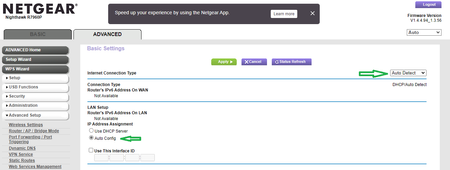
Enable IPv6 Auto if you con...

FURRYe38
Aug 19, 2022Guru - Experienced User
Ya I saw some DNS items yesterday. Still not sure if it was browser cache or something else.
Have you factory reset and setup from scratch?
Have you enabled IPv6 on the router as well?
DanKI6X wrote:
Still an issue with the R8500 and the latest .160 firmware. I have to go back to .144 again (year old).
Dan

DanKI6X
Aug 22, 2022Tutor
Turning on IPV6 seemed to help some, but then my OPENDNS filtering did not work anymore. Saw that being true with others from some more internet searching. I turned off IPV6 and issue did not get worse. I am going to try .160 for a while. Looks like it is improving with use. I did try some flushing, etc. but surely always something being "remembered" so I am giving it time to settle down. Other PC in house is improving too with very little DNS errors now. Do not have issues with Wi-Fi connected Apple devices, nor many connected home assistants.
Dan
- FURRYe38Aug 22, 2022Guru - Experienced User
Thank you for letting us know. Ya I found that DNS issues mostly went away for me after IPv6 was enabled on my 8500.
Be sure to save off a back up configuration to file for safe keeping. Saves time if a reset is needed.
https://kb.netgear.com/24231/How-do-I-back-up-the-router-configuration-settings-on-my-Nighthawk-router
DanKI6X wrote:
Turning on IPV6 seemed to help some, but then my OPENDNS filtering did not work anymore. Saw that being true with others from some more internet searching. I turned off IPV6 and issue did not get worse. I am going to try .160 for a while. Looks like it is improving with use. I did try some flushing, etc. but surely always something being "remembered" so I am giving it time to settle down. Other PC in house is improving too with very little DNS errors now. Do not have issues with Wi-Fi connected Apple devices, nor many connected home assistants.
Dan
- DanKI6XAug 26, 2022Tutor
OK, the old Catch-22...
Turn on IPv6 and you cannot use OPENDNS custom filtering since you cannot "register" your IPV6 address with them. With IPv6 off on the Netgear R8500 you can use custom filtering with the regular OPENDNS DNS but with the latest firmware you get a few random DNS errors that sometimes recover themselves, sometimes don't. Here is what I ended up finding and doing:
Since my kids are older now, I decided I would be fine with the general Parent Controls OPENDNS can use by default without an account or custom settings. This will block the basic "bad" stuff and unable to be customized. Here are my settings now:
Internet: DNS (i.e., IPv4) USE THESE: 208.67.220.123 and 208.67.222.123 (these are OPENDNS basic filter without using an account)
ADVANCED: Advanced Setup: IPv6: USE THESE: 2620:119:35::123 and 2620:119:53::123 (these are the OPENDNS basic for IPv6)
Note that each "number" is four digits so add zeroes in front of those shorter. Also, "::" means fill in "0000" where needed and as many as needed (i.e., first address is really 2620:0119:0035:0000:0000:0000:0000:0123)
Now I am getting the filtering I need (or can live with) and no DNS errors. Firmware .144 was the last one that worked fully with OPENDNS on my R8500. Netgear needs to get the firmware working without the need for IPv6 and OPENDNS needs to get IPv6 addresses allowed in the Dashboard to be registered for custom filtering.
Dan
- CogXSep 05, 2022Aspirant
After installing v1.0.2.154 August 2021 and then quickly reverting back to v1.0.2.144, I finally installed v1.0.2.160 here in September 2022. I had still been getting periodic DNS errors with x.144, but had learned to just live with them. After installing x.160, I didn't see a difference in that problem, so I finally tried out the IPv6: 6to4 Tunnel option and it does appear to have helped. Of course, test-ipv6.com points out 6to4 is less than ideal.