NETGEAR is aware of a growing number of phone and online scams. To learn how to stay safe click here.
Forum Discussion

Sezro626
Nov 13, 2021Guide
Nighthawk router blocking Xfinity website
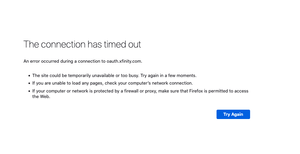
I get the below error when trying to log into my account. Also I can't use my Xfinity apps do to this as well. This randomly happened after I updated my Xfinity app. I thought that was the issue but ...
Sezro626
Nov 13, 2021Guide
plemans wrote:You could try googles at 8.8.8.8 or 8.8.4.4
https://kb.netgear.com/30510/How-do-I-set-static-Domain-Name-System-servers-on-my-NETGEAR-router
It's saying I'm not connected to my network.
"
Trying to connect to your control panel?
You may not be connected to your Router’s WiFi network.
To access routerlogin.com, your device must be connected to your Router’s WiFi network. Check your current connection and try again.
The easiest way to manage your router’s settings and wireless network is the Nighthawk app. Learn more at the link below:"

plemans
Nov 13, 2021Guru - Experienced User
Try using its ip address to connect to the router.
- Sezro626Nov 15, 2021Guide
plemans wrote:Try using its ip address to connect to the router.
I selected "Use These DNS Servers" and changed it from automatic. But it still doesn't work. I guess I'll just live with not accessing my account. :smileyindifferent:
- plemansNov 15, 2021Guru - Experienced User
You could also try updating to the 1.0.11.128 firmware for that router
- Sezro626Nov 20, 2021Guide
plemans wrote:You could also try updating to the 1.0.11.128 firmware for that router
Could you let me know how to download the latest firmware? I no longer see it when I log into my router. I'm currently using V1.0.11.123_10.2.100
I prefer to download through the router than the manual download.