NETGEAR is aware of a growing number of phone and online scams. To learn how to stay safe click here.
Forum Discussion

Carsten_R
Jan 21, 2023Aspirant
Nighthawk x4s -IPV6 Dual Stack Lite (DS-Lite)
Hi all, can someone explain me how to Setup the router for a PPPoE FTTH Connection with IPV6 Dual Stack Lite (DS-Lite) ? I have put in the IPV6 Login credentials for pppoe, get an IPv6 Adress , ca...

FURRYe38
Jan 23, 2023Guru - Experienced User
Be sure to edit out any router serial numbers or MAC addresses from pictures before posting for security reasons.
Carsten_R wrote:
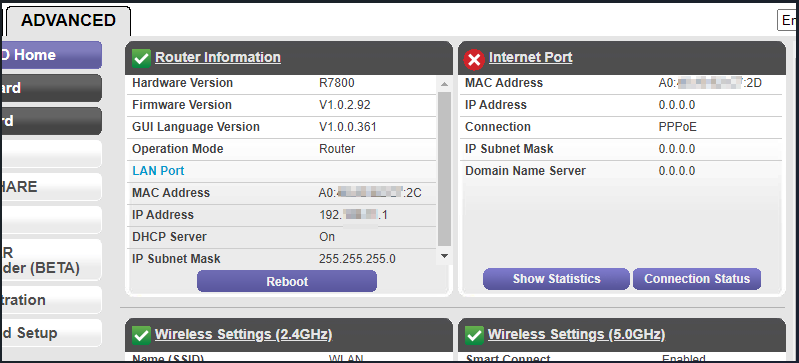
And here is the overview:
Carsten_R
Jan 23, 2023Aspirant
OK a nother try with the screenshot 'what is my ip address' attached 😉
Hope you can help.
- Carsten_RJan 23, 2023Aspirant
and the overview of the router
- KitsapJan 23, 2023Master
Good job on the attached images.
I can find no information on the DS-Lite being a feature by name on Netgear routers that can be enabled or disabled.
I need to understand more on the issue. What makes you think you cannot go to a web site with an IPv4 address? Are you talking about a device on your LAN? On your router, when you look at the attached devices list, what does it show for IP addresses?
What is the brand name and model number of the upstream modem/gateway/ONT you are connecting to with the R7800?
- Carsten_RJan 23, 2023Aspirant
The devices on my lan gets an ipv4 and ipv6 address, thats ok, but the R7800 gets only a ipv6 address from the ISP.
A FritzBox is working well, see attached image.The 'Modem' the R7800 ist connected to is a GENEXIS Gigabit a Gigabit-FTTH-Gateway.
- KitsapJan 23, 2023Master
Carsten_R wrote:The devices on my lan gets an ipv4 and ipv6 address, thats ok, but the R7800 gets only a ipv6 address from the ISP.
A FritzBox is working well, see attached image.The 'Modem' the R7800 ist connected to is a GENEXIS Gigabit a Gigabit-FTTH-Gateway.
Therein lies the heart of your problem. Your gateway is a combination ONT and router. The gateway is also providing routing functions on your LAN at the same time your R7800 is attempting to do the same thing. This results in a situation called double NAT. Not good. See here for background.
https://kb.netgear.com/30186/What-is-double-NAT-and-why-is-it-bad
Your Genexis gateway has a model number. It would be helpful for you to provide it. Look on the label.
The design and hardware for your R7800 has been around for a few years. One option is to configure the R7800 as an access point. There will be no routing conflicts, but some features are disabled. See here for details, including the links toward the bottom.
https://kb.netgear.com/000061927/What-is-the-difference-between-router-mode-and-AP-mode
If you think your R7800 is better at routing, you can configure your gateway to bridge mode. Not all device manufacturers have the same definition of bridge mode. Read carefully from the OEM manual.
Part of your decision has to do with your use of Wi-Fi. If you use the Wi-Fi from your Genexis, bridge mode will disable it.
I am not familiar with a FritzBox. What is its function?
- KitsapJan 30, 2023Master
Any progress on this??