NETGEAR is aware of a growing number of phone and online scams. To learn how to stay safe click here.
Forum Discussion

Tedrion
Aug 02, 2018Tutor
R7000 Port Forwarding Not Working
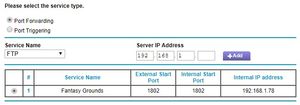
I'm trying to get a program called Fantasy Grounds working, and it requires port forwarding of port 1802. I've done this on the same ISP at other locations, and recently moved to a new place in the s...
 Aug 04, 2018
I found the solution on another forum. This is definitely a bug in the firmware.
There is a low threshold on the static IP address it will allow forwarding to. I was at .78 which was too high. I put my static IP to .10, and then pointed the rule to my new static IP and it worked.
To test this I put my static up to .101 and adjusted the rule. It failed again. I put it back to .10, and it worked again.
Tedrion
Aug 04, 2018Tutor
I found the solution on another forum. This is definitely a bug in the firmware.
There is a low threshold on the static IP address it will allow forwarding to. I was at .78 which was too high. I put my static IP to .10, and then pointed the rule to my new static IP and it worked.
To test this I put my static up to .101 and adjusted the rule. It failed again. I put it back to .10, and it worked again.

antinode
Aug 04, 2018Guru
> I found the solution on another forum. [...]
_Where_?
> [...] There is a low threshold on the static IP address it will allow
> forwarding to. [...]
Perhaps, but I doubt it. What are the limits of your DHCP pool
(ADVANCED > Setup > LAN Setup : Starting IP Address, Ending IP Address)?
Netgear firmware has been observed with many incredible firmware
defects, so I can't say that this couldn't happen, but it does sound
very unlikely. One last resort would be a settings reset (and manual
reconfiguration), which might clear some obscure settings corruption.