NETGEAR is aware of a growing number of phone and online scams. To learn how to stay safe click here.
Forum Discussion

fstarne
May 24, 2016Aspirant
R7000 firmware version 1.0.5.64_1.1.88 released today
New Firmware Version 1.0.5.64_1.1.88 Release Notes 1. [New Feature] Supports Smart Connect. 2. [New Feature] Supports the Kwilt app, which can be used to view photos stored on the...


bigdps
Jun 10, 2016Aspirant
IrvSp wroteDid you RESET the router after flashing, needed especially after going down in version. Then manually re-enter settings is needed.
Yes I did. Just to make sure, I resetted BEFORE flashing and then resetted AFTER flashing. GUI still has the latest firmware number version. Like others, I have connectivity problems like crazy. Still waiting for someone from Netgear to answer any of my questions (actually everyone that has the very similar problems like me).
bigdps
Jun 10, 2016Aspirant
Just to prove what I am meaning. I even went as far as I could to remove all traces of the latest "stable my eye" firmware version. No matter what I try (resetting with power on, ressetting while turning it on, standing on my head, whistling dixie) nothing will remove the GUI from the latest version. If that stays on ,what is to say that the problems I am having as well as others like me, are not caused by residual coding or whatever behind causing havoc?
Still, no response from any Netgear moderator. Sad really.
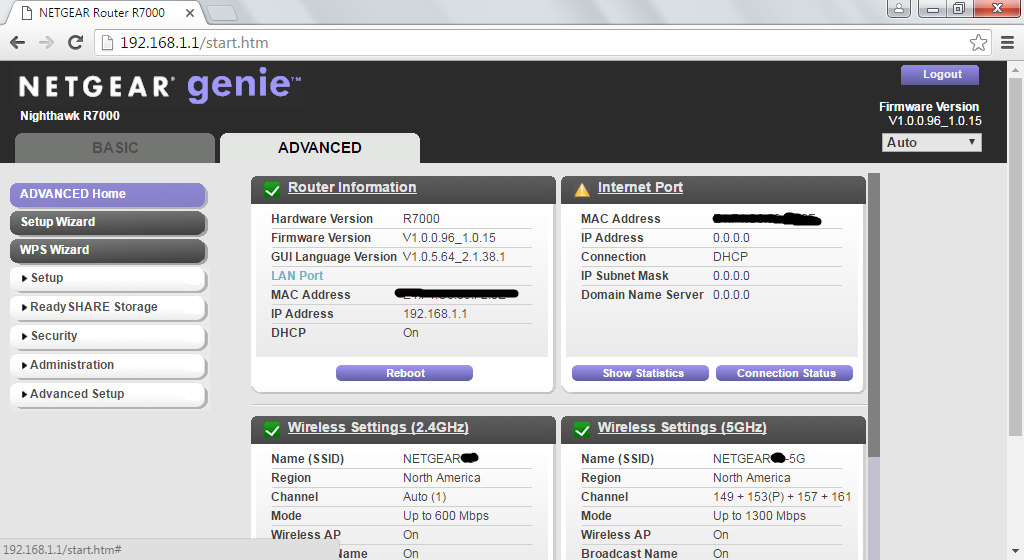
 IrvSpJun 10, 2016Master
Next thing I'd try is resetting the cache in your browser. Even try a different browser...
It appears you don't have an internet connection either? Wonder if that has anything to do with it?
- bigdpsJun 11, 2016Aspirant
I even tried with a laptop that is never used to go on the internet and it still shows me the latest version of the GUI.
I even installed a DD-WRT from Kong on it and reverted back to the original Netgear firmware. Guess what? The 1.0.5.64 GUI version was still there.
- IrvSpJun 11, 2016Master
I'm confused? Not you say the latest official release is showing, but you had an older one showing before? Or are you saying after going to DD-WRT and back it is now OK?