NETGEAR is aware of a growing number of phone and online scams. To learn how to stay safe click here.
Forum Discussion

RRSS
Jul 14, 2023Tutor
R8000 usb storage access
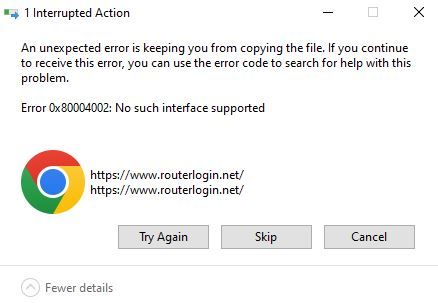
I am setting up a new Win11 Home machine and cannot access the usb storage connected to the router. In Windows Explorer I click on Network/R8000 (Gateway) and see the attached error in image. The wei...
- Jul 15, 2023
michaelkenward wrote:One thing I have found is that in its own inimitable way Windows doesn't always populate the network. However, if I point explorer at \\READYSHARE, it comes to life.
This allowed "USB_Storage" to show up in Explorer and I was able to map it. Thank you for the help! It's crazy that ReadyShare just didn't show up under Network by itself
RRSS
Jul 15, 2023Tutor
michaelkenward wrote:One thing I have found is that in its own inimitable way Windows doesn't always populate the network. However, if I point explorer at \\READYSHARE, it comes to life.
This allowed "USB_Storage" to show up in Explorer and I was able to map it. Thank you for the help! It's crazy that ReadyShare just didn't show up under Network by itself

michaelkenward
Jul 16, 2023Guru - Experienced User
RRSS wrote:
This allowed "USB_Storage" to show up in Explorer and I was able to map it. Thank you for the help! It's crazy that ReadyShare just didn't show up under Network by itself
Absolutely. But I have seen the same "missing link" thing for network stuff that has nothing to do with ReadySHARE.
I have just opened Explorer It found just one of the four NAS boxes on my network. It did find \\READYSHARE.
It seems to be a long running issue with all versions Windows.
One tool worth installing if you want to poke around on your network is the desktop genie for Windows. (There is also a Mac version.)
Netgear is trying to kill this useful utility, but for the time being you can find it here:
genie | Product | Support | NETGEAR
Be warned that the genie installation file is wrapped up in a RAR archive that you have to decompress.
It has a useful Network Map that will reveal everything attached to your network.